A PRISMA flow diagram summarises how material moved through identification, screening and inclusion in a systematic review. Fill it from the selection records you actually kept, using the official template that fits your review. First confirm that this reporting framework belongs in your assignment; adding a diagram does not turn an ordinary literature chapter into a systematic review.
Your selection ledger should support both the diagram and the written method. UniDraft helps organise your confirmed sources, process and instructions into an editable project document. Start your review documentation with UniDraft, then reconcile the text with your real screening record. It does not conduct the search, invent counts or certify a systematic review.
Check whether this is the right reporting task
Page and colleagues' PRISMA 2020 statement describes reporting guidance, not a tool for judging methodological quality or instructions for conducting the review. The main guideline primarily concerns reviews of intervention effects; other review types may need additional guidance. Discuss the approach with your supervisor before choosing a template.
For a general source search or narrative literature chapter, start with finding research papers and the literature-review guide. Do not invent systematic screening steps to make the assignment look more elaborate.
Keep records, reports and studies distinct
The statement's glossary distinguishes an indexed record, a report containing information about an investigation, and the study itself. Several reports may concern one study. Duplicate entries for the same report are different from separate reports about the same investigation.
In your working ledger, keep enough identifying information to connect those levels. Check the actual source rather than merging two entries merely because their titles look alike. An included-report count must not silently become an included-study count.
Choose the matching official template
The official PRISMA flow-diagram page provides separate templates for new and updated reviews, and for searches using databases/registers alone or additional sources. Choose the one matching the work performed. Use the actual source categories and applicable boxes; do not change your account of the search to suit the easiest-looking diagram.
The templates are offered under CC BY 4.0 with attribution. Follow their citation instructions when using or adapting one. The example below is a simplified original teaching illustration, not a replacement for the official template or an actual completed review.
Work through a fictional count example
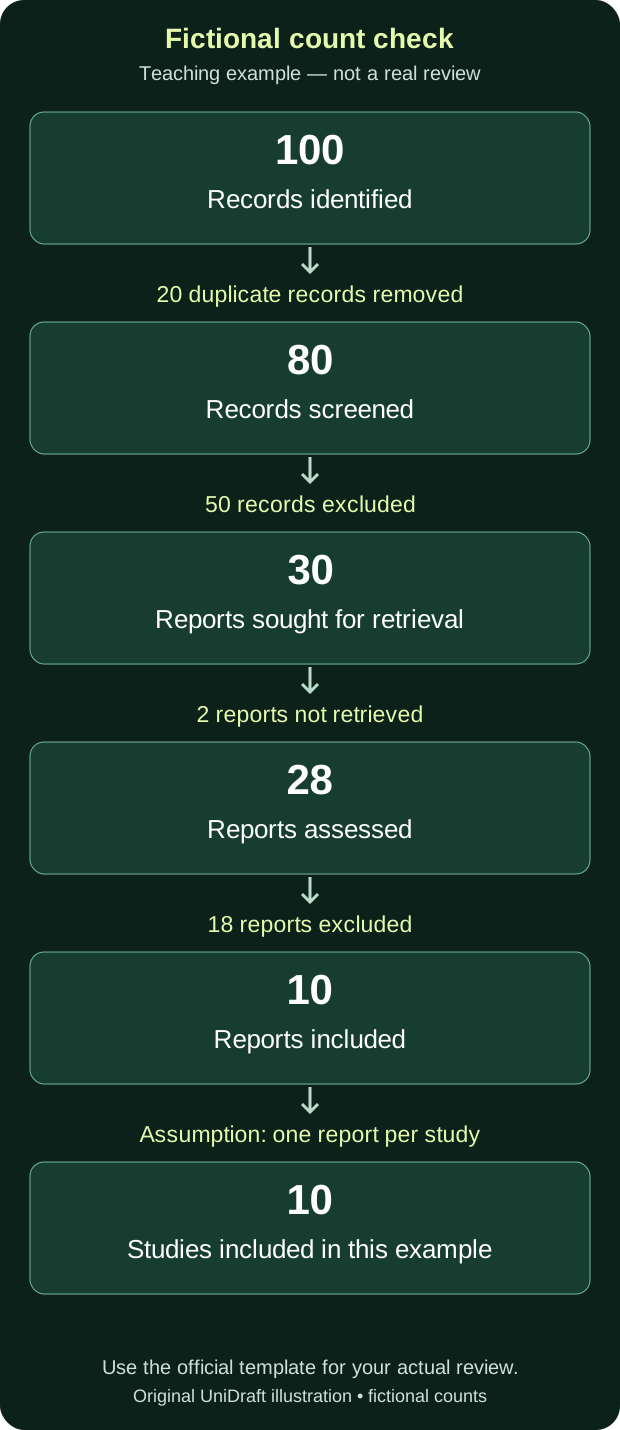
All numbers below are fictional. No papers were searched, screened or included for this example. It demonstrates arithmetic only and supplies no real review findings.
| Stage | Fictional calculation | Total to check |
|---|---|---|
| Identify records | Start with 100 | 100 records |
| Remove duplicates before screening | 100 − 20 | 80 records screened |
| Screen records | 80 − 50 excluded | 30 reports sought |
| Retrieve reports | 30 − 2 not retrieved | 28 reports assessed |
| Assess reports | 28 − 18 excluded | 10 reports included |
| Link reports to investigations | Assume each of these 10 reports describes a different study | 10 studies, for this example only |
For a fictional breakdown of the 18 assessed-report exclusions, suppose 12 fail a predefined population criterion and 6 fail a predefined study-design criterion. Those counts add to 18. This is not permission to create convenient exclusion reasons afterwards: your real criteria and decisions must be documented and explainable.
In a real review, ten included reports could describe fewer than ten studies. Check that relationship separately. Do not make a second publication from one investigation look like another independent study.
Build the ledger before drawing the boxes
Use this original worksheet structure for your own authorised review records:
| Ledger field | What you need to be able to explain |
|---|---|
| Source and search date | Where and when was the entry found? |
| Exact search or route | Which query, reference trail or other route produced it? |
| Record and report identity | Which entry refers to which document? |
| Decision and stage | Was it removed, excluded, not retrieved or retained, and at what point? |
| Reason and supporting note | What documented criterion or retrieval record supports the decision? |
| Study link, where established | Does another report concern the same investigation? |
Keep a version of the ledger that supports the submitted diagram. The data-management-plan guide helps connect working versions, responsibilities and the final output. Do not publish confidential review-team or participant information merely to show that a log exists.
Check the diagram against the written method
Before submission, reconcile the diagram with the search log, selection decisions and report text. Check that exclusions are not counted twice and that material not retrieved is not described as read and assessed. Recheck any totals changed during revisions.
Explain the process that actually happened, including who performed the selection and any tools used where the reporting guidance requires it. Do not claim a second reviewer, independent screening or automation that was not part of your work. A diagram alone cannot establish that the search was complete or the review well conducted.
UniDraft helps organise written documentation around the sources, facts and instructions you confirm. You remain responsible for the search, selection decisions and their evidence. Explore the document workflow.
