
Choose a system-design diagram by the question it needs to answer. A use-case diagram shows roles and the goals they pursue through a system; a data-flow diagram shows how information moves and is transformed; an entity-relationship model describes data entities and their relationships. They are different views, not interchangeable decorations for Chapter Three.
Your supervisor and departmental brief decide the required models, notation and level of detail. Use your actual requirements and implementation. A diagram does not prove that the software was built or tested.
Readable models need a written explanation that matches what you built. UniDraft helps organise your confirmed design material, project work and instructions into an editable document. Start your project documentation, then compare each model and claim with the implementation. See the project workflow; it does not validate software or run tests.
Start with one boundary and one question
If the underlying rules are still vague, use the software requirements worksheet first. Record each need's source, confirmation status and planned verification before turning it into a model.
Write a sentence naming the system and what is outside it. Distinguish the proposed design from the version you implemented. If a feature was removed, update the relevant documentation and explain the change rather than presenting the old model as the finished product.
| Question you need to answer | A potentially suitable view | What it does not establish |
|---|---|---|
| Who interacts with the system, and for what goal? | Use-case diagram | The sequence of every click or internal method call |
| What information enters, changes, is stored and leaves? | Data-flow diagram | The order and timing of every execution step |
| What data entities exist and how are they related? | Entity-relationship model | A complete account of user behaviour or interface design |
The table is an original selection aid, not a mandatory list of diagrams for every Nigerian project. If your brief requires another model, follow it and explain that model's purpose.
Keep the same fictional system across the views
Fictional teaching example: imagine a proposed equipment-booking system where a student requests an item for a period. No deployed application, institutional procedure, database or evaluation result is being reported. The example is deliberately incomplete so you can see which design questions still need answers.
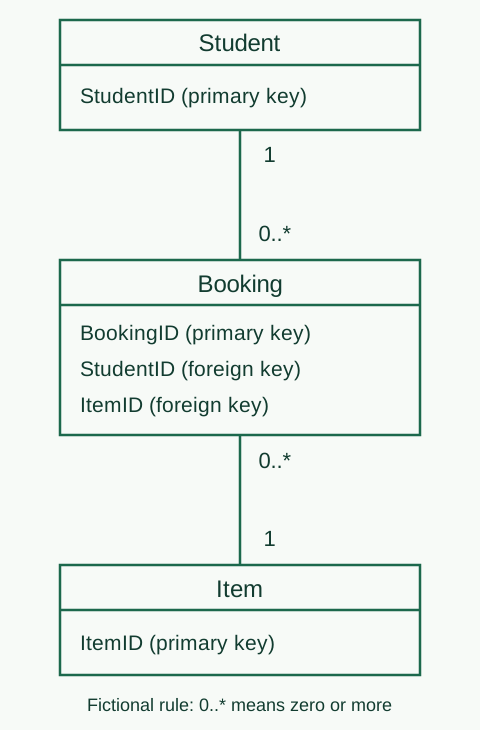
First define the rule being illustrated: each booking refers to one student and one item. That is a chosen rule for this example, not a universal booking design. Real systems may handle group reservations, multiple items or different approval processes.
Use this rule consistently in the actor view, the information flow and the data model. A database with a different rule cannot be explained away by drawing a cleaner diagram.
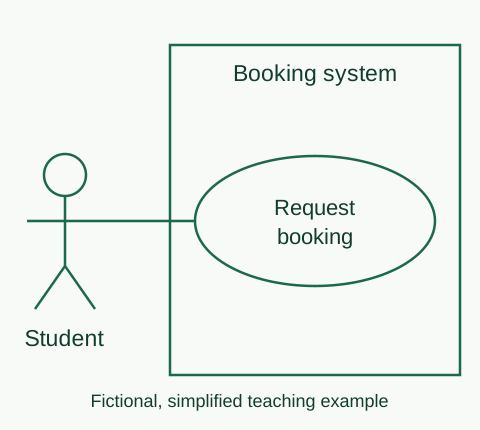
Use-case view: role, goal and boundary
Microsoft's UML use-case guidance describes actors outside a system boundary and the behaviours in which they participate. It also distinguishes this view from the order of steps.
In the fictional example, “Student” is a role and “Request equipment booking” is a goal involving the system. The student's name is not the actor label. A screen such as “Booking form” is not automatically a complete user goal.
Start with a small model and explain the main scenario in text: what starts it, the necessary conditions, the normal outcome and a relevant alternative. Do not add advanced relationships merely to make the model look technical. Check the notation your course requires before using include, extend or generalisation.
Data-flow view: label the information
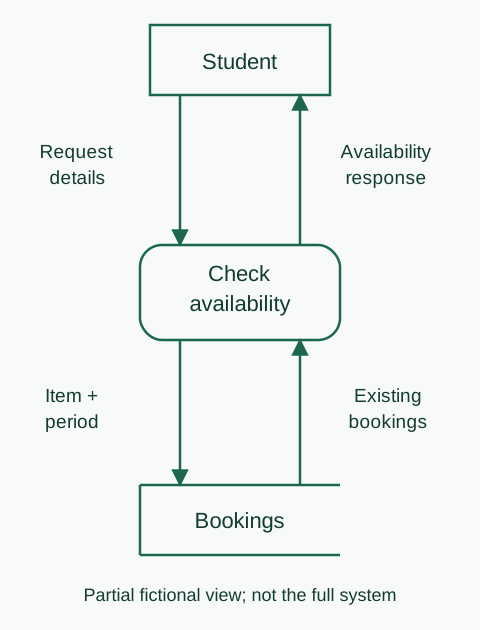
IBM's DFD overview distinguishes external entities, processes, data stores and flows. Different notation conventions exist; choose the required convention and keep it consistent.
For the fictional booking task, identify the request information, the process that checks it, the relevant stored records and the information returned to the student. Label a flow with the data it carries. An arrow labelled only “next” does not explain the information.
A flow sketch cannot by itself specify every timing or concurrency rule. If two requests arrive together, the implementation and testing need to address the actual requirement; a pair of arrows does not establish that conflicts are prevented.
When expanding a high-level view, check that the boundary information remains consistent. Do not silently introduce an unexplained external source in a detailed diagram. Discuss the numbering and decomposition convention with your supervisor rather than assuming all textbooks label levels identically.
Data model: explain the rule behind each relationship
Microsoft's database-design guidance explains organising data into tables and using keys and relationships. Its Access examples are background; you do not have to use Access for your project.
For the fictional rule above, a Student can be associated with multiple Bookings, while each Booking refers to one Student. Similarly, an Item can appear in multiple Bookings across time, while each Booking refers to one Item. Explain whether zero related records are permitted, and select the relationship notation that expresses your actual rules.
Do not confuse a conceptual entity model with a finished physical database schema. If your report shows tables and fields, identify the keys and relevant constraints accurately. A relationship drawn on a page does not establish that referential integrity or a booking-conflict rule is enforced in code.
Check the model against requirements and evidence
Use this original review worksheet:
| Check | Evidence or correction to record |
|---|---|
| Every diagram has a stated purpose | What question does it answer? |
| Names are consistent | Do role, entity and process names match the text and implementation? |
| Scope is visible | Is this proposed, implemented, partial or future work? |
| Rules are explained | What permits or forbids the relationship or behaviour? |
| Detail is readable | Can a reader follow the labels at report size? |
| Differences are documented | What changed from the earlier design and why? |
Number and caption each figure according to your confirmed format. Explain the important design decision in the surrounding text; “the diagram is self-explanatory” leaves the reader to guess. The figure-formatting guide covers readable presentation.
For a defence, follow one requirement through the relevant model, implementation and test evidence. State what the model leaves out. The methodology chapter guide helps document how the design and evaluation fit together.
A use-case goal can also help you choose what to investigate in a usability evaluation. Observe relevant participants attempting a defined task; the model alone does not establish that people can complete it or understand the interface.
UniDraft can help organise documentation around the design and work you confirm. It does not validate your software or execute its tests. Explore the project workflow.