
Descriptive statistics in research are the numbers, tables and charts that summarise the data you collected: counts and percentages for categories, and the mean, median, mode, range and standard deviation for numeric values. In a final year project they usually open your Chapter 4, and the right summary depends on what type of variable you measured.
UniDraft helps you organise your confirmed results, checked sources and supervisor instructions into an editable Word project document. Start your project document once your analysis is done and checked, and bring the actual output from your own analysis tool.
This guide is about the summary step only. Choosing a test to compare groups is in which statistical test fits your project, Likert-specific scoring is in Likert scale analysis.
Preparing the data comes first; see how to code and clean questionnaire data before you calculate anything.
What do descriptive statistics actually do?
Descriptive statistics summarise a sample. They do not try to draw conclusions about a wider population; that is the job of inferential statistics, which sit on probability theory. Keep the line clear in your own writing: "Of the 20 respondents, 55% were female" is descriptive. "Female students in Nigerian universities are more likely to..." is a claim about a population, and a table of percentages cannot carry it alone.
For a single variable, you normally report three things:
- Frequency: how many cases fall in each category or value.
- Centre: the typical value (mean, median or mode).
- Spread: how scattered the values are (range, standard deviation, minimum and maximum).
Some descriptions also mention shape, meaning whether the values pile up on one side. A histogram or a dot plot shows shape better than any single number.
Which summary fits which variable?
Statistics are limited by how a variable was measured. Textbook treatments agree on the broad pattern, and the figure below sets it out.
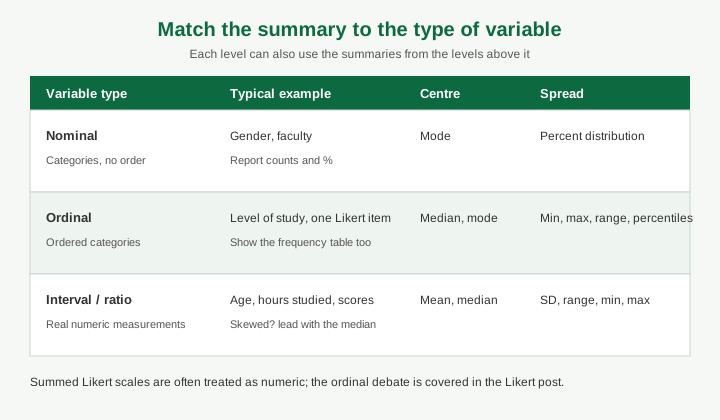
- Nominal variables are categories with no order, such as gender or faculty. Use counts, percentages and the mode.
- Ordinal variables have an order but unequal or unknown gaps, such as level of study or a single agreement item. Use the median, the mode and the range, and show the frequency table beside them.
- Interval or ratio variables are real numeric measurements, such as age, hours studied or marks. The mean and standard deviation are appropriate, as are the median and range.
A useful rule: a summary that works at a lower level also works at a higher one, but not the other way round. You can report a mode for age, but you cannot report a mean for gender.
If your department treats a summed Likert scale as numeric, that is a decision to state and defend, not to assume. The Likert post walks through that debate.
How do I report frequencies and percentages?
A frequency is a count. A percentage is that count divided by the number of respondents, multiplied by 100. Report both, because a percentage alone hides how few people it may describe: 50% sounds large until the reader learns it means 3 of 6.
Rules that keep this table clean:
- State the base. Write n = 20 (or N) in the table title or header.
- Use the same denominator all the way down a column. If some respondents skipped the question, say whether the percentage uses everyone or only those who answered. Do not mix the two.
- Make the percentages add to about 100%. If rounding makes them total 99.9 or 100.1, add a note rather than quietly adjusting a figure.
- Keep the category labels exactly as they appeared on your questionnaire, so the reader can match table to instrument.
- Report missing answers as missing, not as zero and not as a category you invented. The coding step explains how.
For a questionnaire, the Chapter 4 guide covers describing your sample before presenting findings, and the sampling post explains what you can and cannot say about who your respondents represent.
Mean, median and mode: what is each one telling the reader?
- Mean: add all the values and divide by how many there are. It uses every observation, which makes it informative but sensitive to extreme values.
- Median: the middle value once everything is in order; with an even number of cases it is the average of the two middle values. It is hardly affected by a few extreme observations.
- Mode: the most frequent value or category. It is the only centre for nominal data. A distribution can have more than one mode, and you should say so when it happens.
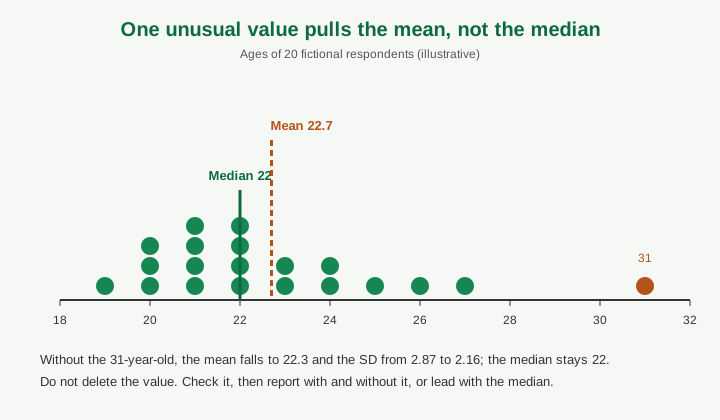
In a symmetrical distribution the three coincide. When a few very large values stretch the data to the right, as incomes usually do, the mean is pulled above the median. That is why a skewed variable is often better described by its median. The figure below shows this on our fictional data.
What do range and standard deviation add?
- Range: the highest value minus the lowest. It is the simplest measure of spread, and it depends entirely on two observations, so one odd value stretches it. Report the minimum and maximum as well, because "range = 12" tells the reader less than "19 to 31".
- Standard deviation (SD): roughly, how far a typical observation sits from the mean, in the same units as the data. A larger SD means more spread. It is the square root of the variance, and it is non-negative. For a sample, software normally divides by n minus 1; say which version you used if your supervisor asks.
Never report the mean without something about spread. "Mean = 3.7" could describe twenty people who all answered 4 or 3, or a group split between 1 and 5.
If you are asked what a value of SD means in practice, avoid vague phrases like "the data are close". Say that responses clustered tightly around the mean, or that they were widely dispersed, and point to the minimum and maximum to back that up.
A fictional worked example you can copy the layout from
The numbers below are invented for illustration. They are not from any real study or institution. They were computed from the 20 values listed so you can check them by hand or in Excel.
Suppose 20 final-year students answered a small pilot questionnaire. Their ages were: 19, 20, 20, 20, 21, 21, 21, 21, 22, 22, 22, 22, 23, 23, 24, 24, 25, 26, 27, 31.
Table 1: Respondents by gender and level of study (n = 20)
| Variable | Category | Frequency | Percentage |
|---|---|---|---|
| Gender | Female | 11 | 55.0 |
| Male | 9 | 45.0 | |
| Level | 300 level | 6 | 30.0 |
| 400 level | 9 | 45.0 | |
| 500 level | 5 | 25.0 |
Table 2: Age of respondents in years (n = 20)
| Statistic | Value |
|---|---|
| Mean | 22.7 |
| Standard deviation | 2.87 |
| Median | 22 |
| Mode | 21 and 22 (four respondents each) |
| Minimum | 19 |
| Maximum | 31 |
| Range | 12 |
Table 3: Responses to "I understand the project guidelines" (1 = strongly disagree, 5 = strongly agree; n = 20)
| Response | Frequency | Percentage |
|---|---|---|
| 1 Strongly disagree | 1 | 5.0 |
| 2 Disagree | 2 | 10.0 |
| 3 Neutral | 4 | 20.0 |
| 4 Agree | 8 | 40.0 |
| 5 Strongly agree | 5 | 25.0 |
| Mean 3.70, SD 1.13, median 4 |
How to write one of these in prose:
The 20 respondents were aged 19 to 31 years (M = 22.7, SD = 2.87; median = 22). One respondent aged 31 raised the mean slightly above the median. Excluding that respondent changes the mean to 22.3 and the SD to 2.16 (n = 19), so the age profile is concentrated in the early twenties.
Notice what this paragraph does not do: it does not explain why that student was older, and it does not claim the finding applies to all students. Interpretation and comparison with other studies belong in the discussion, as the discussion and conclusion guide explains.
If you compute by hand, remember the mean for Table 2 is the sum of the ages (454) divided by 20.
How should I present descriptive results in tables and charts?
Tables first for exact values, charts for patterns. A reader checking whether 45% is correct wants the table; a reader asking "which level dominates?" wants a chart. Do not repeat the same numbers in both without reason.
Table conventions you can follow unless your department sets different ones:
- Number tables in order and give each a clear title. Many styles put the table number and title above the table and use horizontal rules only, with no vertical lines, and the numbers aligned on the decimal point.
- Use the same number of decimal places down a column. One or two decimals is usual for means and SDs on a short scale; keep percentages to one decimal at most.
- Put abbreviations (M, SD, n) in a note under the table.
- Refer to every table in the text before it appears.
Chart choices:
| Data | Suitable chart | Avoid |
|---|---|---|
| Nominal or ordinal categories | Bar chart, with a clear base | 3D bars, too many slices in a pie |
| Parts of a whole with 2 to 4 categories | Pie or single stacked bar | Pie with many tiny slices |
| One numeric variable | Histogram or dot plot | Bar chart of raw ages |
| Change over time | Line chart | Connecting unrelated categories |
Label axes, state the sample size, and use colours that are still readable if the printout is greyscale, since some copies are printed in black and white. Formatting captions and numbering in Word is covered in formatting figures, tables and captions.
Common mistakes supervisors flag
- Reporting a mean for a nominal variable, such as an "average gender" of 1.45 because the codes were 1 and 2.
- Mean with no spread, or a range with no minimum and maximum.
- Percentages with no n, or percentages that use different bases in different rows.
- Silently dropping the outlier. Check whether it is a typing error, a genuine unusual case or a person outside your target group, and record what you decided. Do not delete it to make the figures tidy.
- Treating a descriptive result as a finding about the population. "55% of respondents" is not "55% of students."
- Over-precision. A mean of 3.7142857 gives false confidence; round consistently.
- A table the text never mentions, or text that repeats every cell instead of drawing out the pattern.
- Mixing results and discussion when your department wants them separate.
- Numbers that do not match. The total of Table 1 should equal the n you stated in Chapter 3. If it does not, explain the missing cases.
- Copying software output unedited, including labels like "Valid Percent" that the reader has to decode.
Questions a panel may ask
- Why did you use the median here instead of the mean?
- How many respondents are in this table, and why is it not the number you sent out?
- What does this standard deviation tell us?
- How did you handle missing answers?
- Is this finding about your sample or about the whole population?
- How did you check that the figures in the table are correct?
Prepare a sentence for each, using your own data. If you used a tool you do not fully understand, practise reproducing one table by hand.
Pre-submission checklist
- Every table states its n and its base.
- Every numeric mean has a spread figure beside it.
- Variable type matches the summary used.
- Percentages are calculated from the stated base and add up as expected.
- Outliers and missing values are checked and noted.
- Every table and chart is referred to in the text and numbered consistently.
- The data were cleaned and the codebook is available if the supervisor asks, using the steps in coding and cleaning questionnaire data.
- You have asked your supervisor whether the department expects only descriptive results or also tests, and for any required table style.
If your design needs a test of relationships, see how to read a correlation table. For deciding how many respondents you need, which is a design question, read calculating sample size and confirm the approach with your supervisor.
Where UniDraft fits in
You do the counting. UniDraft does not run your analysis or calculate your statistics. After you have run and verified the figures, UniDraft organises your confirmed results, checked sources and supervisor instructions into an editable Word project document, so your tables, text and references end up in one place you can revise. Start your project document. For references, the free citation tool can help you format sources you have checked.
Sources
Opened and used for this guide:
- Central tendency and variability, University of Utah Sociology 3112: definitions of mode, median, mean, range and standard deviation, effect of skew, and which measure suits which variable type.
- Reporting your statistics, University of Southampton Library: reporting conventions for descriptive statistics and table layout.
- Descriptive statistics, Wikipedia: descriptive versus inferential statistics and the main measures of centre and variability.
Requirements for tables, decimal places and the balance between descriptive and inferential results vary by department. Follow your own supervisor's brief.