
Chapter 4 has one job: show, clearly and honestly, what you actually found. Not what it means, which is Chapter 5's work (or the back half of a merged chapter, depending on your department). Just what happened.
That line between presenting and discussing is where most Chapter 4 drafts go wrong. This guide shows you where the line sits, how to build the chapter section by section, how to lay out tables and report statistical tests, and what to do when your data is messy, disappointing or incomplete.
Your checked results are the starting point, not something a writing tool should invent. UniDraft helps organise them and your confirmed instructions into an editable project document. Start your results-based project report, then compare every table and statement with your actual output. It does not run statistics or create missing findings.
The short answer
- Present results in the order of your research questions or objectives, not in the order your data arrived.
- Describe your sample first: how many people you approached, how many responded, how many responses were usable.
- Every table gets an appropriate caption, number, in-text pointer and explanation of the relevant result.
- State findings as facts and stop. Explaining why is discussion.
- Report tests completely (statistic, degrees of freedom, exact p-value) and never overstate what "significant" means.
- Report what you found, including results that disappoint you. Student work is the source of truth, without adjusting values to fit a preferred conclusion.
Results-only, or results-and-discussion combined? It depends on your department
This varies across Nigerian universities, and neither convention is universal:
- Some departments merge them. A single Chapter 4 titled "Results and Discussion" (or "Implementation, Results and Discussion" for technical projects) presents each finding and interprets it right after the table.
- Others keep them separate. Chapter 4 presents results only, in neutral language, and all interpretation waits for Chapter 5.
Use the current course and project instructions to determine the arrangement. Check your department's project-writing guideline, or ask your supervisor, before you start writing. Restructuring a finished chapter costs far more time than a five-minute question.
Whichever format applies, the underlying skill is identical: knowing the difference between reporting a finding and interpreting it. Even in a merged chapter you do both, in separate sentences, not tangled together.
| If your department uses... | Chapter 4 contains | Chapter 5 contains |
|---|---|---|
| Separate chapters | Results only, neutral wording | Discussion, conclusion, recommendations |
| Merged "Results and Discussion" | Each result, then its interpretation, in that order | Summary, conclusion, recommendations only |
| Implementation-heavy (software, hardware) | System implementation, test results, performance figures | Evaluation against objectives, limitations, future work |
The checklist: what belongs in Chapter 4 vs Chapter 5
This is the most common point of confusion. Use it to check any paragraph you have written.
Belongs in Chapter 4 (presenting):
- The raw or summarised data itself: tables, figures, frequencies, percentages, means, test statistics
- A plain restatement of what a table shows ("Table 4.2 shows that 72% of respondents rated the system as easy to use")
- Response rate and sample description (how many participants, how many usable responses, any exclusions)
- A direct answer to each research question or hypothesis, stated as a finding, not a conclusion
- For quantitative work: the statistical test result itself (test statistic, degrees of freedom, p-value)
- For qualitative work: identified themes, supported with direct participant extracts
Belongs in Chapter 5 (discussing), or the discussion half of a merged chapter:
- Why you think a result came out the way it did
- What a finding implies for your field, your users, or your recommendation
- Comparing your result with what other researchers found, and explaining agreement or disagreement
- Limitations of your findings and what they mean going forward
- Recommendations based on what you found
- Broader conclusions drawn across several results combined
If a sentence explains a cause, a meaning, or a comparison to literature, it is discussion. If it only states what happened, it is a result. The figure below illustrates this distinction for an assignment with separate results and discussion sections.
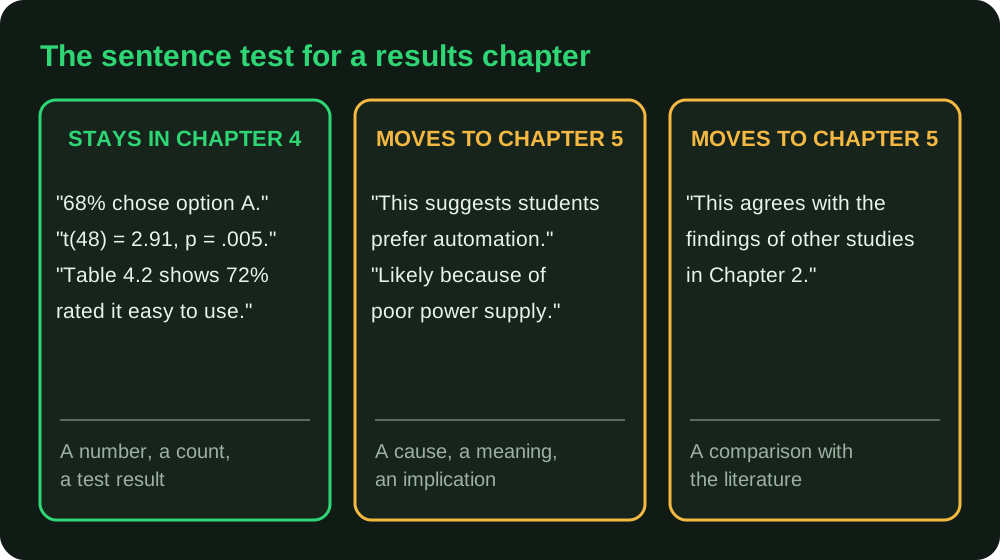
The discussion and conclusion chapter is where everything in the right-hand columns of that figure finally gets its place, so nothing you cut from Chapter 4 is wasted.
Reporting mode vs discussing mode: a direct comparison
Stays in reporting mode: "60% of respondents agreed that the current manual attendance system was time-consuming, while 25% were neutral and 15% disagreed."
Has drifted into discussion: "This shows that students strongly prefer an automated system over the manual process, confirming the inefficiency widely reported in the literature."
The first sentence states a number and nothing else. The second makes an inferential leap ("shows... prefer"), asserts a cause ("inefficiency"), and reaches back into the literature review. All three are discussion moves. In a strictly separated Chapter 4, the second sentence is cut and saved for Chapter 5. Moving it to discussion does not make the inference valid: ratings of time burden alone do not establish preference for automation or confirm wider inefficiency. Revise the claim to fit the evidence before placing it in either chapter.
Three more drift patterns to watch for in your own draft:
- Adjectives that judge. "Impressive", "alarming", "surprisingly high" are opinions. "72%" is a result.
- Causal verbs. "Because", "due to", "as a result of" and "which explains" almost always signal interpretation. A correlation table cannot tell you why two things move together.
- Backwards references. "As the literature predicted" or "in line with Chapter 2" belong after the results are on the page.
Structuring the chapter
The order matters as much as the content. The figure below shows the build order; the numbered notes explain each step.
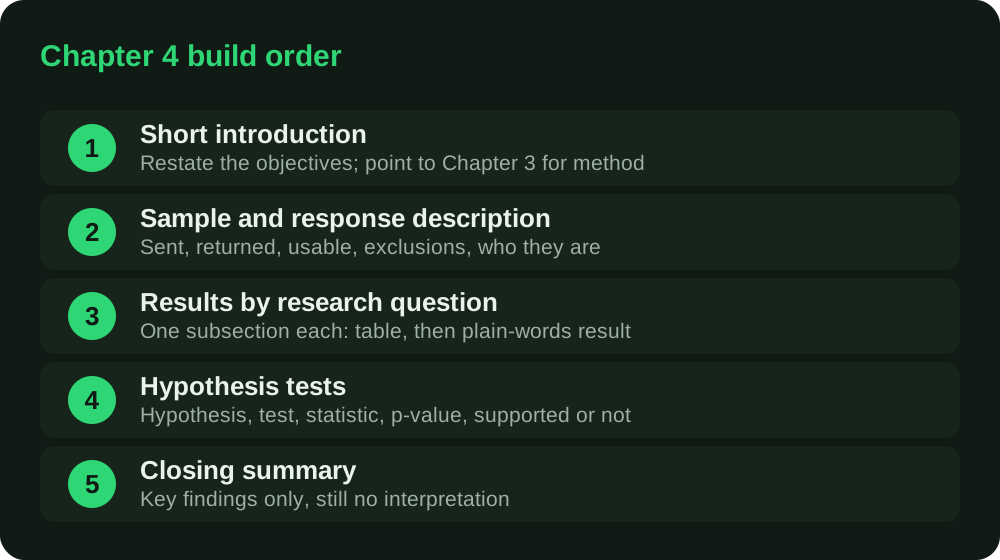
- A short introduction. Restate what you set out to find, tied to the research questions or objectives from Chapter 1, with a one-line cross-reference to Chapter 3 for how the data was collected. Do not repeat the methodology. If your questions are vague, the results will read vague too, so revisit how to write strong research questions and objectives before you begin.
- Sample or response description. How many participants, how many valid responses, any exclusions and why. Details in the next section.
- Results organised by research question or objective. Each question gets its own subsection with the table or figure and the result that answers it. Label subsections with the question itself ("Research Question 2: How do students rate the portal's ease of use?"), so a panel member flipping through can find the answer in seconds.
- Hypothesis testing, where applicable. State each hypothesis, the test used, the result, and whether it was supported or not supported.
- A closing summary. A short paragraph pulling the key findings together, still in reporting mode, setting up Chapter 5.
Describe your sample before your findings
Open with a short section (and a table where useful) that makes the sample and its limits understandable:
- How many questionnaires were distributed, returned, and usable?
- Why were any excluded under justified, documented rules (for example, ineligible respondents)? The same option ticked throughout is not, by itself, proof that answers are invalid.
- Who responded: gender, level, department, age band, years of experience, whichever variables matter to your study?
Illustrative example (invented numbers, for layout only):
"A total of 150 questionnaires were distributed and 132 were returned. Twelve were excluded because more than half the items were unanswered, leaving 120 usable responses (80.0% of those distributed). Table 4.1 summarises the respondents."
Table 4.1: Gender of respondents (n = 120)
| Gender | Frequency | Percentage |
|---|---|---|
| Male | 66 | 55.0 |
| Female | 54 | 45.0 |
| Total | 120 | 100.0 |
In that fictional example, 132/150 is an 88% return proportion, while 120/150 is an 80% retained-for-analysis proportion. Those calculations describe different stages. The exclusion rule is part of this illustration, not a recommended universal cut-off. If your sample size fell short of what you planned, report the actual counts and discuss the consequences. Calculating your sample size is a Chapter 3 task; it does not establish how many people actually took part.
Explain which denominator you used
Before labelling a percentage a response rate, explain who was selected, who was eligible and how each case ended. The fictional arithmetic above assumes a known count of distributed questionnaires. It is not a universal response-rate formula. An open survey link circulated through several groups does not produce a known eligible sample denominator merely because you can see a view count.
AAPOR's Standard Definitions explains why final case outcomes matter and why the response rate alone cannot establish whether, or how much, nonresponse error exists. Choose and explain a definition suited to your actual survey design with your supervisor. Do not present a high percentage as proof that respondents represent everyone you hoped to study.
Use an original working ledger like this to connect recruitment with the final analysis:
| Record | What to explain |
|---|---|
| Selected case ID | How the case entered the sample; keep any identity key securely separate |
| Eligibility | What established eligibility, or what remains unknown |
| Contact or invitation outcome | What actually happened, without counting repeated invitations as different people |
| Returned, partial or not returned | Which outcome applies under the definition you use |
| Exclusion decision | The justified rule, evidence and reason, applied consistently |
| Included in analysis | Whether the case contributes to the reported result |
Keep missing answers separate from missing questionnaires. If some retained respondents skip a question, state the actual denominator for that table and how missing values were handled. Do not silently code a missing answer as zero. The coding and cleaning guide helps connect those decisions with the analysis file.
If you review a response for a possible quality problem, document the evidence and apply the same justified rules across cases. Never exclude it because it weakens the conclusion you wanted. Keep participant information protected under your approved arrangements.
Building a results table that does its job
A results table should let a reader see the answer without reading your paragraph, and the paragraph should tell them what to look for. Here is an illustrative Likert-item table for a study of a school portal:
Table 4.3: Responses to "The portal is easy to navigate" (n = 120)
| Response | Score | Frequency | Percentage |
|---|---|---|---|
| Strongly agree | 5 | 30 | 25.0 |
| Agree | 4 | 48 | 40.0 |
| Neutral | 3 | 12 | 10.0 |
| Disagree | 2 | 20 | 16.7 |
| Strongly disagree | 1 | 10 | 8.3 |
| Total | 120 | 100.0 |
Mean = 3.57 (out of 5.00), using the illustrative 1–5 coding. These are fictional teaching counts, not collected responses.
And the reporting-mode text that goes with it:
"Table 4.3 shows that 78 of 120 respondents (65.0%) agreed or strongly agreed that the portal is easy to navigate, 12 (10.0%) were neutral, and 30 (25.0%) disagreed or strongly disagreed. The mean score was 3.57."
Note what that paragraph does not do. It does not say "most students find the portal easy", because the reader can see that from the numbers, and "find" already moves towards interpretation. It states counts, percentages, and one summary statistic.
Check the arithmetic every time. For a complete single-response item, percentages should total approximately 100 after rounding and frequencies should total the stated valid n. Multiple-response items and missing values need their own stated denominators. A reported mean should be recomputable from the coding and frequencies. Supervisors and external examiners do recompute them, and a mismatch damages trust in the whole chapter.
Deciding what a mean "means"
Many Nigerian projects state a decision rule in Chapter 3, such as "a mean of 3.00 or above indicates agreement on a five-point scale", or use real limits (for example, 3.50 to 4.49 for "agree"). This is a widely used convention, not a national standard, so use the rule your department or supervisor expects and state it once. Then apply it consistently. Two cautions:
- Likert responses are ordinal. Sullivan and Artino note that the distance between "agree" and "strongly agree" is not measurable, and that means are of limited use for single items unless the distribution is roughly normal; medians, modes and frequencies are safer for individual items. They also note that parametric tests are generally robust for Likert data when the sample is adequate and the distribution near-normal. Either way, justify your choice in the methodology.
- A mean of 3.57 hides whether people agreed or split into two camps. That is why the response distribution and the chosen summary both need consideration.
If you built the questionnaire yourself, the questionnaire design guide covers scale choices, and questionnaire validity and reliability covers the Cronbach's alpha figure you should report from your pilot or main data.
Table and figure conventions
- Number sequentially. Most Nigerian departments use chapter-then-order ("Table 4.1", "Figure 4.1"). Some number straight through the whole document. Follow your department's guideline.
- Caption position varies by style. A widely used convention is the table caption above the table and the figure caption below the figure. The APA 7th edition style, however, places both the number and title above tables and figures. Do not mix conventions: pick what your department's guide says, or ask your supervisor, and apply it everywhere. The formatting checker and the per-university format guides help you confirm the rules for your institution.
- Every caption stands alone. A reader skimming only your List of Tables should understand what each one shows without opening the body text. "Table 4.3: Responses to 'The portal is easy to navigate' (n = 120)" works. "Table 4.3: Results" does not.
- Reference every table and figure by number in the text, before or around where it appears ("as shown in Table 4.3"). Never drop a table in with no pointer.
- Do not paste raw software output. A screenshot of SPSS or Excel with default column names, "Valid", "Cumulative Percent" and grey gridlines does not belong in the chapter body. Rebuild it as a clean table, and put raw output in an appendix if your supervisor wants it available.
- Do not repeat the table in the paragraph. If the table has ten rows, the text picks out the two or three that answer the question. Reading every number aloud is padding.
- Use figures for shape, tables for exact values. A bar chart shows that one category dominates. A table lets you read the precise percentage. Use a chart only when the pattern is the point, label both axes with units, and never use a 3-D pie chart.
- Cut what is not doing work. If a table is not tied to a specific research question and does not get at least a sentence of explanation, move it to the appendix.
- Use consistent decimals. Choose suitable precision for means and percentages and apply it consistently. Mixed precision looks careless.
Table numbering and the List of Tables are also formatting matters, so the chapter has to match the layout rules in how to format a final year project report.
Reporting a statistical test result
If your project involved formal testing (t-test, ANOVA, chi-square, correlation, regression), the general academic convention, not specific to any Nigerian institution, is to report:
- The test statistic and its symbol (t, F, χ², r)
- Degrees of freedom, where applicable
- The p-value, either exact (p = .032) or, for very small values, p < .001
- The sample size where it is not obvious
- An effect size where you can, because a p-value alone does not say how large a difference is
Illustrative reporting-mode sentences (invented values):
- t-test: "An independent-samples t-test showed a significant difference in scores between the two groups, t(48) = 2.91, p = .005."
- Chi-square: "Preference for the mobile version differed by level of study, χ²(2, N = 120) = 7.81, p = .020."
- ANOVA: "Mean satisfaction differed across the three departments, F(2, 117) = 4.36, p = .015. Post-hoc comparisons are reported in Table 4.9."
- Correlation: "There was a moderate positive correlation between hours of internet use and test score, r(118) = .42, p < .001."
Each sentence states the finding and stops. What it means is a Chapter 5 sentence.
Three traps worth knowing:
- "Significant" is not "important". Sullivan and Feinn show that with a large enough sample even a trivial difference can produce a tiny p-value, and that a p-value does not reveal the size of the effect. They recommend reporting an effect size alongside it, using Cohen's d benchmarks (about 0.2 small, 0.5 medium, 0.8 large) as one common reference.
- Do not run repeated t-tests on three or more groups. Kim explains that this adds repeated chances of error, and that ANOVA is the appropriate first step, followed by post-hoc comparisons (such as Tukey or Bonferroni) to see which pairs differ.
- Match the test to the data. Choosing a test after seeing which one gives p < .05 is exactly the wrong order. If you are unsure whether your test suits your data type and question, choosing a statistical test walks through the decision, and the choice should already be justified in your methodology.
UniDraft, like any writing tool, cannot run your statistics for you. Use SPSS, Excel, R, Python or whatever your department teaches, and check the output yourself.
Reading SPSS output without overstating the result
For correlation output, follow the matrix-to-write-up worksheet. Read the correct pair's coefficient, usable N and inference together; the diagonal and repeated mirror cells are not extra findings.
Identify the procedure, variables, usable sample size and assumptions before choosing a number to report. Match the statistic to the question your method promised to answer. A label such as "Sig." is not a conclusion about practical importance or causation. Include an appropriate effect estimate and uncertainty where the analysis supports them; get help with output you cannot explain.
If a planned test does not meet the stated significance threshold, report that honestly. It does not establish that the null hypothesis is true or that the study has no value. Do not rerun different tests until one becomes significant. The ASA statement explains why inference should not rest on a p-value threshold alone. Discuss interpretation and limitations in the appropriate chapter, with your actual design in view.
Before interpreting output, complete the questionnaire coding and cleaning checks. Put necessary results in the body and use appendices for justified supporting detail, not as a hiding place for findings you cannot explain.
Presenting qualitative results differently
If your project is interview-based, uses focus groups, or relies on thematic or content analysis rather than statistics, Chapter 4 looks different, and that is expected:
- Organise by theme, not by table.
- Support each theme with direct extracts from your data, attributed anonymously ("Participant 4 noted that...").
- Match the analytical approach. Explain the pattern and interpretation your chosen qualitative method requires. Follow your department's arrangement for separating findings, analysis and wider discussion.
- Use counts only when they serve the method. Frequency does not by itself establish a theme's meaning or importance. Do not add participant counts as a compulsory quality test for reflexive thematic analysis; see the worked thematic-analysis guide.
- Show your process briefly. One paragraph on how you coded the transcripts (who coded, how themes were formed) lets the panel trust the themes. The detail belongs in Chapter 3.
- Protect identity. Use codes rather than names, and remove details that identify a person or a small workplace.
Results for software, hardware and engineering projects
If you built something, Chapter 4 should show what the implementation and evaluation evidence supports, including limitations. A typical structure:
- Implementation results. Screenshots of the working system with numbered captions, each one tied to a requirement from Chapter 3.
- Test results. A table of test cases with the input, expected output, actual output and pass or fail.
- Performance measurements. Response time, accuracy, throughput, power consumption or cost, measured under stated conditions.
- User evaluation, if you ran one. Treat it like a questionnaire study, using the sample and Likert guidance above.
For the preparation and execution record, use the software test-case worksheet. Keep case definitions separate from versioned runs, and distinguish blocked or unexecuted cases from completed results.
Fictional teaching table, not an executed student test or evidence that a system works:
Table 4.5: Login module test cases
| Test | Input | Expected | Actual | Result |
|---|---|---|---|---|
| T1 | Valid matric number and password | Dashboard opens | Dashboard opens | Pass |
| T2 | Valid matric number, wrong password | Error message | Error message | Pass |
| T3 | Empty fields | Validation prompt | Page reloads silently | Fail |
Report the failure. A system with one honestly documented failed test and a note on the fix is more credible than a perfect column of passes. State the test environment (device, browser, network or hardware specification), because "loads in 2 seconds" means little without it. Screenshots should be readable at print size and show the feature being described, not a full desktop with unrelated windows open.
When your data is messy, incomplete or disappointing
If any of these problems occur, document them. The rule is the same for all of them: report what happened, explain the handling in a sentence, and leave interpretation for the discussion.
- Low response rate. State the figure. Do not inflate the count or duplicate forms to reach your target sample.
- Missing answers. Say how you handled them (excluded the respondent, or reported valid n per item). Change the n in your table headings when it varies between items.
- Results contradict your hypothesis. Report "not supported". The reasons go in Chapter 5, and explanations must remain within what the design and evidence support.
- Results are not significant. Report the statistic and the p-value exactly as they came out. "Approaching significance" for p = .08 is not reporting; it is wishful thinking.
- An outlier or an odd result. Say you noticed it, say whether you kept or excluded it and why, and be consistent.
- Your data collection changed from the plan. Note the change in Chapter 3 and refer to it here. Keep the actual deviation and its implications explicit.
- You lost part of your data. Tell your supervisor now, not at the defence. It is far easier to agree a fix early.
Never fabricate, adjust or "smooth" data. Beyond the ethics, it is one of the easiest things to expose: a panel asks to see a raw questionnaire, or asks you to recompute a mean at the board. The panel questions in common project defence questions and how to answer them often start exactly there.
Common Chapter 4 mistakes and how supervisors flag them
| What the supervisor writes in the margin | What is usually wrong | Fix |
|---|---|---|
| "This is discussion" | A cause, meaning or literature link inside a results paragraph | Cut it, park it for Chapter 5 |
| "Which research question?" | Tables not organised by objective | Regroup under the questions from Chapter 1 |
| "Where is Table 4.6 mentioned?" | Table with no in-text pointer | Add "Table 4.6 shows..." before it |
| "Numbers do not add up" | Percentages or n inconsistent | Recompute, and align n across tables |
| "Unedited SPSS" | Pasted software output | Rebuild as a clean captioned table |
| "Sample?" | No response rate or sample description | Add the sample section |
| "Significant of what?" | Test named but no statistic or p-value | Give t, F, χ² or r, df and p |
| "Too many tables" | Every output pasted in | Keep what answers a question, appendix the rest |
Pre-submission checklist for Chapter 4
- Every research question and hypothesis from Chapter 1 has a matching subsection
- Sample section states distributed, returned, usable, and exclusions
- Every table and figure is numbered, captioned, and referred to in the text
- Caption position matches your department's convention throughout
- Each table states its actual denominator; totals and rounding fit the question type (multiple-response percentages need not total 100)
- Each applicable test reports the relevant statistic, degrees of freedom where applicable, p-value and justified effect or uncertainty information
- The division between results, analysis and wider discussion follows the actual method and brief; qualitative findings may involve interpretation
- Raw output moved to appendices; nothing pasted unedited
- Figures readable in print, with labelled axes and units
- Failures, non-significant results and deviations are reported honestly
- Numbers in the abstract and in Chapter 5 match Chapter 4 exactly
If the checklist raises a supervisor point you still need to fix, managing supervisor corrections without losing earlier work explains how to keep track of versions.
A realistic timeline
Students often treat Chapter 4 as the quick chapter because "the data is already there". It rarely is. Allow roughly: a few days to clean and code the data; a week to run and check the analysis and rebuild your tables; another week to write and revise; and time for one supervisor correction cycle. Data collection slipping into the last three weeks is the main reason Chapter 4 gets rushed. If you are planning the whole project backwards from your submission date, the step-by-step final year project guide shows where this chapter sits, and it should be written before your abstract, since the abstract quotes its numbers.
Where UniDraft fits in
UniDraft does not generate results, statistics or findings. It cannot, and it should not. It does not run your analysis either. What it does: take the results you have actually gathered (upload them as a document with your tables and labelled images, or enter them directly) and build the written project document around them, applying your confirmed topic, your supervisor's instructions, and your department's or university's format, in that priority order. Numbering, captioning and layout are handled by deterministic code, and you must compare every rendered value, table and interpretation with the original output before submission.
The project document is an editable Word file. Check the current price and correction allowance before checkout. You supply supervisor comments, confirm extracted changes and review a new version while earlier versions are retained. So if your supervisor flags a table that has drifted into discussion language, fixing it does not mean starting the chapter over.
Sources
- Using Effect Size, or Why the P Value Is Not Enough (Sullivan and Feinn, Journal of Graduate Medical Education, 2012): why a p-value does not show the size of an effect, and the recommendation to report both.
- Analyzing and Interpreting Data From Likert-Type Scales (Sullivan and Artino, Journal of Graduate Medical Education, 2013): Likert data as ordinal, suitable descriptive statistics, and when parametric tests are acceptable.
- Analysis of variance (ANOVA) comparing means of more than two groups (Kim, Restorative Dentistry and Endodontics, 2014): why repeated t-tests inflate error and the role of post-hoc comparisons.