
A good Geography project topic is one question about a defined place, answerable with data you can obtain and check. Pick a route first: a field survey where you collect the evidence, or a GIS and remote-sensing study where you process existing data. The strongest projects combine them, checking a map against the ground.
UniDraft's free topic generator can give you a starting shortlist, but treat every suggestion as provisional until your supervisor accepts the question and the evidence route. Once your fieldwork, maps and checked sources exist, UniDraft helps organise your confirmed work, sources and supervisor instructions into an editable Word document. Start your project document when your evidence is in hand, and keep the datasets, field notes and map files behind every figure.
This guide is about final-year projects, where you produce original evidence. If your task is a literature-based presentation, the Geography seminar guide is the better fit; this page does not repeat it.
Field survey or GIS: which route fits your question?
The two routes fail in different ways, so choose with the weakness in mind.
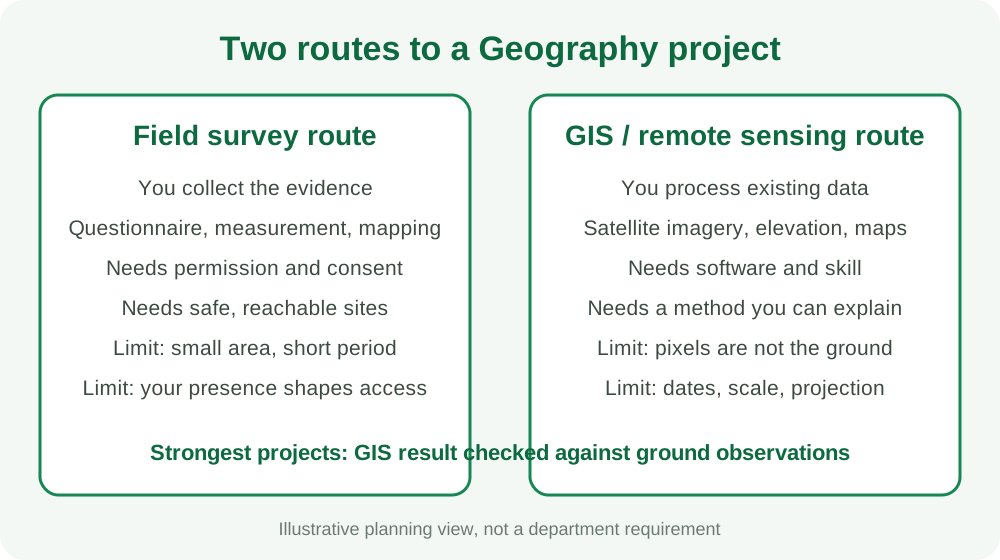
| Question | Field survey | GIS / remote sensing |
|---|---|---|
| What do you produce? | New observations: counts, measurements, interviews, mapped features | Maps and measurements derived from existing imagery and layers |
| Biggest practical risk | Access, permission, weather and personal safety | Software skill, data quality and picking a method you cannot explain |
| Biggest scientific risk | Too few or unrepresentative locations | Mistaking a pixel pattern for a real-world cause |
| What the panel probes | Why those sites, how you recorded, consent | Which data, which dates, how you classified, how you checked it |
A project can be honest and modest on either route. What it cannot do is claim more than the evidence supports. A map showing that a surface looks different between two dates does not by itself explain why. For the general logic of choosing, see the guide to choosing a final year project topic; the points below add what is specific to Geography.
What kinds of question suit each route?
These are provisional question shapes, not approved titles and not completed studies. Adapt the place, the period and the data to what you can actually obtain.
- Field survey shape: "How do residents of [defined neighbourhood] describe their access to [a specific service], and how does that differ between [two defined sub-areas]?" The evidence is your own survey or interviews, so ethics and sampling come first.
- Measured-site shape: "How does [a measurable property, such as channel width or soil moisture] vary along [a defined transect]?" The evidence is your own measurements with a recorded method.
- GIS shape: "How did the mapped extent of [a land-cover class] in [defined area] differ between [two dates], according to [a named dataset]?" The evidence is imagery you cite precisely.
- Combined shape: "How well does a classified map of [defined area] agree with field observations at independent check locations?" The evidence is both the map and your ground data.
Notice that each shape names a place, a period and a data source. A title such as "Environmental problems in Nigeria" names none of these and will not survive the first question from the panel. If your interest sits closer to ecology and resource management, compare the environmental science seminar guide to see whether your question belongs in that department's territory instead.
Where do open satellite and map data come from?
Check each source's current terms yourself; policies and portals change. Here is what the official pages say, as opened for this guide.
Landsat (USGS). The USGS data-access page states that Landsat products in its EROS archive have been available for download at no cost since 2008. It lists several access routes, including EarthExplorer (a map-based search), GloVis, a bulk-download application, an API and a cloud-hosted copy. It describes Level-1 scene products as covering Landsat 1 to 9 worldwide and Level-2 surface reflectance and temperature products as Landsat 4 to 9 worldwide. A related USGS video description says to register for a free account to order data through some tools, so expect to create one.
Copernicus Sentinel (ESA / EU). ESA describes a European Delegated Act giving free, full and open access to Copernicus data, including Sentinel satellite data. The ESA page does not describe a download portal, so find the portal Copernicus currently points to and note the access date in your methodology.
Digital Earth Africa. This is an African initiative whose openly accessible tools combine analysis-ready Earth observation data with cloud computing. The organisation reported a November 2025 training with Nigeria's National Space Research and Development Agency (NASRDA) covering agriculture, water and flood monitoring, urban expansion and coastal erosion. That tells you the platform is active for Nigerian use cases; it does not tell you which layers cover your study area, so check the platform's maps and documentation.
Google Earth Engine. Google states that Earth Engine will remain free of charge for students, faculty or staff at an academic or educational institution, for research or teaching, and that free use excludes fee-for-service work. The quotas and rules can change, so read the current noncommercial terms before building a project on it.
Nigerian sources. NASRDA coordinates Nigeria's National Geospatial Data Infrastructure, and the Office of the Surveyor General of the Federation is one of the agencies involved. No student-facing public download service from either agency was confirmed while preparing this guide, so do not promise your panel Nigerian national data. Ask your department whether it holds topographic sheets or local datasets, and ask the relevant state or local office in writing for anything official. Say in your methodology exactly where each layer came from.
Keep a data log as you go: dataset name, provider, product or version, acquisition date, download date, coverage and the page where its terms are stated. The primary and secondary data guide explains why the source of every dataset must be traceable, and the same discipline applies to a satellite scene.
What is ground truthing and why does the panel ask?
Ground truthing means checking what the map says against what is actually on the ground. Accuracy-assessment literature in remote sensing generally treats this as three decisions: how check locations are sampled, how each location is labelled, and how the comparison is analysed. Ask your supervisor which method reference your department prefers.
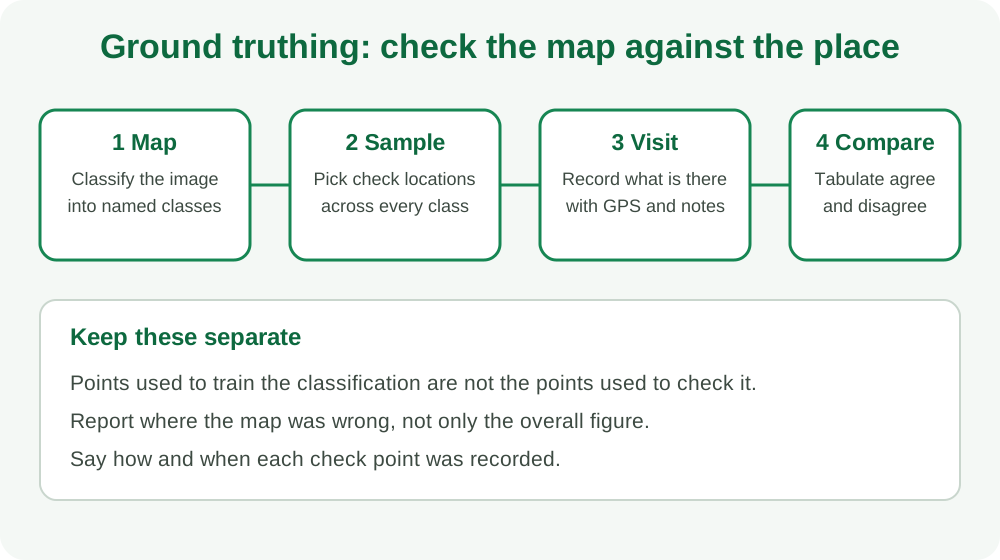
In plain terms:
- Name your classes before you classify. If "built-up" and "bare land" are not defined in a sentence each, you cannot tell whether a field visit agrees.
- Choose check locations with a stated rule. Picking only places that are easy to reach, near a road, biases the result. Explain how you sampled, and see the sampling techniques guide for the logic of choosing units.
- Keep check points separate from training points. If you used a location to teach the software what a class looks like, it cannot also prove the classification right.
- Record how you observed. GPS reading, date, photo, your description and who recorded it. A field notebook that cannot be read back later is not evidence.
- Report disagreement. An overall percentage can hide a class the map got badly wrong. Show which classes were confused with which.
This guide gives no required number of check points. How many you need depends on your classes, area and supervisor's expectations, so ask your supervisor and cite a method source rather than quoting a rule of thumb from a forum.
Scale and coordinate-system pitfalls, in plain language
You do not need to be a geodesist, but you must avoid the errors that make a map quietly wrong.
- Scale is a promise about detail. Imagery with coarse pixels cannot show small features. If your question is about a single building, drain or footpath, check whether the data you intend to use can show it at all. State the pixel size of each dataset in your methodology.
- Dates matter. Two scenes from different seasons can differ because of vegetation or moisture, not because the land changed. Compare like with like or explain the difference.
- A coordinate reference system (CRS) is part of the data. Layers can use different systems. Nigerian survey work may involve the Minna datum, which the EPSG registry lists with a UTM zone 31N entry (EPSG:26331) whose area of use is given as Nigeria west of 6 degrees east, with a neighbouring zone 32 entry for the rest. Satellite products and phone GPS commonly use other systems. Read the metadata of every layer.
- Do not assume layers match. If a boundary layer sits visibly off from the imagery, stop. The cause is often a CRS or datum mismatch, or a layer that was never properly georeferenced.
- Reproject deliberately. Choose one project CRS, convert layers into it, and write the choice and the transformation into your methodology.
- Measure areas in a suitable projection. Area and distance depend on the system used. Ask your supervisor or lecturer which system the department expects for area calculations.
A small table in your methodology listing each layer, its source, date, resolution and CRS answers most of these questions before the panel asks them.
What software can you actually get?
Your department's GIS laboratory may offer specific software and licences, so ask what is installed, when it is open, and whether you can work on your own laptop. Open-source GIS software such as QGIS is widely used in teaching and publishes its code openly, though its licence terms were not checked for this guide, so confirm the current terms on its site. Cloud platforms such as Google Earth Engine or Digital Earth Africa's tools run in a browser, which helps if your laptop is modest, but they need reliable internet, which you should plan around. Whatever you choose, record the software name and version in the methodology, because the panel may ask you to reproduce a step. Learning the software late is a common reason a GIS project stalls, so schedule practice time before your data collection period ends.
Field safety, access and permissions
Field work is where Geography projects most often run into trouble that has nothing to do with the research question.
- Get written clearance. Ask your supervisor what your department requires before you leave campus for data collection, and do not assume a letter is optional.
- Seek permission for the site. Land can belong to a community, institution, company or government agency. Agree access with the right person and keep a note of who agreed and when.
- Plan for people. If you interview or survey residents, you need informed consent and a plan for protecting what they tell you. The research ethics and consent guide covers the principles.
- Do not go alone. Tell someone your route and return time, and avoid remote sites without company. Weather, flooding, wildlife and security conditions change; check local conditions the day before.
- Do not photograph or map restricted places. Some sites, such as installations, have rules about cameras and drones. Ask first; if in doubt, leave it out and record why.
- Protect your equipment and data. Back up field notes and GPS tracks the same day.
If a site cannot be visited safely, say so in the report and design around it, rather than dropping the ground check without a word. The limitations section guide shows how to state such constraints honestly.
Illustrative feasibility worksheet (fictional)
This worksheet is a made-up teaching example. No imagery was downloaded and no analysis was run.
A student proposes the title "Urban expansion in Town A." Here is how they might test it.
| Check | Student's answer | Verdict |
|---|---|---|
| Question | How did the mapped built-up extent in the Town A campus district differ between two dates? | Narrower than the title, good |
| Data | Two cloud-free scenes from the same season, from a free archive | Must record dates and product |
| Method | Classify four named classes in the chosen software | Must define each class in a sentence |
| Ground check | Visit independent locations across all four classes | Needs permission and a safe plan |
| Claim allowed | The map shows a difference between the dates | Cannot claim a cause without more evidence |
| Open question | Does the department require a field component? | Ask the supervisor this week |
The point is not the town. It is the order: question, data, method, ground check, then the claim the evidence supports.
What does the panel ask?
Panels vary, so treat these as preparation prompts, not a script. The guide to common project defense questions covers general technique; these are Geography-specific.
- Why this study area, and what makes it a fair one for your question?
- Which data did you use, from where, and on what dates? Can you show the access page?
- What are your classes, and how did you decide what belongs in each?
- How did you check your map? Were the check points independent of the ones used to classify?
- What coordinate system did you use and why? Did any layer need reprojecting?
- What is the smallest feature your data could show? Does your claim depend on anything smaller?
- What does your result not tell us? What else could explain the change?
- Did you have permission to work at your sites, and how did you protect participants or safety?
- What would you do differently with more time or better data?
Practise answering these with your maps and data log open. Your methodology chapter should already answer most of them; the methodology writing guide explains how to present a method so it can be checked.
Common mistakes to avoid
- Choosing the software first and the question later.
- Treating a coloured map as a finding rather than the result of choices you must justify.
- Using the same points to train and to test a classification.
- Mixing layers without checking coordinate systems.
- Claiming a cause (population growth, policy, climate) that your data never measured.
- Visiting sites without permission or telling anyone.
- Ignoring the supervisor's actual brief because a past project looked different.
Where UniDraft fits
UniDraft does not collect your field data, process imagery, classify land cover or check your map accuracy. Those remain your work. What it does is help organise your confirmed question, your actual results, checked sources and your supervisor's instructions into an editable Word project document. Use the citation tool as you collect sources, then start your project document once your evidence is ready.
Sources
- USGS: Landsat data access — no-cost availability since 2008, access tools and coverage.
- ESA: Free access to Copernicus Sentinel satellite data — free, full and open access policy.
- Digital Earth Africa: strengthening geospatial capacity in Nigeria — open Earth observation tools and the NASRDA training.
- Google Earth Engine: noncommercial and research use — eligibility for students and academic staff.
- Spatial Reference: EPSG:26331 Minna / UTM zone 31N — name, projection and area of use.