To take useful notes from a research paper, write one note per source with the same fields every time: the full citation, the authors' question, their method, the finding you need, its limits, any exact quote with its page number, and your own comment. Put everything except the quote in your own words.
UniDraft organises your confirmed work, checked sources and supervisor instructions into an editable Word document, so notes you can trust make a better starting point. When your reading notes are ready, start your project document. UniDraft's free citation tool can help you format the reference entry that goes into the first field of every note.
This post is about the notebook habit, not the reading itself. For how to move through a paper in the first place, see how to read a research paper. Here we cover what to write down once you have read it, so that your literature review nearly writes itself later.
Why does note taking matter more than reading?
Reading feels productive while you do it. Three weeks later you remember that "a paper said something about training," but not which paper, what it measured or whether the authors were cautious about it. That memory gap is where invented details, wrong citations and accidental copying creep into reports.
Notes fix three problems at once:
- Findability. You can see which source supports which claim without re-reading twenty PDFs.
- Honesty. A note records what the authors actually did and said, so your report does not drift into what you vaguely remember.
- Comparison. Notes written in the same shape can be laid side by side, which is how you start to synthesise instead of just summarise.
The method in this post comes from combining guidance in university library and writing-centre pages (listed under Sources) with a fixed template. The template itself is a practical suggestion, not a rule from any one university. If your supervisor gives you a note format or a required reading log, use theirs.
What does a good source note contain?
Use the same seven fields for every paper. The first six describe the source. The seventh is where your own thinking goes, and it should stay visibly separate.
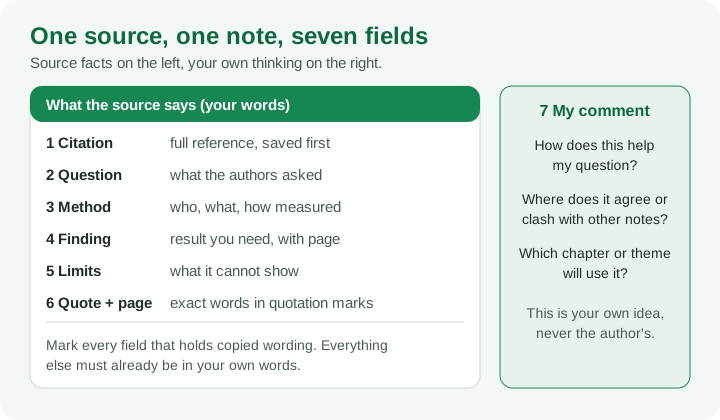
| Field | What to write | Why it matters |
|---|---|---|
| 1. Citation | The full reference, in your required style, saved first | You never hunt for author, year or journal later |
| 2. Question | What the authors set out to find out, in one sentence | Stops you using the paper to answer a question it never asked |
| 3. Method | Who or what was studied, what was measured, how the comparison was made | Lets you judge how strongly the finding can be stated |
| 4. Finding | The result relevant to your question, with the page or table location | Your claim can be traced back and checked |
| 5. Limits | What the evidence does not establish, including limits the authors admit | Keeps your wording as careful as the evidence |
| 6. Quote + page | Exact words in quotation marks, with the page number, only when wording matters | Quoted wording never gets confused with paraphrase |
| 7. My comment | How it helps your question, and where it agrees or clashes with other notes | The beginning of your own argument |
Two small habits make the template work. First, fill in field 1 before anything else, because a note without a full citation is half-useless. Second, leave a field empty rather than guessing: if the paper never states a sample size, write "not stated," do not estimate one.
Why separate quotes from paraphrase in your notes?
This is the single habit that prevents the most accidental plagiarism. Lehigh University's library research guide describes three forms of note: summary, paraphrase and quote. It treats the quote as the one kind copied word for word, enclosed in quotation marks, with the person quoted identified. Summaries and paraphrases are written in your own words.
The danger is not copying on purpose. It is copying a sentence into your notes "just to save it," forgetting to mark it, and finding it six weeks later looking like your own prose. By then you cannot tell, and you paste it into your draft.
Build three rules into how you write notes:
- Anything copied goes in quotation marks, with the page, the moment you copy it. If you are not sure whether you will use it, still mark it.
- Fields 2 to 5 are always your own words. If you catch yourself copying a sentence into the "finding" field, stop, close the paper and write it from memory, then check.
- Never put a quote and a paraphrase in the same field. Give the quote its own field, field 6, so you can see at a glance what is exact and what is yours.
The University of British Columbia's library page describes a simple check for the paraphrased parts: read the source a couple of times until you can explain the main points aloud without looking back, write them in your own words, then compare your notes against the original to confirm they capture it accurately. For the sentence-level craft, our paraphrasing method goes through weak and strong versions side by side.
A related idea comes from the UNC writing centre's account of using a synthesis matrix: its writer suggests paraphrasing more and copying fewer direct quotes into the matrix, because paraphrasing forces a closer reading. That fits with the advice here. Quote only when the exact words matter, such as a definition you will analyse.
Worked example: one filled note (fictional)
The paper below is invented, as are its authors and numbers, so you can see the shape of a note without worrying about a real study. Imagine a fictional article, "Adekunle and Bassey (2021), Journal of Rural Health Logistics," on stock records in rural clinics.
| Field | Filled note |
|---|---|
| 1. Citation | Adekunle, T., & Bassey, E. (2021). Written stock records and medicine availability in rural clinics. Journal of Rural Health Logistics, 12(2), 45-61. (fictional) |
| 2. Question | Do clinics that keep written monthly stock counts run out of medicines less often than clinics that rely on memory? |
| 3. Method | Compared two groups of rural clinics in one fictional state over one year; stock-outs counted from clinic registers; no random assignment. |
| 4. Finding | Clinics with monthly written counts reported fewer stock-outs. The authors say shortages were noticed earlier. (p. 52, Table 2) |
| 5. Limits | One state only; clinics were not assigned at random, so other differences between clinics could explain part of the gap; self-kept registers. |
| 6. Quote + page | "shortages were noticed before the shelves were empty" (p. 53) |
| 7. My comment | Useful for my Chapter 2 theme on record keeping and availability. Fits Note C (also links records to fewer stock-outs) but design is weaker than Note B, which used independent counts. Do not write "caused" because of the design. |
Notice what the note does not contain. It does not copy the abstract. It does not carry a percentage the paper never gave. The only exact wording sits inside quotation marks with a page number, and field 7 holds a judgement that belongs to the student, not the authors.
When this note later becomes a sentence, it can be as plain as: "Adekunle and Bassey (2021) found fewer stock-outs in clinics keeping written monthly counts, although their comparison was not randomised." Every word of that traces to a field above.
How do I turn notes into a synthesis table?
Summaries tell you what each paper said. Synthesis tells you what the papers say together. The tool for this is a table where each row is a source and each column is a category you want to compare.
The UNC Writing and Learning Center describes this as a research worksheet, usually built in a spreadsheet. Each row is one source, the first columns carry the author, date and citation, and the remaining columns are categories the writer adjusts as they read, so that the table reflects what the sources actually discuss. The University of Tasmania's library guide likewise recommends a synthesis matrix for taking notes, with headings matched to the focus of your review.
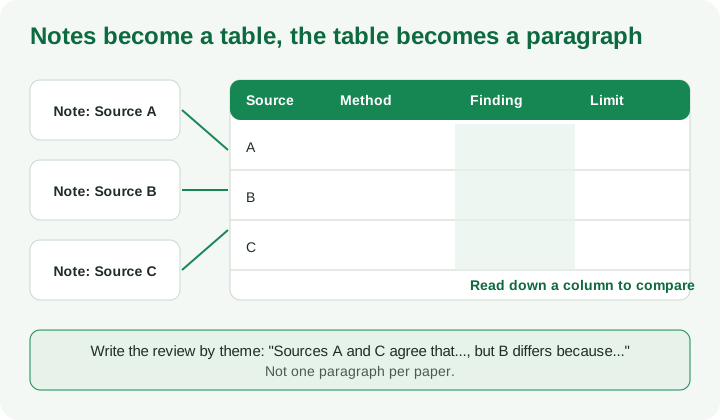
Because you filled the same fields for every paper, building the table is mostly copying across. Here is a short fictional table, continuing the clinic theme:
| Source (fictional) | Method | Finding on records and stock-outs | Limit | Theme |
|---|---|---|---|---|
| Adekunle and Bassey (2021) | Group comparison, registers | Fewer stock-outs with written monthly counts | Not randomised; one state | Records |
| Note B (fictional) | Independent counts by visiting staff | Fewer stock-outs with written counts | Small number of clinics | Records |
| Note C (fictional) | Staff interviews | Staff say counts help them spot shortages | Opinions, not measured stock | Records, staff views |
Reading down the "Method" column shows something the individual notes hid: two of the three rely on clinic registers or staff accounts, and only one used independent counts. Reading down "Finding" shows agreement. Together that supports a careful synthesis sentence such as "Three studies point in the same direction, though only one relied on independent counts, so the evidence is suggestive rather than settled." You could not write that from three separate summaries.
A few practical tips for the table:
- Add columns only when a pattern appears in at least two sources. A column used by one paper is a note, not a category.
- Add a column for "page" next to anything you may quote or cite precisely.
- Colour or tag rows by theme so you can sort them into the sections of your outline. Our literature review guide shows how a matrix feeds Chapter Two, and the empirical review guide covers organising study findings by theme.
Which tool should I use: paper, spreadsheet or reference manager?
Use whatever you will actually keep up. Lehigh's guide describes both a hand version (index cards, one idea per card, with a numbered source card and the page on each note) and an electronic version (a separate list of sources, with the source number and page next to each idea, such as "A5 p. 35"). The same logic works for the seven fields.
| Option | Strength | Watch out for |
|---|---|---|
| Paper cards | No setup, forces short notes | Hard to sort and search |
| Word document, one note per source | Easy to paste into a draft | Notes drift into long copied paragraphs |
| Spreadsheet, one row per source | Becomes your synthesis table directly | Cells can encourage copy-pasting; keep quotes in their own column |
| Reference manager notes | Keeps PDF, citation and note together | Does not write the note for you |
If you want one place for PDFs and reference entries, read our comparison of Zotero and Mendeley for students. A reference manager stores the container; the seven-field note is still your job.
What common mistakes ruin research notes?
- Notes that are mostly quotation. If a note is two pages of the paper's wording, you have photocopied it, not understood it.
- No page numbers. You cannot check or quote precisely later, and a supervisor asking "where does it say that?" will be hard to answer.
- Recording the abstract as the finding. Abstracts compress. Go to the results and write the specific finding.
- Skipping limits. Without a limits field, every paper starts to sound equally strong, and your report overclaims.
- Mixing your opinion with the authors' claims. If field 7 is not separate, you will later cite the author for something you thought.
- Adding details you did not read. Never fill a gap in your note from memory or from what "usually" happens. Go back to the paper.
- Forgetting the source you did not read directly. If a paper cites another, say so in your note rather than pretending you read the original.
If your source of the idea is a second-hand citation, note it as such. Our guide to finding research papers covers locating the original so your note can be about the real source.
How do my notes connect to similarity checks and supervisors?
Careful notes make your later work easier to defend. If a supervisor asks where a sentence came from, your note gives the page. If a similarity report flags a passage, your field 6 tells you whether it was a marked quotation or a paraphrase that stayed too close. Our explanation of similarity reports in a final-year project covers what such a report does and does not prove; the report is a signal for your supervisor, and your notes are the evidence of honest working.
For anything involving your department's expectations, such as how long a reading log should be, how many sources are expected or which referencing style to use, follow your supervisor's brief. This post does not set those rules.
A quick checklist before you close a note
- Full citation saved in your required style
- Authors' question stated in one sentence
- Method described as what they did, not just a tool name
- Finding written with its page or table location
- At least one limit recorded
- Every exact phrase inside quotation marks with a page
- Field 7 written, and clearly yours
- Nothing in the note you did not actually read
Turning notes into your document
Good notes are the raw material for the literature review, the seminar review of sources, or the background section of a SIWES report. UniDraft helps organise your confirmed work, checked sources and supervisor instructions into an editable Word document, but it cannot read the papers for you or decide what they mean. Check each claim against your notes and the original source, then start your project document when your notes are ready. If you are still choosing your area, try UniDraft's free topic generator and take the first notes against that question.
Sources
Opened and read while preparing this guide: