For most students the choice is simple: Zotero and Mendeley both do the job, and the one your supervisor, coursemates or department already use is usually the better choice. Both store your sources, insert citations into Word and build the reference list for you. Neither checks that a source is real or says what you claim it says.
If you are writing a project, UniDraft organises your confirmed work, checked sources and supervisor instructions into an editable Word project document. Start your project document once your sources are checked, and use a reference manager to keep them tidy while you write. The free citation finder can help you locate papers to add to your library.
All the names, years and titles in the examples below are made-up placeholders, not real studies.
What does a reference manager actually do?
A reference manager is a small database of the sources you have read, plus a connection to your word processor. You save a source once, with its author, year, title and journal. When you cite it in your text, the tool inserts the in-text citation and builds the reference list from the same stored record.
The benefit is consistency. If you change a citation style from APA to IEEE, or correct a misspelt author name in one place, the whole document can be updated. That is the part that is painful to do by hand across 80 pages. The reference list guide explains the styles themselves; a manager only applies them.
What it does not do is read for you. Treat it as a filing cabinet with a formatting engine.
Zotero or Mendeley: what the official pages say
We opened the official pages of both tools to check what they currently say. Features and limits change, so confirm on the sites before you commit.
| Question | Zotero | Mendeley |
|---|---|---|
| Who runs it | Open source, developed by a nonprofit | Elsevier's reference management tool |
| Cost to start | Free | Free account |
| Free file storage | 300 MB (paid tiers: 2 GB, 6 GB, unlimited) | 2 GB on a free account |
| Saving from the web | Zotero Connector browser button | Mendeley Web Importer |
| Adding PDFs | Drag in; Zotero tries to retrieve metadata | Drag in, or use a watched folder |
| Word | Zotero tab inside Word | Mendeley Cite add-in |
| Other editors | LibreOffice and Google Docs | The library guide we read says Cite works with Word only |
| Shared libraries | Free shared group libraries | Groups with shared libraries |
Sources for the table are listed at the end. Two details are easy to misread. First, Zotero's 300 MB is for syncing attached files such as PDFs; the records themselves are small. Second, Mendeley's older Desktop citation plugin is in maintenance mode, and the library guide we read recommends Mendeley Reference Manager for new users. If an older tutorial tells you to install "Mendeley Desktop", check that it is still current.
Which one should you choose?
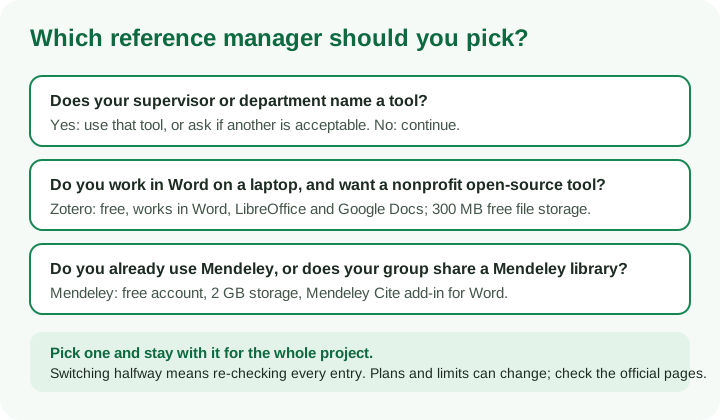
Ask three questions in this order.
- Does your supervisor or department name a tool? If yes, use it, or ask whether another is acceptable. Many departments say nothing, which is fine.
- Does your group already share a library? If your coursemates already keep a Mendeley group, joining it may save work. If nobody does, you are free to choose.
- Where do you write? Both work with Microsoft Word. If you might switch to LibreOffice or Google Docs, Zotero lists support for them; Mendeley Cite is described as a Word add-in.
If none of these decides it, Zotero is a sensible default for a single-author project because it is free and open source. Mendeley's larger free storage is attractive if you plan to keep many PDFs in the cloud. Neither is clearly "better for Nigerian students"; the right one is the one you will actually keep up with for the length of the project. Do not install both and split your sources between them.
A practical note: your library lives on your computer, with optional sync. Back up the library regularly, not only the Word file. A laptop failing the week before submission should not take your whole source list with it.
The five-step workflow
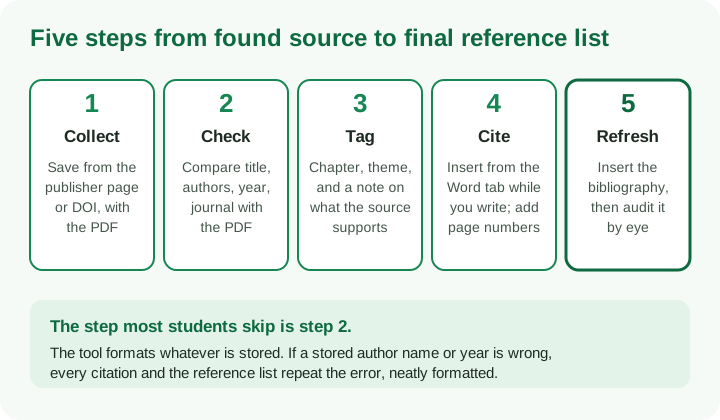
Step 1: Collect from the source, not from a snippet
Save a paper from the publisher or repository page, or add it by DOI. Zotero's Connector detects the details on many pages and lets you add an item by identifier such as a DOI or ISBN; Mendeley has the Web Importer. Attach the PDF so you can reopen it later.
Collect as you read, not in a panic at the end, and add a source only after you have opened it and confirmed it exists. The guide to finding research papers covers where to look, and the reading guide covers what to take from each paper.
Step 2: Check the stored record against the PDF
This step decides whether your reference list is right. Zotero's own help says to always check items for accuracy after saving them, and warns that imported data can be incomplete or wrong, such as incorrect journal names, missing or misordered authors, or inconsistent title casing. The next section shows what to look for.
Step 3: Tag and annotate
Use collections or tags for chapters and themes ("Ch2 theory", "methods", "Nigeria context"), and write a one-line note on what each source supports. That note is the link between the tool and your argument. When you come to write the literature review, you can filter by theme instead of re-reading everything.
Step 4: Cite while you write
In Word, Zotero adds a Zotero tab. Click Add/Edit Citation, type part of an author surname, title or year, select the item and press Enter. You can type a page such as "p.34" as a locator, which matters for direct quotations. Mendeley Cite works from its own panel in Word and draws on your synced Mendeley library.
Write the sentence first, then cite it. A citation says that this source supports this claim, and the tool cannot make that true. The APA in-text citation guide shows when a paraphrase, quotation or secondary source needs which form.
Step 5: Refresh, insert the bibliography and audit it
Insert the bibliography where your department wants it. In Zotero, Refresh updates all citations and the bibliography after you change a record. Then read the result like a supervisor: check each entry for author order, year, title and journal, and confirm that every listed source is cited and every cited source is listed.
Zotero's help gives one warning worth remembering: avoid typing directly into citation fields or the bibliography in Word. Manual edits can stop a citation updating, and bibliography edits are overwritten when you refresh. If you must make a last-minute manual change, do it on a copy after the document is otherwise finished. Keep your version with live citations as the master, because Zotero's Unlink Citations option is irreversible.
The pitfall: trusting auto-generated metadata
A reference manager reads metadata from web pages, databases or the PDF itself. That is fast, and it is also where errors enter. The tool will format a wrong year perfectly. Here is a fictional example of what a careless import can look like.
| Field | What the import stored | What the PDF shows | Why it matters |
|---|---|---|---|
| Authors | "Adeyemi, T." only | Three authors | The in-text citation becomes "(Adeyemi, 2022)" instead of "(Adeyemi et al., 2022)" |
| Year | 2021 | Published 2022 (online first 2021) | Mismatch with the version you read |
| Title | ALL CAPITALS | Sentence case | Looks careless; styles expect a consistent case |
| Journal | Abbreviation or publisher name | Full journal title | Entry is hard to trace |
| Type | "Web page" | Journal article | Wrong format; volume and pages missing |
| DOI | Missing | Printed on the first page | Reader cannot trace the paper |
Common causes: a PDF added without a DOI, so the tool guesses from the first page; a web page saved as a generic "Web Page" instead of a journal article; and a database record that holds the date a paper was first posted online rather than the year of the issue.
A quick audit for every item, before you cite it:
- Open the PDF and compare the title, every author name and their order, and the year with the stored record.
- Check the item type (journal article, book, report, thesis) and that volume, issue and pages exist where they should.
- Add a DOI or stable link where the source type supports one.
- Fix the record in the library, not in the Word document, so the correction flows everywhere.
If the tool cannot find the details, enter them by hand from the PDF. Never fill a gap with a plausible guess. The reference list guide explains what to do when a source has no author or date.
What a reference manager cannot protect you from
- Sources that do not support your claim. A neatly formatted entry for a paper that says the opposite is still a mistake.
- Made-up sources. If an AI chatbot suggested a paper that never existed, the manager will not notice. Confirm each paper exists before it enters your library.
- Departmental style variants. Built-in styles may differ from your department's version of Harvard or APA. Compare the output with the department's guide or sample.
- Pasting from other documents. Copying a paragraph with live citations from a friend's file can bring their fields and records into yours.
- Late changes. After a supervisor's correction adds a new source, run the two-way check again.
The formatting guide for Nigerian projects covers where the reference list sits and how it is laid out.
A realistic weekly routine
A routine beats a big clean-up. This one fits a busy semester:
- When you read a paper: add it to the library, attach the PDF, check the record, tag it with a chapter and write the one-line note.
- When you draft a paragraph: insert citations as you write. Do not leave placeholders like "(Smith 20xx)" in the draft.
- Weekly: refresh the bibliography and scan it for odd entries, such as all-capitals titles or missing authors.
- Before you send a draft to your supervisor: run the two-way check and confirm the style.
- Before final submission: read every entry once more, then save a copy of the document and a backup of the library.
If your supervisor's corrections touch sources, fix the library first, then refresh. The supervisor corrections guide covers the wider workflow.
Questions your supervisor might ask
- Which referencing style did you choose, and who required it?
- How do you know this source exists and says what you cite it for?
- Why does this entry have no DOI or page numbers?
- Did you copy this reference from a list, or read the paper?
- Can you show me where in the paper this statistic appears?
A reference manager makes formatting easy. The answers still depend on you having read the work.
Where UniDraft fits in
A reference manager organises your sources. UniDraft organises your confirmed work, checked sources and supervisor instructions into an editable Word document, so the writing and layout follow the instructions you supply. UniDraft does not run your analysis or guarantee approval or grades, and you remain responsible for checking every citation against the original. Supply the style your supervisor requires and your checked source list, then review the result line by line. Start your project document when you are ready, and use the free formatting checker to check page layout separately from your citations.
Sources
These are the official or library pages opened to check the features described above. Plans and limits can change, so recheck them before you decide.
- Zotero home page, for the description of the tool, Word, LibreOffice and Google Docs support and free group libraries.
- Zotero Storage, for 300 MB of free storage and paid tiers.
- Using the Zotero Word plugin, for toolbar buttons, citing steps and the warning about manual edits.
- Adding items to Zotero, for the Connector, adding by identifier and the advice to check items for accuracy.
- Mendeley Reference Manager, for the Web Importer, watched folders, groups and 2 GB of free storage.
- Bodleian Libraries: Mendeley, for Mendeley Cite, the older Citation Plugin and its status.