Your supervisor has returned your draft covered in comments, and you have to fix it without breaking the chapters they already approved. The way to do that is to collect every comment in one list, sort it by chapter and by how far it spreads, edit a copy rather than the reviewed version, and answer each comment in writing when you resubmit.
A five-chapter project report has far more surface area for corrections to interact than a seminar or a short report. A change to one chapter can quietly break another if it is not tracked. This guide covers what usually gets flagged in each chapter, how to triage a returned draft, how to track corrections, and how to reply so your supervisor can see quickly that you dealt with everything.
Corrections are easier to follow when the reviewed version remains available. UniDraft's project document workflow lets you supply comments, review and confirm the extracted changes, and produce a new version while keeping earlier ones. Start your project document, checking current pricing and included rounds before checkout; you still verify every revision against the actual work.
The short answer
- Never edit the version your supervisor reviewed. Work on a copy and keep the reviewed one exactly as returned.
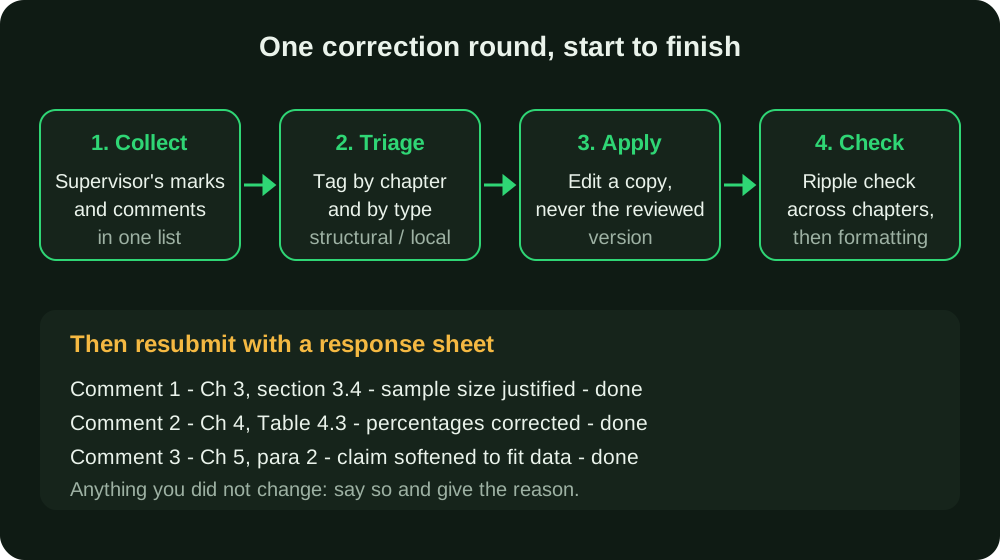
- Put every comment in one list, tagged by chapter and by type (structural or local), before you change anything.
- Fix structural comments first (objectives, methodology, core findings), then local ones (wording, tables, citations).
- Trace each structural change through the other chapters before you resubmit.
- Do not restructure chapters you were not asked to touch. That is how new problems enter sections that had passed.
- Return a short response sheet saying what you did for each comment, including anything you chose not to do and why.
Review questions by chapter
Departments differ in how they number chapters and what they call them, so treat this as one planning pattern and check your department's project guideline for yours. If you are unsure what each chapter is meant to contain, what a final year project is gives the standard layout.
- Chapter 1 (Introduction): an objective that is too broad or does not match what the rest of the project investigates, or a problem statement that describes a topic rather than a problem. Rewriting your research questions and objectives usually settles this.
- Chapter 2 (Literature Review): sources summarised one after another without being tied back to the specific gap your project addresses, outdated sources, or citations in the text that are missing from the reference list.
- Chapter 3 (Methodology): too little detail to be reproduced, a sample size with no justification, or a method that does not match what Chapter 4 describes actually happening.
- Chapter 4 (Implementation, Results and Discussion): results, figures or claims that cannot be traced back to real data. This needs careful checking against the underlying evidence. Tables that do not add up, charts without labelled axes and results reported with no interpretation also appear here.
- Chapter 5 (Conclusion): conclusions that go beyond what Chapter 4 supports, recommendations that do not follow from the findings, or objectives that are never answered.
Any chapter may contain an evidence or wording problem. Keep genuine data files, questionnaires, screenshots and logs organised so you can trace a changed claim to its source.
Step 1: Collect every comment in one place
Corrections arrive in messy forms. A lecturer may write on a printed copy in pen, leave Word comments, send a WhatsApp voice note, or say three things in a corridor. If you work from memory or from scattered notes, you will miss items, and a missed item means another round.
Before you touch the draft:
- Photograph or scan every marked page the same day, so the original marks cannot be lost or smudged.
- Type each comment into a single list, one row per comment, with the page or section it refers to.
- Write down verbal instructions immediately, then ask the supervisor to confirm them by message or a comment on the draft. Verbal corrections you cannot prove are the ones that turn into arguments later.
- Ask when a comment is unclear. "Improve this section" is not an instruction. Asking "do you want more sources, a clearer gap, or a shorter section?" costs one message and saves a whole round.
If more than one person gave you corrections (a supervisor plus a project coordinator, for example), mark whose comment each one is. When comments conflict, request a documented resolution through the applicable project and institutional process; do not claim the conflict is resolved merely because you chose one.
Step 2: Triage by chapter and by how far the change spreads
Not all corrections are equal. Some change one sentence. Others change what your entire report is about. Sort your list on two axes.
By chapter, so you can work through the document in order and stop jumping back and forth. By type:
| Type | Examples | Risk to other chapters |
|---|---|---|
| Structural | Objectives changed, method changed, a result re-computed, a chapter added or reordered | High: check every chapter that mentions it |
| Content | Add a source, expand a justification, explain a table, soften a claim | Medium: check the conclusion and abstract |
| Local | Spelling, a table caption, a reference format, a heading style | Low: check formatting only |
Do the structural corrections first. If you spend three hours polishing wording in Chapter 2 and then a structural comment removes half the section, that time is gone. Then do content corrections, and finish with local ones.
Step 3: Keep the reviewed version untouched
Save the version your supervisor marked exactly as it was returned, and give the copy you edit a clear name, for example Project_v2_after_supervisor_round1.docx. Do not overwrite the earlier file, and do not rename files "final" or "final final". You will need the reviewed version for three reasons:
- To compare what you changed against what was reviewed, so you can confirm nothing else moved.
- To recover a passage that a later correction turns out to make worse.
- To show your supervisor or coordinator what changed, if there is a dispute about whether you fixed something.
A dated, numbered version for each round is enough. If you keep the marked-up copy in the same folder, you can always answer "what did you change since last time?" in seconds.
Step 4: Trace every structural change through the other chapters
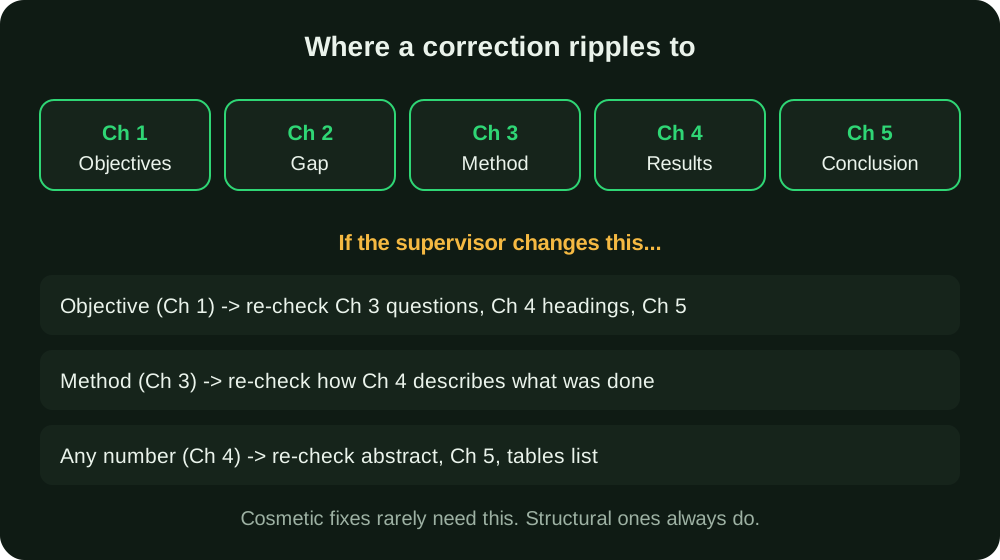
This is a cross-chapter consistency risk. Each edit is correct in isolation, but the document no longer agrees with itself. Look at where the ripples go.
Some worked examples (illustrative, not from a real project):
- The supervisor narrows your objective from "assess the effect of X on students in Nigeria" to "assess the effect of X on 200-level students of one department". Now your Chapter 3 population and sample description no longer fit, Chapter 4 headings that mention "students in general" are wrong, and the Chapter 5 conclusion cannot claim a national picture. Search the whole file for the old wording.
- The supervisor asks you to justify your sample size. Adding the justification to Chapter 3 is easy. But if it turns out your sample is smaller than the justification requires, Chapter 5 needs a limitation stated. Guidance on this is in how to calculate a sample size.
- A table in Chapter 4 had an arithmetic error and you correct it. The abstract, the discussion and the conclusion may quote the old figure. Search for the old number everywhere it might appear.
- You add a new source to Chapter 2. It has to appear in your reference list in the same style as the others; the references guide covers how to keep in-text citations and the list in step.
A practical trick: keep a "numbers and terms" list while you edit. Every figure you change, and every key term you rename, goes on it, and at the end you search the whole document for the old versions.
Whenever a correction touched objectives, methodology or a core finding, do a full read-through from the abstract to the appendices before resubmitting, not only the chapter that was marked. For cosmetic corrections, re-reading the corrected pages is enough.
Step 5: Don't use a correction round to restructure other chapters
It is tempting, while you are in the document, to "improve" the introduction or reorder Chapter 2 because you now see how it could be better. Resist it unless you were asked. Sections that already passed review have been read and accepted. Unrelated restructuring can make the requested changes harder to review; necessary factual corrections still need to be made and disclosed.
If you think something outside the marked pages really needs fixing, do it deliberately: change it, note it on your response sheet ("also corrected a typo in 2.3"), and keep it small. Anything larger, raise with your supervisor first.
Step 6: Answer every comment in writing
Returning a corrected draft with no explanation forces your supervisor to hunt for changes, and they may conclude you ignored something. A response sheet fixes that. It can be one page, in a simple table:
| # | Where | Supervisor's comment | What I did |
|---|---|---|---|
| 1 | 3.4 | Justify sample size | Added formula and source, now 3.4.2 |
| 2 | Table 4.3 | Percentages do not add to 100 | Recalculated, corrected Table 4.3 and text |
| 3 | 5.2 | Conclusion overstates finding | Reworded to match the significance test |
| 4 | 2.6 | Add recent sources | Added three, see references |
Two rules for the last column. First, be specific: give the new section number or page. Second, if you did not follow a comment, say so and give the reason (for example, "the data does not support this; see Table 4.5"). An honest "not changed, because..." is far better than silence.
If you add sources, use ones you have actually read. The free citation finder can help you locate real published sources in APA, IEEE or Harvard style, but you still need to open the source and confirm it says what you claim. Never invent a reference to satisfy a comment.
Before you resubmit: a checklist
- The reviewed version is saved untouched, and your corrected file has a new, clearly numbered name.
- Every comment on your list is marked done, or explained on the response sheet.
- Structural changes have been traced through Chapters 1 to 5 and the abstract.
- Every changed number and renamed term has been searched for across the whole document.
- The abstract still matches your final findings.
- The table of contents, list of tables and list of figures are updated, and page numbering still follows your department's rules. See Roman and Arabic page numbers in Word if the front matter has shifted.
- In-text citations and the reference list match.
- You have run the file through the free formatting checker. A content fix can introduce formatting drift, such as a pasted paragraph in the wrong font, that is easy to miss on a quick re-read. For what a compliant layout looks like, see how to format a final year project report.
What to do when corrections keep coming
The number of rounds depends on the actual work and review process. If the same issue returns, clarify what remains unresolved. If the same kind of comment returns, ask your supervisor for ten minutes to talk through it. Bring your response sheet and ask which part is still unclear. Also plan around your deadline: submission dates, defence dates and departmental cut-offs are set locally, so check yours and leave time for at least two rounds. Students who fail to finish corrections in time can be affected in serious ways; what happens if you fail your final year project explains the general picture, though your department's rules decide the actual outcome.
Corrections also do not end at submission. Panel members at the defence often raise points your supervisor accepted, so it helps to know the common defence questions before you get there. Every correction you handled cleanly is one you can explain confidently.
Where UniDraft fits in
UniDraft builds your written final year project as an editable Word (.docx) document around your confirmed topic and real results, following project/supervisor instructions first, followed by student-confirmed guidelines, department patterns, university baselines and platform defaults. Check current pricing and included correction rounds before checkout.
Here is how a correction round works in practice:
- You supply your supervisor's corrections and instructions.
- UniDraft extracts the changes and shows them to you, and you confirm them before anything is applied.
- A new version of the document is produced.
- Earlier versions are kept, so the reviewed state of every chapter stays available if a change needs to be reversed.
UniDraft does not invent results or approvals, and it cannot guarantee that a supervisor will accept your work. It also does not decide which of two conflicting comments is right. You still read every change, run the ripple checks above and take the final version to your supervisor.
