
A literature search strategy is a written plan that turns your research question into concepts, synonyms, search strings, chosen databases and a log of results. Write it before you search, adjust it as you learn, and keep the record so you can show your supervisor how you found each source.
Searching is only the first half of Chapter Two. UniDraft organises your confirmed work, checked sources and supervisor instructions into an editable Word document, so once you have found and read your papers you can start your project document from material you have verified. This guide is about the searching itself, and it stays separate from how to find research papers, which covers the basic routes, and from the literature review guide, which covers writing.
What a search strategy adds to "just Googling"
Most students type their whole topic into a search box, read the first page and stop. That finds whatever the engine ranks highest for your exact words, not what the field has actually published. A strategy fixes three things:
- Coverage. Authors do not use your words. One paper says "supervisor comments", another "formative feedback", another "teacher response". You only find all three if you planned the synonyms.
- Repeatability. If your supervisor asks "how did you find these?", you can answer with search strings and dates instead of "I searched online".
- Honesty about gaps. A logged search shows when little exists, which matters if you plan to claim a research gap.
This post does not repeat the reading routine in how to read a research paper, and a formal systematic review has stricter reporting; see the PRISMA flow diagram guide only if your brief asks for one. Most student projects need a clear, honest, narrative search, not a full systematic one. Check which your supervisor expects.
Step 1: Break the question into concepts
Write your research question as one full sentence, then underline the ideas that must all be present. University library guides, such as the University of Missouri-Kansas City guide, recommend writing the question out, breaking it into concepts, and then listing synonyms for each concept.
Illustrative question (not a real study): How do undergraduate students in Nigerian universities use supervisor comments when revising their reports?
| Concept | Terms to try |
|---|---|
| Feedback | "supervisor comments"; "written feedback"; "formative feedback"; "teacher feedback" |
| Action | revis*; "feedback uptake"; "report writing" |
| Setting | undergraduate*; "higher education"; Nigeria* |
Three or four concepts is usually enough. If you have six, you are searching for a very narrow intersection and will return almost nothing; drop the least essential concept first.
Step 2: Collect synonyms, spellings and abbreviations
For each concept, list other ways authors might name it. The UMKC guide suggests including spelling variants such as British and American forms, and abbreviations alongside full terms. This matters a lot for Nigerian students, because you will meet both spellings: behaviour/behavior, programme/program, organisation/organization, counselling/counseling.
Where to find extra terms:
- The reference lists and keyword lines of two or three papers you already trust.
- Your course textbook's index.
- The words your own supervisor uses.
- Related-term suggestions from a search engine, tested rather than trusted.
Add every useful term to your table, then test each one in a sample search to see which return relevant results, which is also what the Washington State University library guide advises.
Step 3: Combine terms with Boolean operators
Boolean operators tell the database how your terms relate. The Washington State University library guide gives these definitions:
- AND requires both terms and narrows results:
influenza AND vaccine. - OR accepts either term, so use it for synonyms:
(influenza OR flu) AND vaccine. - NOT excludes a term, but the guide says it is rarely needed for a literature review, so use it sparingly.
- Parentheses group terms.
(influenza OR flu) AND vaccineandinfluenza OR (flu AND vaccine)return very different results. - Quotation marks keep a multi-word concept together as a phrase, for example
"young adult". - An asterisk (truncation) catches word endings:
nurs*finds nurse, nurses and nursing. The same guide warns it can also pull in unwanted words such as nursery.
The working rule is the one both the UMKC and WSU guides describe: join synonyms with OR inside one bracket, then join the concept brackets with AND.
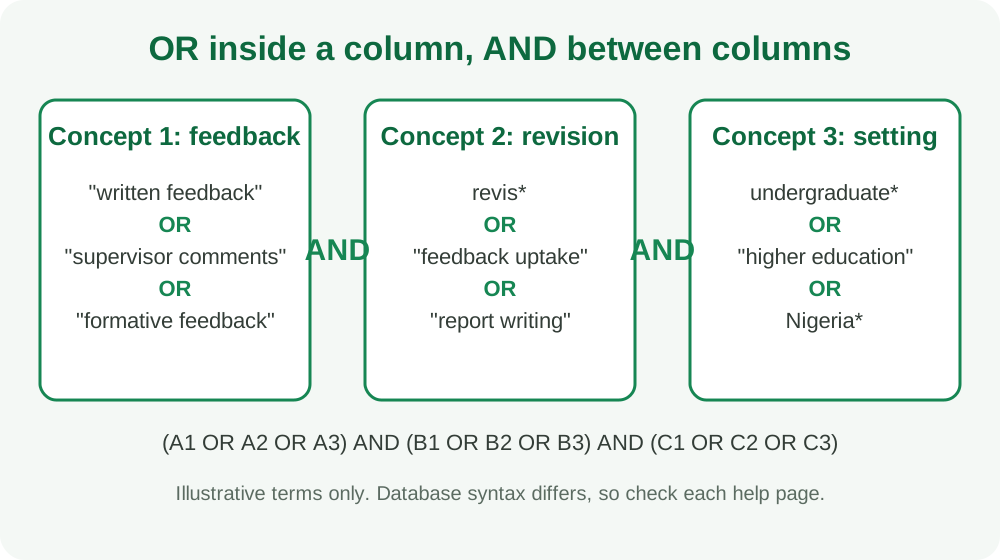
For the illustrative question, the string becomes:
("supervisor comments" OR "written feedback" OR "formative feedback") AND (revis* OR "feedback uptake") AND (undergraduate* OR "higher education" OR Nigeria*)
Two cautions. First, do not truncate too early; the UMKC guide notes that a very short root such as "diab*" retrieves unrelated words. Second, databases do not all use identical syntax or support every feature, so read the help page of each one before copying a string and adapt it where needed.
Step 4: Use Google Scholar properly
Google Scholar is where most students begin, so use its real features. These come from Google Scholar's own search tips page:
- Quotes search for an exact phrase or title.
author:"d knuth"searches by author name.- Advanced search (in the side menu) lets you search by author, title or publication and limit by date.
- Since year in the left sidebar restricts to recent papers while keeping relevance sorting; sort by date shows the newest additions first. By default, results are sorted by relevance, not date.
- Cited by shows newer papers that cite a result; Related articles finds similar documents.
- Alerts (the envelope icon) email you new papers matching a search.
- Save puts a result in My library, where you can add labels.
- [PDF] and [HTML] links beside a result point to available full-text versions, and All versions lists other places the item appears.
- Library links next to results point to your library's subscriptions. The help page says that off campus you must first visit Scholar on campus so your subscriptions are recorded, and that records expire after 30 days. Whether your own university library is linked is something to ask your librarian.
That help page does not describe operators such as intitle: or source:, so this guide does not recommend relying on them. Test them yourself if you want to use them, and record what happens.
A useful routine: run your string, use Advanced search to limit dates only if your brief asks for recent work, scan titles, open ten promising results, and save the ones you intend to read in full.
Step 5: Open-access and Nigerian routes
A paywall is not the end of the search. Look for a [PDF] link in Scholar, the All versions link, the journal's own open-access page, and your university library's access page. These are legitimate routes; avoid shadow sites and password-sharing, which are not reliable and may breach copyright.
Keep African and Nigerian literature in view
If your topic is about a Nigerian setting, global databases alone will under-represent local studies. African Journals Online (AJOL) describes itself as a non-profit platform that indexes African-published, peer-reviewed scholarly journals and has worked since 1998 to expand online access to African research. Its home page lists open-access journals (both fee-based and no-fee) and lets you browse by subject, by country and alphabetically. It also states that it supports open access and fee-free publication models. Journal and article counts change, so look at the live site rather than quoting a number.
Practical habits:
- Add Nigeria* and a state, region or sector to a search as one concept, but also run the search without it to see the wider field.
- Read local papers critically, as you would any other: check the method, the sample and the date.
- Check your university library page for institutional repositories or subscribed databases, and ask the librarian what is available to you.
- Use local material to show context, and international papers to show methods and theory. A good review often has both.
Step 6: Chase citations
Once you have one genuinely relevant paper, use it as a seed. The Radboud University library guide defines two directions:
- Backward: find publications in the seed paper's reference list.
- Forward: find publications that cite the seed paper. In Google Scholar this is the Cited by link.
It also describes an iterative process: identify a starting set, evaluate the references and citations, include or exclude the new papers, make the final decision on the full paper, then repeat or stop.
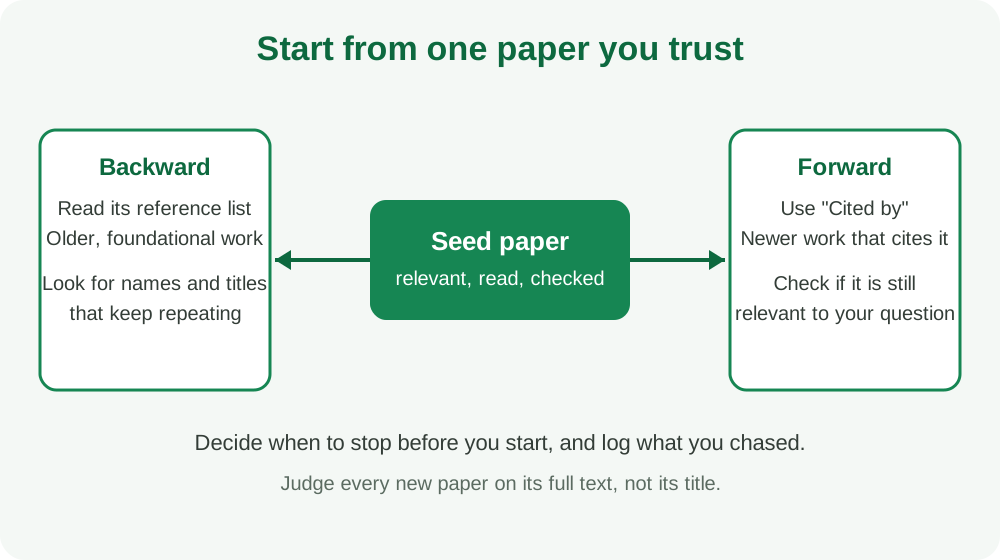
Because chasing can go on indefinitely, set a stopping rule in advance, for example "two rounds from each of my five seed papers" or "stop when new papers repeat names I already have". That rule is your own, not an official one; tell your supervisor what you chose. When the same authors and titles keep appearing, you are probably near the centre of the topic.
Step 7: Keep a search log
A search log is what makes the strategy checkable. Keep one row per search.
| Date | Source | Exact search string | Filters | Results scanned | Kept | Notes |
|---|---|---|---|---|---|---|
| 2026-11-02 (example) | Google Scholar | ("supervisor comments" OR "written feedback") AND revis* |
none | first 50 | 6 | Many results were about schools, not universities |
| 2026-11-02 (example) | AJOL | feedback AND university |
none | first 30 | 2 | Local context useful |
| 2026-11-04 (example) | Seed paper A, Cited by | n/a | since 2020 | 25 | 3 | Added "assessment feedback" as a synonym |
These rows are fictional and show format only. The column that earns its place is Notes: it records why you changed the string, and that story becomes the honest basis for the search description in your methodology or the opening of Chapter Two. A reference manager can store the papers themselves; see Zotero and Mendeley for students.
Step 8: Judge source quality before you keep it
Finding a paper is not the same as being able to use it. Before a paper enters your review, ask:
| Question | What to look for |
|---|---|
| Who published it? | A journal, a university, a recognised organisation, a thesis repository, or an unattributed web page |
| Is it reviewed? | A peer-reviewed journal is a stronger signal than a blog; check the journal's own description of its process |
| Does the method fit the claim? | A small convenience sample cannot support a claim about a whole country |
| How old is it? | Old is fine for theory, weaker for fast-changing practice |
| Does it answer your question? | A relevant title can hide an unrelated study |
| Can you verify it exists? | Find the DOI or the journal page, and open the paper |
Being indexed by a search engine does not prove quality. If a source has no author, date, method or publisher you can identify, treat it as a lead for finding better sources, not as a citation. For how to read the paper itself, use the paper-reading guide, and for turning findings into comparison, the empirical review guide.
Where the citation finder fits
UniDraft's citation finder is a free tool that, according to its public page, finds real, verifiable academic papers for your topic and formats the citation in APA, IEEE or Harvard style. Use it as one more search route and as a way to check that a paper exists with a DOI. It does not replace your own search log, and it cannot tell you whether a paper supports your argument; you still open the paper and decide. For formatting the reference list afterwards, see how to write references.
A worked narrowing example
Suppose the first search returns thousands of results and few are relevant. Fictional walk-through:
- Search
feedback AND students: far too broad. - Add the phrase
"supervisor comments": results shrink, but many are about schools. - Add
("higher education" OR undergraduate*): more relevant. - Open the three best papers and read their keyword lists; add "formative feedback" and "feedback uptake".
- Use Cited by on the best paper, filtered to recent years, and note two new authors.
- Run the string once more with
Nigeria*to see local studies, and record that few appeared.
At each step the log records the change. If very few Nigerian studies appear, say so honestly in your review and avoid claiming that "no research exists" unless your search was thorough enough to support it.
Common mistakes
- Searching only the full title of the project.
- Using one database and stopping.
- Forgetting spelling variants (behaviour/behavior).
- Overusing NOT, which can silently remove useful papers.
- Not recording strings, so the search cannot be repeated.
- Collecting 80 PDFs and reading none.
- Citing a paper from its abstract or search snippet.
- Treating a missing Nigerian study as proof of a gap.
Questions your supervisor may ask
- Which databases did you search and why?
- What search strings did you use, and what did you change?
- How did you decide which papers to keep?
- How much of your evidence is Nigerian or African, and is that enough for your question?
- How do you know these sources are reliable?
If you can answer from your log in under a minute, your strategy is working.
Next step
Use your log to feed the review itself: the literature review guide shows how to organise selected papers by theme, and for a seminar you can start your seminar report from the sources you have checked. Follow your department's brief for how many sources are expected and how the search must be described.