
A project defence lets you explain the work and respond to questions about your choices and evidence. Confirm the actual stage, speaking time and submission requirements. Your slides should support an accurate account, including what you could not establish.
Most advice online stops at "keep slides short". This guide goes further: what each slide must do, how to split your time, how to script your words without memorising a speech, what to rehearse, and what to do when things go wrong on the day.
Your slides are easier to plan from a written account you can explain. UniDraft helps organise your confirmed question, method and actual findings into an editable final-year project document. Start your project document with UniDraft, then check its claims against your evidence before building your own slides. UniDraft does not create the deck or guarantee a defence outcome.
The short answer
- Plan 10-15 slides for a 10-15 minute slot. Confirm your actual time and any slide limit with your supervisor or coordinator first.
- Spend most of your time on your results, not on background. Roughly a third of the talk, more if your project is data-heavy.
- One idea per slide. A headline that makes a point, and a diagram or table that proves it.
- Never read the slide. Write brief speaker notes, not a script you recite.
- Open with the problem in one sentence, and close by handing over to questions.
- Prepare a backup slide or two for the questions you already expect.
- Rehearse aloud, timed, at least three times, once in front of someone who will interrupt you.
What a defence presentation is really for
Panel membership and prior access to the report depend on your institution. What they cannot see from the report is whether you can explain your choices and defend them when someone pushes back.
So the presentation has three jobs:
- Orient the panel in the first minute: what problem, why it matters, what you did.
- Show your best evidence: the method and the results that carry the project.
- Invite the right questions. Your talk should steer the panel towards the parts of your work you understand best, not leave a blank they fill with their own worries.
Notice what is not on that list: re-teaching Chapter 2, or reading the report aloud. If you are unsure what the whole session involves, what a project defence is and how to prepare covers the format before you start building slides.
Confirm the rules before you open PowerPoint
There is no national rule for how long a defence talk should be, how many slides it may have, or what template to use. The National Universities Commission is the regulator for universities and sets standards through accreditation; its published information does not prescribe defence presentation rules. That means your department and, ultimately, your supervisor set the terms. Two departments in the same university can differ.
Before you design anything, ask your supervisor or project coordinator these questions:
| Question | Why it matters |
|---|---|
| How long is the presentation, and how long are the questions? | Sets your slide count and pacing. |
| Is there a departmental slide template or logo requirement? | Some departments insist on one. |
| Is it individual or group? If group, who speaks on what? | Group defences need an agreed speaking order. |
| Do you present on a projector, or is it a closed-door oral only? | Some defences have no slides at all. |
| Should you bring printed copies of the report? | Panels often want to write in it. |
| Do you demo the system live, or only show screenshots? | Matters for software and engineering projects. |
Write the answers down. If your supervisor gives you instructions that differ from anything in this guide, follow your supervisor; a lower-priority rule should never win over an explicit instruction from the person grading you.
Split your time before you make a single slide
Plan the talk in minutes first, and then let the slides follow the minutes. Students who do it the other way round end up with 25 slides and rush the last ten.
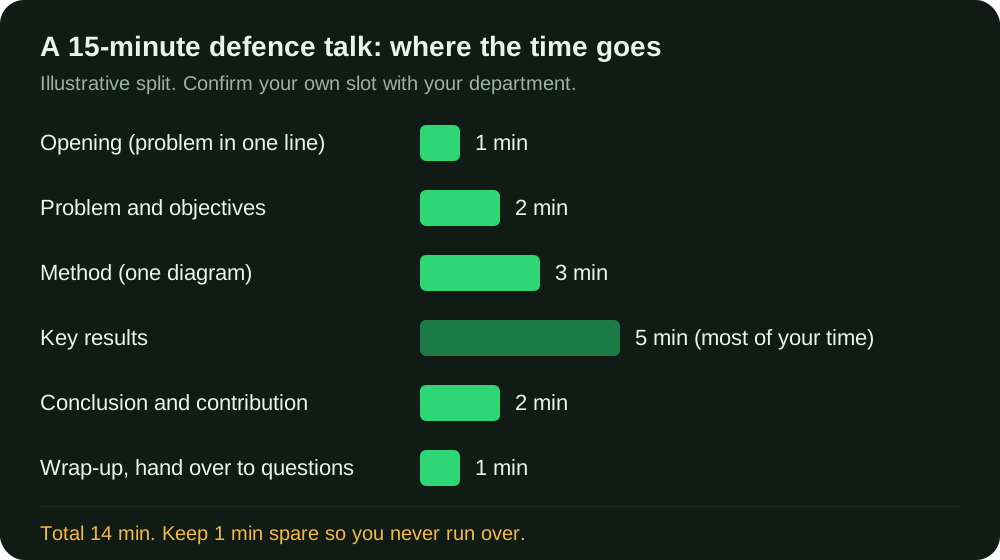
If your slot is 10 minutes, scale down: cut the method to two minutes and the results to three or four, and remove any background slide. If it is 20 minutes, add depth to your results, not more background. The proportions matter more than the totals: results are the largest share, the opening the smallest.
The slide-by-slide structure
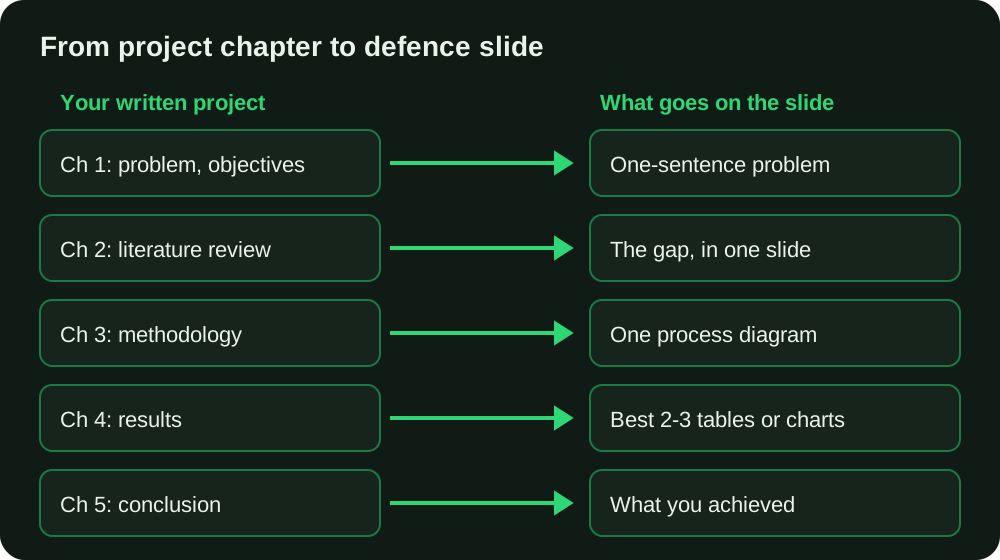
This is one planning structure to adapt to your actual project and brief. It follows your report, compressed to headlines. Adapt it to your department: an engineering project may add a "system design" slide, a science project may add "materials and procedure", and a social-science project may add "sample and instrument".
1. Title slide (do not read it)
Project title, your name, matric number, department, supervisor, date. Leave it on the screen while you greet the panel, then move on. For the exact words to use, see how to start a seminar or project defence presentation.
2. Problem and why it matters (1 slide)
State the problem as a single sentence a non-specialist could follow, followed by one line of evidence that it is real. This is your statement of the problem compressed, not pasted. If the problem remains unclear, revisit the wording and evidence before building the slides.
3. Objectives (1 slide)
Use the actual objectives from your report, with any agreed changes explained. Panels compare this slide with your Chapter 1 and with your conclusion, so any drift in wording will be noticed. If your objectives are shaky, tighten them using how to write strong research questions and objectives before the rest of the deck depends on them.
4. The gap in existing work (0-1 slide)
One slide, at most. Two or three themes from your literature review and the gap your project fills. Do not walk through sources one by one; the panel has your Chapter 2 for that.
5. Methodology (1-2 slides)
Show the approach, not the paragraph. A flow diagram, a system block diagram, a sample-and-instrument table, or a stage-by-stage process beats text. You need to be able to answer "why this method and not another?", which your methodology chapter should already justify. Put that justification in your notes, not on the slide.
6. Key results (3-5 slides)
This is the core of the talk. One slide per finding, ideally one per research question or objective, using a clean table or chart and a headline that states what it shows. More on this below.
7. Discussion, conclusion and contribution (1-2 slides)
What the results mean, what the project achieved against each objective, one or two limitations you admit honestly, and a recommendation if your department expects one. Your discussion and conclusion chapter is the source.
8. Closing slide (1 slide)
"Thank you. I am happy to take your questions." Add your key result as a single line if you like, so the last thing on screen is your strongest point, not a blank "Thank you".
9. Backup slides (hidden, after the closing slide)
Extra tables, the questionnaire, a code listing, a circuit diagram, a longer derivation. You do not present these. You flip to them when the panel asks.
How to present your results (the part panels remember)
Your evidence needs enough explanation for the audience to understand what it supports and what it cannot establish. Three habits separate strong presentations from weak ones.
Lead with the finding, not the table. A slide titled "Results" tells the panel nothing. A slide titled "Response time fell from 4.2 s to 1.1 s after caching" or "Most respondents (68%) cited network problems" (fictional headline examples, not actual findings) makes the point before they look at the chart. Researchers at Penn State's Leonhard Center advocate exactly this: a headline sentence that states the takeaway, supported by visual evidence rather than a bulleted list.
Show fewer, cleaner exhibits. Pick the two or three tables or charts that answer your research questions. If your Chapter 4 has fifteen tables, thirteen of them go into backup slides. If you need a refresher on which findings matter most, see how to write the results chapter, and keep the numbers on your slides identical to the ones in your report.
Make every figure readable from the back of the room. Label the axes, use large fonts, and do not paste a screenshot of a whole Excel sheet. If a table has more than about five rows and four columns, it belongs in the report, not on the slide.
A worked example, clearly illustrative and not from a real project:
Weak slide. Title: "Results". Body: a pasted 12-row table of survey responses, in 12-point text, with no highlighting.
Strong slide. Title: "Delivery delays are the most common complaint". Body: a simple bar chart with the top four complaints, the leading one highlighted, and "n = 120" in small text at the corner.
The stronger layout makes the proposed takeaway visible, and leaves you free to explain how you got there.
Text on slides: what to cut
The most-repeated advice is "not too much text", and it is right, but it is not specific. The Penn State assertion-evidence approach observes that the usual default of a phrase headline followed by a bulleted list leads to too much text and clutter, making it hard for an audience to know where to look. Use these rules in practice:
- A headline that is a full sentence stating your point, no more than two lines.
- At most three or four short items if you must use a list, and prefer a diagram.
- Body text of about 24 pt or larger, so it can be read from the back of a hall. Treat this as a rule of thumb, not a regulation.
- Dark text on a light background, or the reverse, with high contrast. Avoid busy templates and low-contrast text over pictures.
- No paragraph of text, ever. If you are tempted to paste a paragraph from your report, that paragraph belongs in your spoken explanation.
For a longer before-and-after on cleaning a crowded slide, see the slide-by-slide seminar presentation guide, which works through it in detail. The principles are identical for a defence.
Talking points: script the ideas, not the sentences
Reading a full script sounds flat and makes you helpless if you lose your place. Winging it makes you ramble and run over time. The middle route is a short talking point for each slide.
For each slide, write on a numbered card or in the speaker notes:
- The headline you will say in your own words, in one sentence.
- Two or three supporting points, in three to six words each.
- The transition to the next slide, one sentence.
- One number to remember, such as your sample size, accuracy or cost.
An example for a results slide, again illustrative:
Slide 7. Say: "Our main finding is that the recommended process cut waiting time by about a third." Points: baseline 42 min; new process 28 min; n = 60 patients. Transition: "That leads to our second objective, which is cost." Remember: 28 minutes.
Memorise your first two sentences and your last two. Everything between can be spoken from the ideas, because you know the material better than anyone in the room. That is the point of the exercise.
Rehearse properly, not just "go over it"
Silently clicking through your slides is not rehearsal. A rehearsal that improves your defence has these features:
- Out loud, standing up, as you will present. Your mouth needs practice as much as your memory does.
- Timed with a phone. Record the total, and record the time at each slide. If you are three minutes over by slide six, you know which section to cut.
- At least three full runs. The first finds the slides that do not work, the second fixes the timing, the third builds confidence.
- At least one run for a listener who interrupts. A coursemate who asks "why did you choose that?" gives you a preview of the panel.
- Once on the actual equipment, if your department lets you. Check the fonts, the colours on a projector, and that any embedded video plays.
If you can, ask a friend to record you on their phone. Watching yourself is uncomfortable and extremely useful: you will see the habits you cannot feel, such as turning your back to the panel to read the screen.
Prepare for the questions your talk will trigger
The presentation is the warm-up; the questions are the exam. Your slides should be built with them in mind:
- Anticipate three questions per slide for the ones you are least sure about. Write them down and draft short answers.
- Build backup slides for the ones you can predict: sample size justification, why you chose that instrument, why not a different algorithm.
- Know your limitations. A panel that finds a limitation you did not mention will press harder than one you disclosed yourself.
The full range of likely questions and how to answer them is in common project defence questions. Read it after you have a draft deck, so your backup slides match the questions you actually fear.
Software, engineering and lab projects: showing the work
If your project produced something, the panel will want to see it work. Decide in advance how.
- A live demo needs rehearsal within the actual allowed time and a plan for failure.
- A recorded demo or screenshots are safer. Record a short screen capture as a fallback even if you plan to go live.
- For hardware, confirm permission, safety and venue arrangements before bringing equipment; use permitted photographs where appropriate. Do not rely on power and network being available.
- For data or lab work, show your raw evidence: photos of the setup, calibration notes, one representative output.
Never show or claim a result that you did not obtain. If a component did not work as planned, say so, say what you learned, and move on. Explain the limitation and the evidence you do have; do not promise how a panel will assess it.
What goes wrong on the day (and how to avoid it)
| Problem | Prevention |
|---|---|
| Laptop will not connect to the projector | Bring your own adaptor if you can; keep the deck on a flash drive and your email. |
| Fonts or layout break on another computer | Save a PDF copy and export any unusual fonts. |
| The embedded video will not play | Have a screenshot version of that slide in place. |
| Power cuts, a common Nigerian reality | Charge your laptop fully, bring printed notes and printed copies of key slides. |
| You run out of time | Know which slide you cut first, and practise skipping it. |
| Your mind goes blank | Look at the slide headline; it is your cue. Take a breath, then continue. |
| A panel member interrupts early | Answer briefly, then say "I will come to that on slide 8" if it fits. |
Common mistakes supervisors flag
- Slides replacing explanation. Check that the audience can follow your reasoning and evidence.
- A title slide read aloud, followed by ten minutes of background before any results.
- Slide numbers that do not match the report: results, objectives or figures worded differently from the submitted version.
- Copy-pasted report pages in tiny fonts.
- No conclusion mapped to objectives. The panel wants to see that each objective was met or honestly not met.
- Running over time. Some panels cut you off mid-sentence, and your conclusion is then lost.
- Unlabelled charts and unreadable screenshots.
- Claiming certainty you do not have. Overstating a result invites a challenge you cannot answer.
- Not knowing your own report. If a panel member cites a page number, you should be able to find it.
Correcting your report after a defence is normal, and often the panel's comments become your final set of corrections. If that happens, managing final year project corrections without losing earlier work explains how to keep track of them. And if a defence goes badly, what happens if you fail your final year project sets out the options, which are rarely as final as students fear.
A pre-presentation checklist
Treat the following timing as an example rehearsal plan. Your department's actual submission and presentation dates take precedence.
About two weeks before, if the schedule allows
- Confirmed your time slot, slide limit and template with your supervisor.
- Confirm the report submission deadline and double-check every number in the version you will present.
- Draft deck complete with headline sentences and one idea per slide.
One week before
- Speaker notes written for every slide.
- Backup slides built for the likely questions.
- At least two timed rehearsals done out loud.
- Answers drafted for your ten hardest questions.
The day before
- Deck saved as PPTX and PDF, on a flash drive, in your email, and on your laptop.
- Printed copies of key slides and your report, if allowed.
- Charger, adaptor, clicker or a friend to advance slides.
- Formal clothes ready, and an early night.
On the day
- Arrive early, test the projector and check the slide order.
- Water within reach.
- First two sentences memorised.
- Breathe, speak slowly, and look at the panel, not the screen.
Prepare a software demonstration around requirements
Make a short demonstration sheet: requirement, input, expected behaviour, observed behaviour and limitation. Choose one ordinary path and one relevant error case that you actually implemented and tested. Use permitted test data. A dashboard screenshot alone does not show that validation, persistence or access control works.
Practise the sequence on the equipment you will use and confirm the allowed demonstration time. Keep permitted screenshots or a recording as a fallback and label the version and conditions accurately. If the live system fails, explain what happened and what the fallback demonstrates; do not claim the fallback proves the current live build worked. The results guide explains reporting actual test outcomes, including failures.
For quantitative projects, prepare to explain an unexpected or non-significant result as well. State what the analysis supports and its limits, rather than treating a preferred hypothesis as something your project must prove. Your method and evidence matter more than a dramatic claim.
Proposal slides and final-defence slides need different evidence
Before using a deck template, check your stage. A proposal explains the problem, gap, objectives, planned method and feasibility. A final defence explains what you actually did, what you found and what the findings can support. Planned sample sizes are not achieved sample sizes, and expected results are not findings.
If you have not collected or analysed data, use the proposal defence guide. If your assessment is a literature-based seminar, use the seminar slide structure and seminar question practice. If it is industrial training, use the SIWES defence slide plan, which centres your actual placement activities.
If the brief requires a poster as well as a talk, use the project-poster planning and evidence checklist. It covers a separate visual summary; the report, poster and demonstration should still describe the same actual work.
Where UniDraft fits in
UniDraft builds the written project, not the slides. It creates an editable Word document for your final year project, seminar report or SIWES report, built around your confirmed topic and real results, following project/supervisor instructions, student-confirmed guidelines, department patterns, university baselines and platform defaults, in that order. It never invents results, sources or approvals, and it does not create PowerPoint slides or presentation content.
That still matters for your defence, because the slides come out of the report. When your problem statement, method and results are correct and consistent, compressing them into headline slides is straightforward, and you can speak to every number because it is yours. If the panel asks for changes, you can upload the supervisor's corrections, confirm the extracted changes and get a new version while earlier ones are kept. You can also run the free formatting checker on your .docx, and use the citation finder to check that every reference is a real source, before you print for the panel.
Sources
- National Universities Commission (NUC): the regulator's statement of its role in accreditation and standards; it does not set defence presentation rules, which are departmental.
- Assertion-Evidence Approach, Leonhard Center, Penn State University: guidance to use headline sentences and visual evidence instead of phrase headlines with bulleted lists.