If your seminar report is written, the presentation should be the easy part. Most students hit a different problem at this stage: not what to say, but what to put on the slide while they say it. That is a structure and design question, separate from how you open your talk or how you handle panel questions.
Build the deck from an argument you have already checked on paper. UniDraft helps organise your confirmed topic, sources and instructions into an editable seminar report. Start your seminar document, then use the report to plan your own slides and spoken explanation. The written-report workflow does not generate PowerPoint slides.
The short answer
- Follow your report's order. Title, introduction, objectives, literature review, discussion, conclusion, references, questions. Compress each section to its headline.
- Plan by speaking time, then rehearse. Slide count depends on how much explanation each idea needs; confirm your real time slot first.
- One idea per slide, a headline that states the point, and at most about six short lines. Put connective explanation in your voice, not on the screen.
- Give the literature review and discussion the most slides, and use a diagram or table in the discussion.
- Rehearse aloud with a timer and get your supervisor to look at the deck before the day.
UniDraft does not make slides. It builds the written report the deck should come from. Everything below is about building the deck yourself.
Step zero: find out what your department actually expects
Before you open PowerPoint, get four facts. Nobody outside your department can supply them for you.
- How many minutes you get, and whether that includes questions. A "15-minute seminar" might mean 15 minutes of talking plus 10 of questions, or 15 in total.
- Whether slides are compulsory. Some departments expect a deck; others allow a handout or a marker board.
- The equipment. Is there a projector, does the lecture hall have working power and a laptop connection, and will you use your own laptop or a shared one? Nigerian seminar rooms vary widely, so ask rather than assume.
- Whether there is a departmental template, logo, or slide-count limit. If there is one, use it; it outranks any design advice on this page.
If your supervisor gave you instructions about the presentation, those win over anything general, including this guide. If you are still unsure what separates a seminar from other course requirements, what a seminar is covers that groundwork.
How many slides do you actually need
There is no universal number, and any guide that gives you one flat figure deserves suspicion. A commonly cited starting point is roughly one to two slides per minute of your allotted time, so a 10-minute slot might run 10-15 slides and a 15-minute slot 12-20, depending on how visual or text-driven your content is. Guy Kawasaki's well-known "10/20/30" guideline (ten slides, twenty minutes, nothing smaller than 30-point font) is another anchor people quote, though it was written for investor pitches, not academic seminars.
The honest method is to work backwards from time. Take your slot, subtract about two minutes for the introduction and closing remarks, and then decide how long each idea needs. The explanation time depends on the idea and audience; measure it in rehearsal. A slide that you would spend three minutes on is either two slides or a slide that is hiding a lecture. A slide you would skip past in ten seconds probably does not belong.
| Time slot | Typical slide range | Notes |
|---|---|---|
| 8-10 minutes | 8-12 | Fewer literature themes; one strong discussion visual |
| 15 minutes | 12-18 | Illustrative starting plan; confirm the actual slot |
| 20-25 minutes | 16-25 | Room for a methodology slide and a worked example |
| 30 minutes | 20-30 | Only if your department allows a long slot |
These are planning ranges, not rules. Departments and even individual lecturers differ, so treat the numbers as a first draft you adjust after your first timed run-through.
A slide-by-slide structure that follows your report
Your seminar report already has a structure. If yours is still shaky, how to structure a seminar report in Nigeria sets out the usual chapter order. Your slides should follow that skeleton, compressed to headlines.
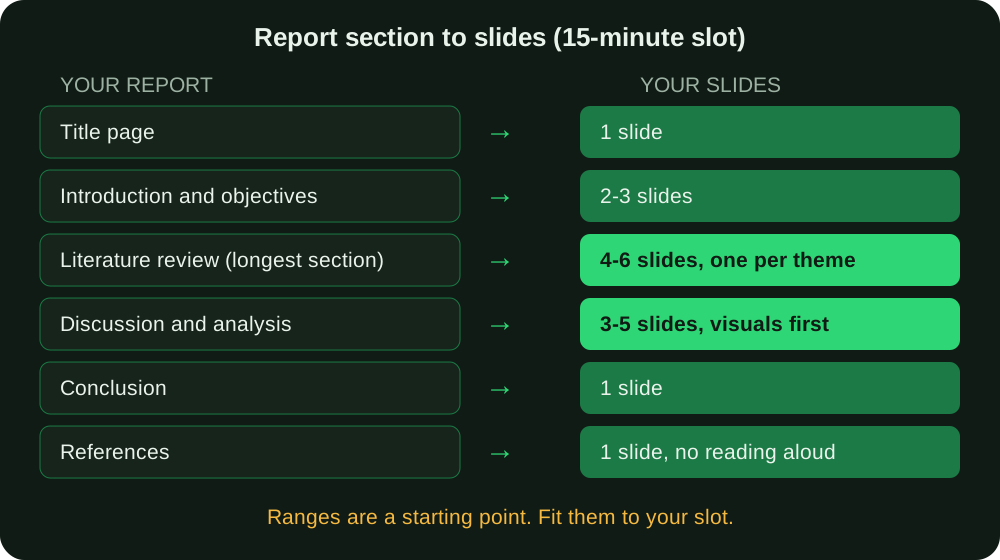
1. Title slide (1 slide)
Topic, your name, matric number and programme if your department expects them, supervisor, department, and date. Use the exact title on your report cover page. A different title on the slide and the report invites an avoidable question.
2. Introduction: why this topic matters (1-2 slides)
State the specific question or angle your seminar addresses in plain words. One slide can hold the problem, a second can hold a single striking fact or short definition. Do not paste the background section of your report here. Your first thirty seconds of speech matter more than this slide; how to start a seminar or defence presentation covers that opening.
3. Objectives and scope (1 slide)
What the seminar sets out to cover, and what it deliberately leaves out. Saying what you left out is protective: it pre-empts the panel member who asks why you did not discuss the thing you never planned to discuss. Three or four short lines are enough.
4. Literature review or background (3-6 slides)
For a literature-based seminar, give the evidence and synthesis sufficient space under your brief. Group by theme, not by author. One slide per major theme, school of thought or period of development, and never one slide per source. On each slide, the headline is a point supported by your sources (an illustrative headline might be "The studies disagree about the main barrier") and the one or two sources that support it appear as small tags underneath. If you want a model of what a strong review section looks like on paper, see what a strong seminar report looks like.
5. Discussion or analysis (3-5 slides)
This is your own synthesis: what the sources add up to, where they disagree, and what you conclude. It is also where a diagram, comparison table or timeline outperforms a paragraph. A two-column comparison of two approaches communicates in five seconds what a bulleted list takes thirty to explain. Build at least one visual here.
6. Methodology (optional, 1 slide)
A source-based review can still have a documented selection and analysis method. Explain that approach if it is relevant or required. If the work included original collection, describe what actually happened and with whom; do not invent a method to match a template. Do not invent a method to fill a gap in the template.
7. Conclusion and implications (1 slide)
Your takeaway in one or two lines, plus, if your report includes them, two or three short recommendations. This slide is the one your audience will remember, so it should be the shortest and clearest in the deck.
8. References (1 slide)
Put your reference list on one slide at the end, and do not read it aloud. It shows that the seminar rests on real sources and gives the panel something to check. If you need help formatting the entries, the reference-list guide covers APA, IEEE and Harvard, and the free citation finder helps you locate real published sources rather than typing entries from memory.
9. Thank you and questions (1 slide)
Signals you are finished and opens the floor. A useful upgrade: put your one-line conclusion or your main diagram on this slide instead of a blank "Thank you", so the room has something to look at while people ask questions.
If you add the optional methodology slide and expand literature and discussion to their maximum, you land near 18-20 slides; at the minimum you land near 12-14. Choose based on your slot, not on the template.
Write a headline that states the point
Most weak seminar slides have a label as their title: "Literature review", "Findings", "Challenges". A label tells the audience the topic but not the point. A better headline is a short sentence that carries the claim, so that someone who read only the slide titles would follow your whole argument.
| Label title (weak) | Point title (stronger) |
|---|---|
| Causes | Four factors explain most of the low adoption |
| Existing studies | Most studies measure awareness, not actual use |
| Comparison | Approach B costs less but reaches fewer users |
| Conclusion | Financial literacy is the most practical lever |
Try this test on your finished deck: read only the titles, in order, out loud. If they tell a coherent story in under a minute, the structure works. If they read like a table of contents, rewrite them. The same exercise also exposes slides that should be merged or dropped.
Fixing text-heavy slides: a before-and-after example
This is the design problem that trips up most students. Audiences cannot read a dense slide and listen to you explain it at the same time; the two compete. Avoid competing streams of dense text and speech. Check whether the audience can follow the visual and explanation together. The widely cited 6x6 rule (about six lines per slide, six words per line) is only a rough ceiling, but it is a useful gut-check.
Dense, paragraph-style slide (avoid this):
"Mobile banking adoption among Nigerian university students has grown at a much slower rate than national averages despite widespread smartphone ownership, and this seminar examines the key factors identified in existing literature, including trust concerns, lack of awareness of available services, perceived complexity of banking apps, and infrastructural issues such as inconsistent network access on campus, before proposing that targeted financial literacy interventions may help close this gap."
Clean version of the same content:
Why the gap exists
- Trust concerns
- Low awareness of services
- Perceived app complexity
- Inconsistent campus network access
(spoken explanation fills in the connective detail)
(The example topic and its claims are illustrative, written to show the layout, not to report real findings.)
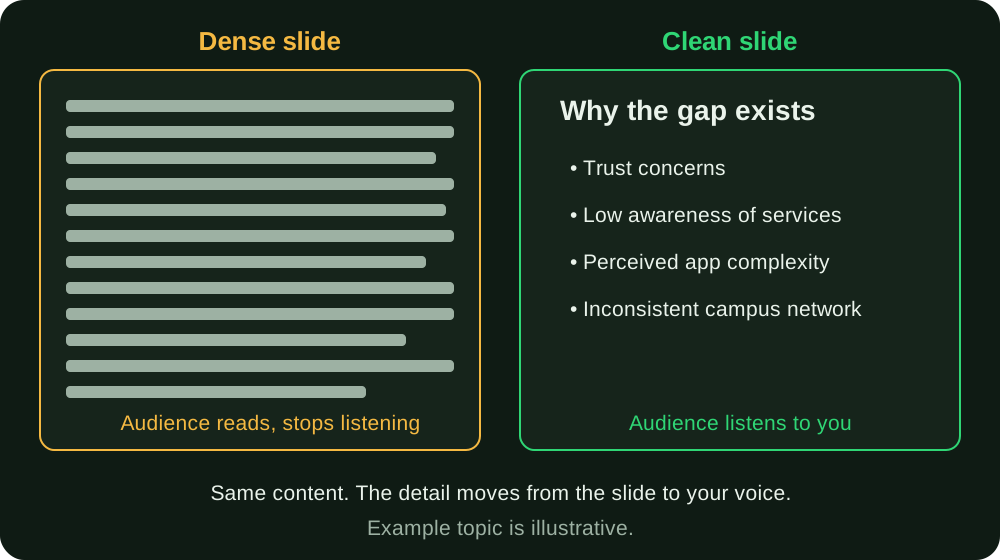
The dense version forces the audience to choose between reading and listening. The clean version gives them the structure and leaves the explaining to you. It is also a stronger position to defend from, because you are showing you know the material rather than reading it off the screen.
A three-step edit you can apply to any slide
- Underline the one sentence you would say if you only had ten seconds. That is your headline.
- List the two to four items that support it, as fragments of three to six words each.
- Move everything else to your speaker notes, or to your report. If it deserves the audience's attention, give it its own slide.
Then check the slide on your phone held at arm's length. If you cannot read it in one glance, it has too much on it.
Other design basics worth getting right
- One idea per slide. If a slide needs two headlines, it is two slides.
- Visuals over text where possible. A simple diagram, chart or comparison table communicates faster than a bullet list and is easier to read from the back of a room. Draw your own where you can. If you use a figure from a published source, credit it on the slide and list it in your references.
- Large, consistent fonts. Body text around 24-30 pt is a common recommendation so slides stay readable on a projector. Keep one font family for headings and one for body text across the whole deck. Small text is the commonest reason a panel member squints and stops following.
- High contrast, minimal decoration. The Web Content Accessibility Guidelines set a minimum contrast ratio of 4.5:1 for normal text and 3:1 for large text; a dark/light description alone does not prove the contrast ratio, so check the actual colours and viewing conditions. Classroom projectors are often dim or washed out by daylight, so test your colours on the actual device if you can.
- Animation sparingly. One simple "appear" for a build-up list can help you pace yourself. Spinning, flying and bouncing transitions distract, and they are the first thing to break on an unfamiliar computer.
- Use speaker notes as your safety net. Put your keywords and transitions in the notes pane instead of on the slide. Print them if you are not sure the presenter view will work in the hall.
- Don't read your slides aloud. Slides carry key points, diagrams and data; you carry the explanation. Reading from the screen is consistently one of the quickest ways a presentation looks under-prepared to a panel. For more on delivery, see preparing a project defence presentation.
Plan the deck as a process, not a night's work
Slides built at 2 a.m. the day before are how the wrong figure ends up on slide nine. A sensible sequence looks like this.
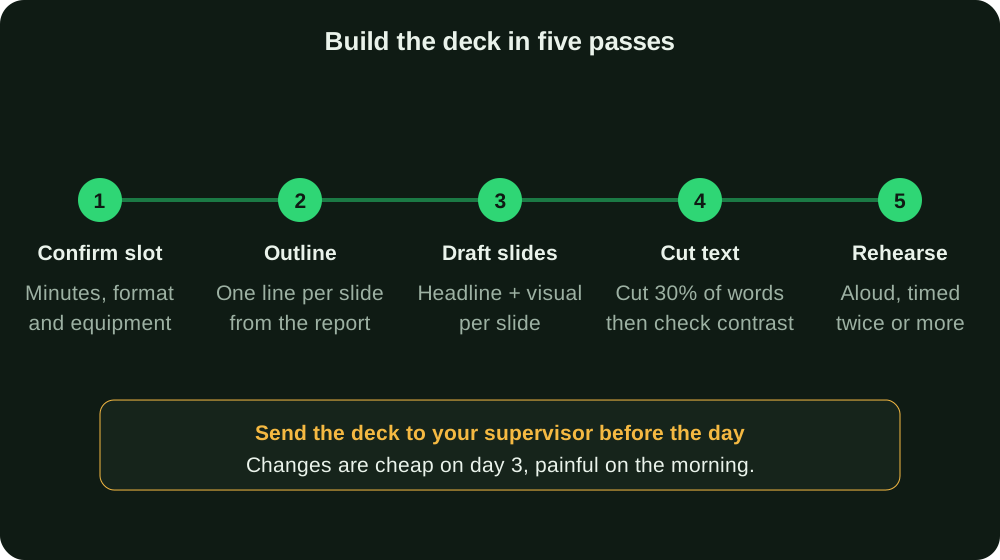
- Confirm the slot and format. Minutes, equipment, template.
- Outline from the report. Write one line per slide, in report order, before you open PowerPoint. This is faster than designing as you go.
- Draft each slide with a point headline and one visual or a short list.
- Cut. Reduce the words by roughly a third, then check contrast and font size.
- Rehearse aloud, timed. Practising out loud is standard advice from university writing centres, which recommend reading to a friend or mirror and checking whether you stayed within your time limit. Run the whole thing at least twice. Use the measured rehearsal time rather than assuming a standard overrun.
Between steps 4 and 5, send the deck to your supervisor. Slides are where numbers and claims drift from the report, and corrections are cheap three days out and painful on the morning. If your supervisor sends corrections on the written report, update the slides too; managing seminar report corrections explains how to keep versions straight so the deck and the report do not disagree.
Common slide mistakes and how panels react
| Mistake | What the panel notices | Fix |
|---|---|---|
| Paragraphs pasted from the report | You are reading, not explaining | Reduce to a headline and 3-4 fragments |
| One slide per source in the review | No synthesis; the review looks like a list | Group by theme |
| Tiny chart labels | Nobody can check your evidence | Redraw larger, delete unused gridlines |
| Numbers that differ from the report | A credibility question | Copy figures from the final report, not memory |
| No source under a figure or quote | "Where is that from?" | Add author and year as a small tag |
| A conclusion that introduces a new claim | Unsupported argument | Conclude only what earlier slides showed |
| More than 25 slides in 15 minutes | You rush and lose the room | Merge or cut to about one per minute |
| Nothing prepared for questions | Hesitation at the end | Keep two or three backup slides hidden |
Backup slides are worth a mention. If you know your report has a weak spot, such as a definition people dispute or a comparison you simplified, prepare a hidden slide behind your final one. If questions are part of your assessment, read common defence questions and how to answer them and prepare answers for the five you dread.
Seminar deck or defence deck?
The structure above is for a seminar, which is usually a literature-based review or a topic presentation. A final-year project defence is a different animal, because it must show your own method and results and expects heavier evidence. If you are unsure which applies to your course, seminar paper vs final year project explains the difference. The other format is covered in a guide to preparing for a project defence.
If your topic is too broad for your slot, narrow it to fit a short talk first, because a narrow question makes for a tighter deck.
Pre-presentation checklist
- Time slot, equipment and any template confirmed with the department
- Full spoken presentation fits the allotted time without rushing
- Every title states a point, not a label
- No slide has more than about six short lines
- Body text is 24 pt or larger, and contrast is high
- Figures and tables identify their actual source or are clearly labelled as your own work
- Numbers on slides match the final report
- Reference information is available in the required readable format
- Rehearsed aloud, timed, at least twice
- Supervisor has seen the deck
- Deck saved as PowerPoint and PDF on a flash drive and emailed to yourself
- Speaker notes printed in case presenter view fails
- Backup slides prepared for your weakest point
If your department requires a specific font, margin or cover layout for the written report itself, the university format guides list what individual institutions ask for. That is separate from slide design, which most departments leave to you.
Worked timing plan for an eight-minute seminar
Suppose your literature-based seminar asks how written feedback helps students revise. This is a planning example, not a research finding or a departmental template. If you have eight minutes of speaking time, try this first outline and adjust it after an aloud rehearsal.
| Part | Time budget | What the audience needs |
|---|---|---|
| Question and scope | 45 seconds | What kind of feedback and revision you are discussing |
| Key terms | 45 seconds | The definitions your report actually uses |
| Evidence theme one | 90 seconds | One supported point and the sources behind it |
| Evidence theme two | 90 seconds | A comparison, disagreement or limitation |
| Your synthesis | 90 seconds | What the evidence supports when considered together |
| Conclusion and boundary | 60 seconds | Your answer and what the report cannot establish |
| Transitions and breathing room | 60 seconds | A buffer instead of a rushed finish |
That totals eight minutes. It does not prescribe seven slides: a diagram might need two views while a transition needs none. If questions are included in your slot, subtract their allotted time before making this plan. Cut an optional example before cutting the explanation of your main claim.
Use your seminar abstract to check the scope, your seminar conclusion to check the final answer, and the seminar defence questions guide to practise explaining the evidence behind the slides.
Check that each evidence slide answers a question
Use a three-line note before designing a slide: question, evidence, boundary. For example, a computing review can ask whether a citation supports a generated claim; its evidence slide should explain the evaluation, rather than simply displaying a fluent answer. A Microbiology review can ask what a surveillance signal measures; its slide must keep the measured indicator separate from the inference. The Computer Science and Microbiology topic guides show verified starting sources for those comparisons.
Put the source beside the figure or claim it supports and keep the full reference information available in your required format. If you cannot explain how the evidence supports your sentence, fix the sentence or reading notes before making the slide more attractive. A screenshot of software or a scientific chart is not self-explanatory evidence.
Where UniDraft fits in
UniDraft builds your written seminar report as an editable Word document, structured to your department's chapter and formatting rules, from your confirmed topic and your real sources. Check current pricing and included correction rounds before checkout.
UniDraft does not generate PowerPoint slides or presentation content, and it will not write your talk for you. What it gives you is the well-structured report your presentation should be built from. Once your introduction, literature review and discussion are clear on paper, turning them into the slide outline above is mostly a compression exercise, not fresh writing.
Sources
W3C: Understanding WCAG 2.1, Success Criterion 1.4.3 Contrast (Minimum), for the 4.5:1 and 3:1 minimum contrast ratios.
UNC Writing Center: Speeches, for practising aloud and checking your timing.