Seminar report corrections can concern the argument, sources, structure or presentation. If your supervisor has returned your draft covered in red ink, the safest approach is to keep the version that was reviewed, sort the comments into groups, and fix one group at a time.
A correction should improve the current report without losing the draft your supervisor reviewed. UniDraft’s seminar document workflow lets you supply comments, confirm extracted changes and retain earlier versions when a new version is produced. Start your seminar document with UniDraft, then verify the revision against each actual comment. Slides and final academic approval remain separate responsibilities.
The short answer
- Keep the reviewed draft untouched. Save it under a clear name before you edit anything, so a section your supervisor already accepted cannot be lost by accident.
- Sort the comments before fixing any of them. Structural comments (a whole section needs regrouping) need different work from sentence-level ones (a citation is wrong).
- Fix structure first, details second. Regroup the literature review, then check citations, then formatting.
- Re-check citations after every pass. In-text citations and the reference list drift apart silently during corrections.
- Keep your slides and your report in step. Changing the report without changing the slides is how a mismatch is born.
What gets flagged most often
Supervisors differ, and a department's own style guide can shift the emphasis. Still, four problems come up again and again on seminar reports, and they are worth checking in your own draft before you submit, not after.
- A descriptive, not analytical, literature review. Summarising what each source found, one after another, without connecting them or showing where the gap in existing work actually is.
- Citations that do not match the reference list, or a reference list holding sources never mentioned in the text.
- An unclear objective. If a reader cannot state your seminar's specific question in one sentence after reading the introduction, expect a correction there.
- Slide and report mismatches, when the presentation and the written report were prepared separately and drifted apart.
How supervisors word these comments
The wording on a marked copy is often short and a little cryptic. Here is how the usual phrases translate.
| What the margin says | What it usually means | Where to fix it |
|---|---|---|
| "Too descriptive" | You report sources but do not compare them | Regroup the literature review by theme |
| "So what?" or "Relevance?" | The source is not tied to your topic | Add a linking sentence to your objective |
| "Cite" or "Source?" | A claim has no reference | Find a real, checkable source or remove the claim |
| "Not in references" | In-text citation with no matching entry | Add the entry or delete the citation |
| "Unclear aim" | Objective is vague or too broad | Rewrite it as one specific sentence |
| "Follow departmental format" | Margins, font, numbering or headings are off | Check against your department's guide |
Handling corrections without losing your reviewed version
Step 1: Keep the reviewed version intact
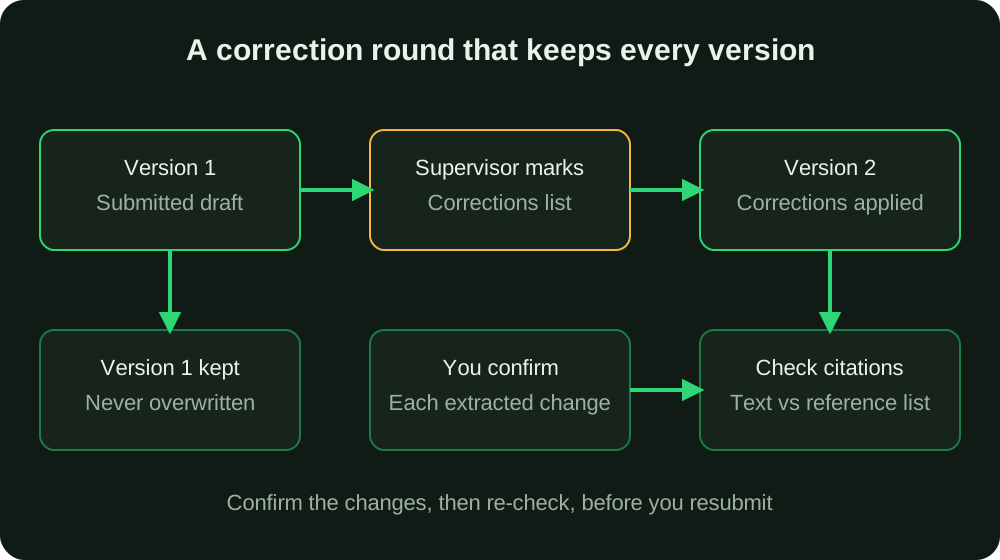
Before you edit, copy the file and name it clearly, for example Seminar_Report_v1_reviewed.docx and then Seminar_Report_v2.docx. Do not overwrite the reviewed file in place. If your supervisor later says "the earlier introduction was better", you will be able to bring it back in a minute instead of trying to remember what you deleted.
The same habit protects you against the common Nigerian-campus disaster: one copy on a phone, another on a flash drive, a third in an email attachment, and no clear idea which is current. Pick one folder, one naming pattern (version number plus date), and stick to it.
Step 2: Turn the marked copy into a checklist
Read the whole marked copy once without changing anything. Then write every comment as a line in a list, and tag each line as one of three types:
- Structural, such as "regroup the literature review" or "your objective is unclear". These change several paragraphs.
- Evidence, such as a missing source, a wrong year or an unsupported claim.
- Mechanical, such as spelling, heading levels or spacing.
Handle them in that order. There is no point polishing sentences in a section you are about to restructure.
If your supervisor gave verbal corrections during a meeting, write them down straight after the meeting while you still remember them, and where possible ask for a short written line confirming the main points. A vague memory of "he said the review was weak" is not a correction you can act on.
Step 3: Fix the literature review by regrouping, not just rewriting sentences
If the correction is "too descriptive", the fix is structural. Rephrasing the same author-by-author list will not satisfy a supervisor who wants comparison.
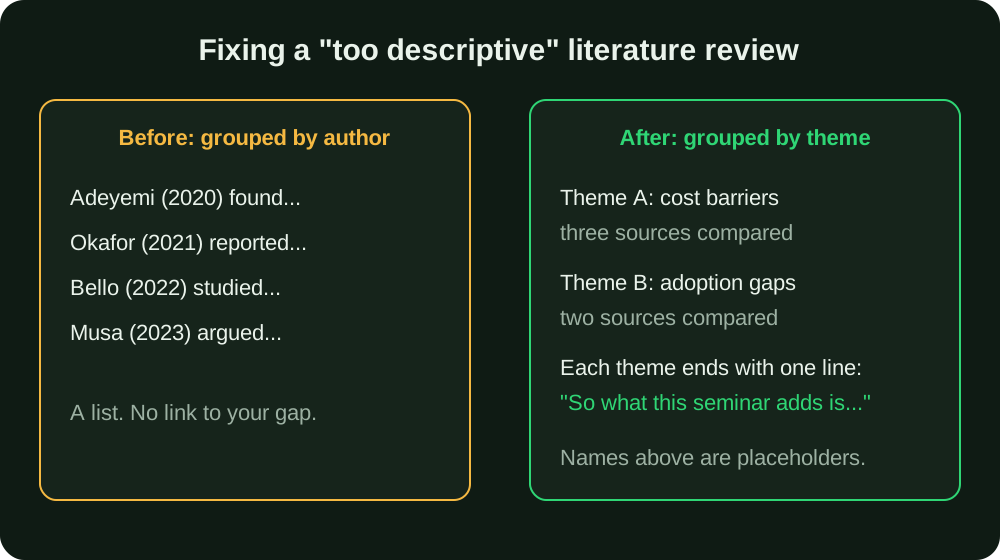
Here is an illustrative before and after. The sources are placeholders, not real citations.
Before (descriptive): "Author A (2020) studied mobile payments among traders. Author B (2021) studied mobile payments among students. Author C (2022) studied network failures."
After (analytical): "Studies of mobile payment adoption point to two recurring barriers. Cost and network reliability are reported for traders (Author A, 2020) and for students (Author B, 2021), while Author C (2022) traces most failed transactions to network downtime. None of these examines adoption among small rural retailers, which is the focus of this seminar."
The second version makes a claim, brings the sources into conversation, and ends by stating the gap. That last move is what supervisors are looking for. For a deeper treatment of this, see how to write the literature review; the same logic applies to a seminar, only shorter.
Step 4: Sharpen the objective
A vague aim is often behind a weak literature review, because you cannot group sources around a question you have not pinned down. Try to write your seminar's aim as one sentence containing the topic, the population or setting, and what you are examining. If it takes three sentences, it is still too broad. The guidance on research questions and objectives shows how to tighten one, and if your topic itself is the problem, the seminar topic guide explains how to narrow it.
Step 5: Cross-check every citation against the reference list
This is the single most common thing that breaks silently during a correction pass. When you regroup a literature review you move, cut and add sentences, and citations get orphaned.
Do this after every round of edits:
- Go through the text and tick each in-text citation against the reference list.
- Go through the reference list and confirm each entry is cited somewhere in the text.
- Confirm the year and spelling of the author's name match in both places.
- Confirm every entry follows one style consistently.
APA’s reference guidance concerns identifying and retrieving cited works. Some material, such as nonrecoverable personal communications, is cited in text only under that style. Check the relevant exception rather than inventing a reference entry. For the mechanics of each style, our guides on writing the references list and in-text citations in APA 7 cover the details.
If a correction flags a missing source, use the free citation finder to locate a real, checkable source rather than searching blind. Never add a reference you have not actually opened, however convenient it looks.
Step 6: Keep your slides and report aligned
If a correction changes your framing, objective or a key finding, your slides must change too. Otherwise the panel sees one thing in the report and hears another in your presentation, which invites exactly the questions you were hoping to avoid.
Use the corrected report as the single source of truth: after you finish each round, go through the slides one by one and check the aim, the main points and every number against the report. Our guide to designing seminar slides shows a slide-by-slide structure that follows the report closely, and how to open a seminar presentation helps with the first minute.
A realistic timeline for a correction round
Students often underestimate how long a round takes. A rough plan for a seminar report:
| Day | Task |
|---|---|
| Day 1 | Read the marked copy, build the checklist, save the reviewed version |
| Day 2 | Structural fixes: regroup the literature review, rewrite the objective |
| Day 3 | Evidence fixes: sources, unsupported claims, citation cross-check |
| Day 4 | Mechanical fixes: format, headings, page numbers, spelling |
| Day 5 | Update slides, read the full report aloud once, resubmit |
Seminar reports are short, so you may compress this, but do not skip the order. Also allow for your supervisor's own turnaround, which can be slow near seminar week. If corrections were vague, ask a specific question in your next meeting rather than guessing: "Do you want the review grouped by theme or by year?" gets a usable answer.
Common mistakes during a correction pass
- Overwriting the reviewed file. You lose the ability to compare or revert.
- Fixing only the commented lines. A supervisor who flags one descriptive paragraph usually means the whole review; fix the pattern, not the single line.
- Adding sources at the last minute to look thorough. Padding the reference list with sources you have not read is the fastest way to a new correction, and a fabricated citation is an integrity problem, not a formatting one.
- Changing formatting the department did not ask you to change. Follow the departmental style, and check what your university's rules say in its format guides. To see whether your document already complies, the free formatting checker reads a .docx and compares font, spacing and margins against your university's rules; the file is not stored.
- Ignoring a comment you disagree with. If you think a correction is wrong, raise it with your supervisor politely and give a reason; do not quietly skip it.
- Resubmitting without a note. A short cover line listing what you changed helps your supervisor find the fixes quickly.
Pre-resubmission checklist
- The reviewed version is saved separately.
- Every comment on the marked copy has been addressed or discussed.
- The literature review is grouped by theme and each theme ends by linking to your aim.
- The aim can be stated in one sentence.
- Every recoverable cited work has a matching reference entry and each listed work is cited; follow the required style’s exceptions.
- Every source is real and one you have actually opened.
- Formatting matches your department's rules.
- The slides match the corrected report.
- The report is titled with the correct version number and date.
Seminar report versus final-year project corrections
The habits are the same, but the emphasis differs. Because a seminar report is shorter and reviewed mostly on its literature review and argument, corrections cluster there. A final-year project brings methodology, results and discussion chapters, each with its own typical corrections, and a supervisor will often ask for changes that ripple across chapters. If you are unsure how the two documents differ, read seminar paper versus final-year project.
Once your corrections are in, check the layout against the expected order of sections in how to structure a seminar report. If you later face corrections on a larger document, the guide to final year project corrections applies the same method chapter by chapter.
When you disagree with, or cannot satisfy, a correction
Sometimes a correction cannot be applied as written. Two supervisors may have given conflicting advice, or a comment may ask for a source that does not exist in the literature. Do not guess and do not invent. Write down the comment, what you tried, and one specific question, then take it to your supervisor. Something like: "You asked for recent Nigerian studies on this; I found two from 2019 and none later. May I narrow the claim to the sources and period I could verify, or use a different question?" That shows you did the work, and it turns a vague complaint into a decision the supervisor can make in a minute.
When your supervisor's instruction conflicts with your department's written format, remember that the supervisor's instruction normally wins, but confirm it in writing so a later reviewer does not mark it as an error.
Where UniDraft fits in
UniDraft builds the written seminar report as an editable Word document, following your confirmed topic, your supervisor's instructions, your department's format and your university's format, in that order of priority. It does not invent sources, results or approvals.
For corrections, the flow is straightforward:
- You supply the supervisor's corrections or instructions.
- UniDraft extracts the changes, and you confirm them before anything is applied.
- A new version of the report is produced.
- Earlier versions are kept, so earlier drafts remain available for comparison; do not describe a version as approved unless it actually was.
See the seminar workflow and the current price and correction allowance before checkout. UniDraft does not create or update slides, so your presentation still needs your own attention after each round. It also cannot guarantee that a supervisor will approve a draft; the confirmation step exists so that what changes is what your supervisor actually asked for.
Sources
- APA Style: Basic principles of reference list entries — American Psychological Association guidance that references let readers identify and retrieve each work cited in the text.