A SIWES report for architecture, quantity surveying, estate management, building or surveying should explain the project work you actually went through: where you trained, the department or project you were attached to, the documents you handled (drawings, bills, valuations, inspection forms), what you did with them, the people you worked beside, and what you learnt. It must trace back to your dated logbook. One weakness to check is describing the profession instead of the placement. Pages on the history of architecture, the types of contract or the principles of valuation read like lecture notes, and the one thing nobody can copy, which project you worked on and what you did on it, gets one thin paragraph.
Your institution's SIWES guide and your supervisors set the chapter order, layout and evidence rules. Start from the general SIWES report guide and use this article for the built-environment parts: what to record, how to describe document-based work, how to handle confidential commercial information, and how to turn modest tasks into honest learning.
Your drawings, measurement notes and project records need a clear written account of your actual role. UniDraft helps organise the permitted placement facts and instructions you confirm into an editable SIWES report. Start your built-environment SIWES document, then check every quantity, source and role against your records. Leave out restricted client information and obtain the required permissions before sharing work material.
The short answer
- Keep a dated project record from week one: project and stage, the document you worked on, the task, the figures involved, your role, confidentiality limits and the actual outcome.
- Label every task observed, assisted or performed under supervision, and keep that label identical in the logbook, the report and your defence.
- Use quantities, rates, areas and levels only from your actual measurements, authorised records or clearly attributed information from a responsible person. State units and sources; otherwise describe the method without invented numbers.
- Resolve applicable permission, privacy and institutional requirements before disclosing client names, contract sums or rates.
- Your department's approved template beats any outline you read online, including this one.
What SIWES is, so your introduction is accurate
The Industrial Training Fund (ITF) describes SIWES as a skills training programme that prepares students of universities, polytechnics, colleges of technology, colleges of agriculture and colleges of education for the work situation they are likely to meet after graduation. Its stated objectives include giving students industrial skills and experience in their course of study and helping them apply theory in real work. The ITF also describes a logbook in which students record their training activities, vetted and signed by the institution's supervisor and the industry-based supervisor. See the official ITF SIWES guidance, including student and supervisor responsibilities. Confirm your institution's current process.
Do not state in your report that your programme is funded, approved or recognised by a professional body in a particular way unless your SIWES office or department told you so. Arrangements differ by institution and course, and professional registration after graduation is a separate matter from your SIWES report. If you want the basics first, read what SIWES is, and if you are unsure how the report is marked, how SIWES is graded explains why to ask your own department.
Match the evidence to your approved placement
Architecture, quantity surveying, estate management and building or surveying overlap on projects but produce different evidence. Your report should speak the language of your own course.
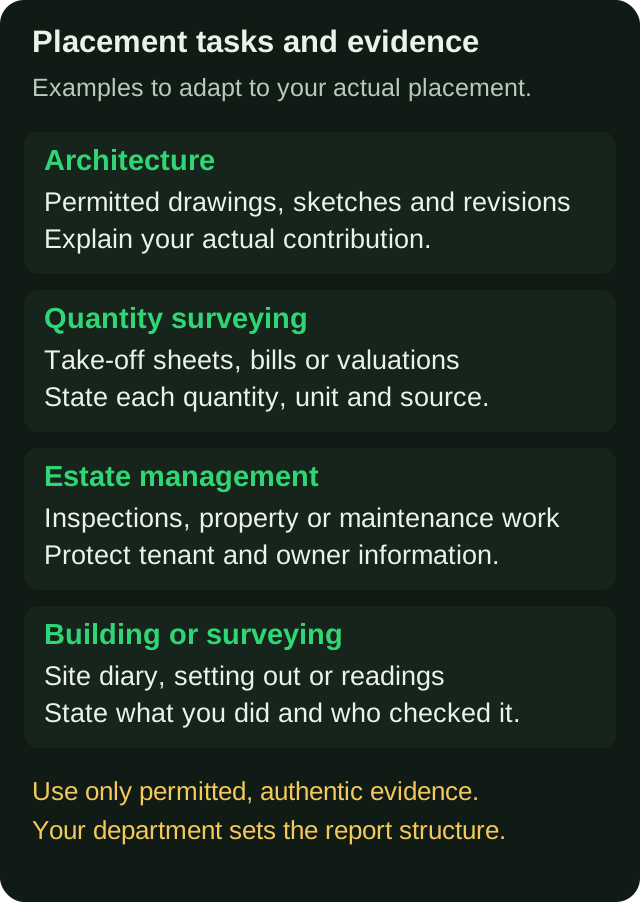
- Architecture. Your evidence is drawing sets, sketches, revisions, site visits and meetings. Drawing numbers and dates anchor everything.
- Quantity surveying. Your evidence is take-off sheets, bills of quantities, rate build-ups, valuations and variations. The quantity, unit and source of every figure matter.
- Estate management. Your evidence is property files, inspection reports, valuations, lettings, rent or service-charge records and maintenance requests, handled with care for tenant and owner privacy.
- Building and surveying. Your evidence is a site diary, setting-out, levels and measurements, progress records and checks of work.
If you rotated across several units, identify the dates and your role for each.
Record the right things every week
A built-environment record is document-driven. The most useful discipline you can build is to name the document and the stage of the project it belongs to.
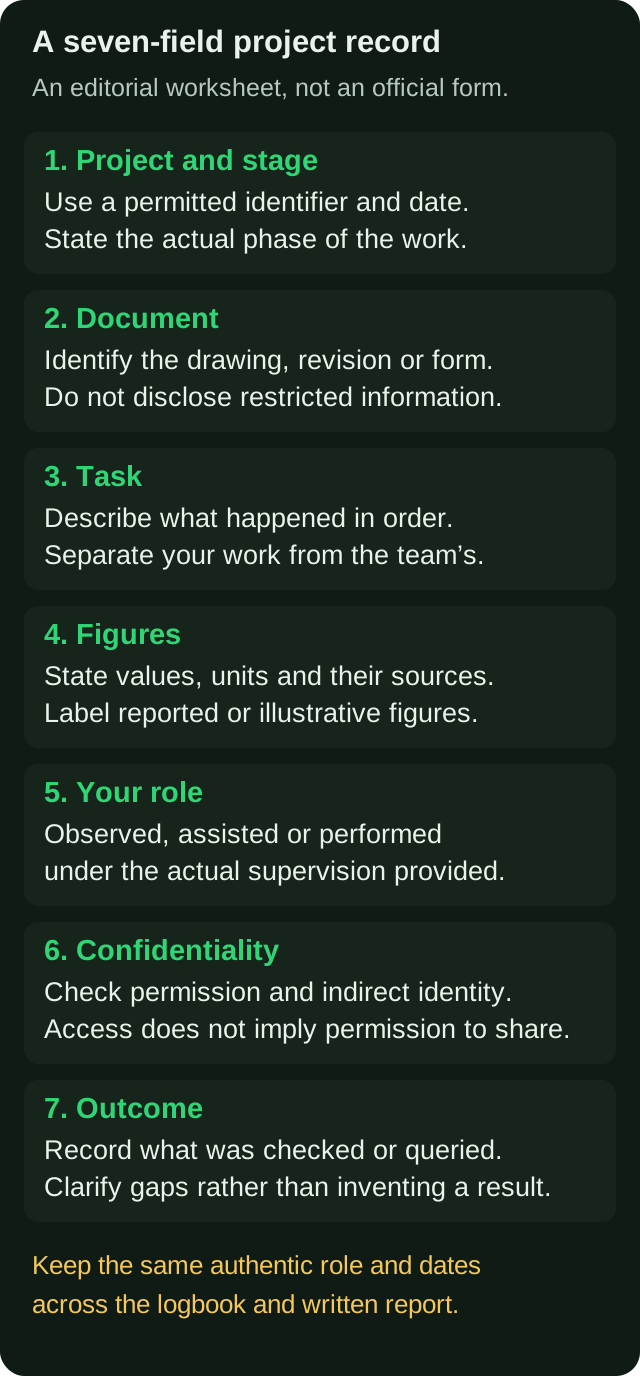
A useful entry has these fields:
- Project and stage. A project name or code you are allowed to use, and where it stood: briefing, design, tender, construction, handover or occupation. The Royal Institute of British Architects describes its Plan of Work as a framework that organises building projects into stages and clarifies the outcomes and information exchanges at each, a UK framework used here only to explain project stages, not to prescribe a Nigerian report template. Use your host's actual stages. See the RIBA Plan of Work.
- Document. Drawing number and revision, bill section, valuation certificate number, inspection form or lease file.
- Task. What you did with that document, step by step.
- Figures. Areas, quantities, levels, rates or amounts, each with its unit and where it came from.
- Your role. Observed, assisted or performed under supervision.
- Confidentiality. What you may publish and what you must hide.
- Outcome. What happened to the work: checked, corrected, issued, queried by the client or sent back.
The logbook guide covers signatures and weekly sign-off, and the civil engineering SIWES guide is a useful companion if your placement was on a construction site, since site records overlap.
A sample logbook entry table
This is a fictional teaching example, not real student work or an official signing schedule. Replace its invented tasks with your own projects, documents and records.
| Date | Project stage and document | What was done | Figures or measures | Role |
|---|---|---|---|---|
| Mon | Design stage, floor plan drawing | Updated a revision cloud after a comment, checked room labels against the schedule | Not applicable | Assisted |
| Tue | Tender stage, bill section for substructure | Watched the senior measure from the drawings and entered dimensions on the take-off sheet | Quantities recorded in cubic metres from the sheet | Observed |
| Wed | Construction stage, site | Recorded work done to date with the site supervisor for an interim valuation | Measured lengths with a tape and noted them in the field book | Performed under supervision |
| Thu | Property inspection | Accompanied a manager on a condition inspection and listed defects on the inspection form | Counts of defects by room | Observed |
| Fri | Weekly review | Reviewed the week with the supervisor and had the logbook signed | Not applicable | Performed |
Notice that the table never gives a price, a client name or a contract sum, and never claims a completed professional output the student did not produce.
Describing document-based work
Much of the work in these courses is done on paper or screen, which is hard to write about without sounding generic. The cure is to describe the path of a document.
For each major document you handled, write:
- What it was and what it was for. A bill of quantities for a particular building element, a set of working drawings for a particular floor, a valuation for a particular interim period, a lease schedule for a unit.
- Where it came from and where it went. Prepared by whom, checked by whom, sent to whom.
- What you did to it. Measured, entered, checked, revised, filed, issued.
- What went right or wrong. A dimension that did not match between drawings, an omitted item found on checking, a query from the client.
- What you learnt. One sentence, linked to a course idea only if the link is natural, such as the difference between a measured item and a provisional sum or the effect of a revision on a cost plan.
This approach works for a drawing register in an architectural office, a take-off in a quantity surveyor's office, a valuation file in an estate firm and a site diary on a building project. It also keeps you honest, because it forces you to say what you actually touched.
Figures, quantities and money
Numbers in these professions are precise and sensitive, so the rules are strict.
- State the unit and source. "Excavation of 42 cubic metres from the take-off sheet for the foundation trench" is checkable. "Large excavation" is not. The 42 here is an illustrative figure for the wording only; in your report, use only numbers you actually took or read.
- Mark reported numbers as reported. If your supervisor told you a rate or an area, write that it was reported.
- Do not publish rates or contract sums without permission. Use a labelled illustrative example to show the method.
- Show a worked calculation only if you did one. A real area, volume or valuation calculation with real values from a task, even a small one, is excellent. A formula copied from a textbook is padding.
- Do not round into precision you did not have. Report only precision justified by the instrument, method and actual record; do not add decimal places that were not measured.
Confidentiality and permission
Built-environment work involves clients, contract values and sometimes private homes and tenants. Handle it as a professional would.
- Check indirect identification. Codes and generic descriptions may still identify a client through dates, locations or unusual features. Removing a name alone is not guaranteed anonymisation.
- Ask before you include. Drawings, bills, valuations and photographs may be the firm's or the client's property. Permission to access does not automatically permit printing, publication or upload to an online tool.
- Protect tenants and occupants. Do not include names, phone numbers or personal circumstances from property files.
- Say what you left out. A sentence in the introduction such as "client names and contract sums are withheld at the request of the host" shows professionalism, not weakness.
Safety on and around site
If your placement included site visits, include safety honestly. Write what you saw: helmets, boots and high-visibility clothing; scaffold and excavation edge protection; barriers and signage; permit-to-work or induction practices; first aid. Include these only if true. Then add a short section on what your host did about site safety, and a recommendation if something was missing. If your placement was entirely in an office, say so and write about office-based risk, such as ergonomics and data security, only if you actually noticed them.
A working chapter outline
Use this only where your approved template leaves the activity chapters open. Your department's layout comes first.
Preliminary pages. Title page, certification, acknowledgement, abstract or summary, table of contents, and lists of tables and figures as required.
Chapter 1: Introduction. Brief, accurate background to SIWES, aims and objectives of your training, and scope of the report.
Chapter 2: The host organisation. Name (if permitted), location, services, organisation structure, and the department or projects you were attached to. Write from what you saw and what the host allows.
Chapter 3: Training activities. Organised by project or by period. Use the document-path approach: document, task, figures, role, outcome.
Chapter 4: Experience gained, challenges and lessons. Skills built, tied to specific weeks, and real challenges, such as delayed information, changing client instructions or limited access to documents.
Chapter 5: Conclusion and recommendations. A short summary, your judgement of the training and recommendations to a named party.
References and appendices. Books, codes or standards you cited, and appendices only as permitted, such as a blank template of a form.
Common mistakes supervisors flag
- Describing the profession instead of the placement. Pages of definitions and no project.
- Role inflation. "I prepared the bill of quantities" when the record shows you copied figures into a sheet.
- Confidential information in the report. Client names, rates and contract sums without permission.
- Figures without a traceable source. A genuine measurement may be round; check its provenance rather than its appearance.
- Drawings or photographs that are not yours or are not permitted.
- A report and logbook that disagree.
- No sign of learning. A list of tasks with no sentence about what was understood or what went wrong.
- Backfilled logbook, with entries written in one sitting weeks later.
- Wrong formatting. Font, spacing and heading levels that differ from your institution's rules. The free formatting checker reads a .docx and flags mismatches, and the format directory lists university rules where they are on record.
Defence questions to prepare for
Use these practice questions to explain the work and your decisions. Prepare honest answers to questions such as:
- Walk me through one project you worked on from the document you started with to the document you ended with.
- How did you arrive at that quantity, area or level, and how was it checked?
- What would have happened if that item had been missed?
- What is the difference between the stages you saw, and what was produced at each?
- What confidentiality limits applied, and how did you respect them?
- Which part of the report did you only observe?
- How does something you saw connect to a course you took?
- What would you recommend the firm change?
The guide to defending your SIWES report explains how to structure answers and what to bring.
Plan around your submission date
The four-week sequence below is a planning suggestion, not an institutional deadline. Clarify genuine record gaps with the supervisor; never invent contemporaneous entries, dates or signatures. Obtain endorsements on your required schedule.
- Week one: review the record. Lay your logbook out by project and week, mark gaps honestly and ask your industry supervisor to confirm a detail if you can.
- Week two: draft the activity chapter document by document, with role labels.
- Week three: the rest. Host organisation, experience gained, safety section, conclusion and recommendations, which the closing chapter guide walks through.
- Week four: figures, formatting and checking.
If your supervisor sends corrections, managing IT report supervisor corrections shows how to track them so nothing is missed.
Pre-submission checklist
- Every activity matches a dated logbook entry and carries an observed, assisted or performed label.
- Every figure has a unit and a source, or is marked as reported or illustrative.
- Client names, rates and contract sums are withheld unless the applicable permission, privacy and institutional requirements are resolved.
- Drawings and photographs are yours or permitted, numbered, captioned and discussed in the text.
- Chapter order, headings and length match your approved guide.
- No signature or approval appears that you have not actually received.
Where UniDraft fits in
UniDraft builds the written IT/SIWES report as an editable Word (.docx) document from the placement facts you confirm and the guidelines you supply. Supervisor instructions and student-confirmed guidelines take priority over general departmental and university patterns. Check every project detail, quantity, source and valuation against your records. UniDraft does not fill your official logbook or Form 8, supply approvals or produce slides. If your supervisor sends corrections, you provide them, confirm the changes, and a new version is created while earlier versions are kept. You still supply the real project details, because those are what you will be asked about at your defence.
Sources
- ITF: SIWES guidance: training objectives, records and supervisor responsibilities.
- RIBA: Plan of Work: a staged framework for briefing, designing, constructing and operating buildings (United Kingdom; used for the idea of project stages only).