Most lists of the best tools for a final year project mix together software that does completely different jobs. A reference manager, a statistics package and a document builder are not rivals. This guide sorts the tools into categories, says what each does well, and says plainly where each one stops, including where UniDraft is the wrong choice.
Already have your topic and research material, but still need to assemble the report? UniDraft helps organise your confirmed work into an editable Word document using the instructions you supply, so you can spend your review on the argument and evidence. Start your final-year project document with UniDraft. Keep your actual data analysis in the appropriate statistics or development tools; bring the verified results into the document.
The short answer
- You almost certainly need a word processor used properly. Word's heading styles, automatic contents page and section breaks handle most mechanical formatting.
- Consider a reference manager when sources change or recur across chapters. Choose by the citation work it removes, not an arbitrary minimum source count.
- Choose analysis software for your method. A spreadsheet may cover simple descriptive summaries; statistical software can support both descriptive and inferential analysis.
- A general AI chat assistant needs evidence and review. It may help with wording, but cannot know data you have not supplied and can invent sources.
- A formatting checker tells you what is wrong; a document builder does the assembling. Use whichever matches whether you already have a draft.
Start with the tool you already have: your word processor
Before you install anything, check what Word (or the free equivalents) already does. Manual formatting can become inconsistent as a report changes; styles and fields make repeated changes easier to manage.
Heading styles. Apply Heading 1 to chapter titles, Heading 2 to sections, Heading 3 to sub-sections, and never bold-and-enlarge text manually. Styles let you change font and spacing for the whole document once, which matters when your supervisor changes the required font size in week eleven.
Automatic table of contents. Word builds the contents page from your headings and updates it when text changes, using the Update Field command on the contents (Microsoft's guide to inserting a table of contents explains it). A typed contents page goes wrong the moment a heading moves.
Section breaks for page numbers. Many departments want Roman numerals for preliminary pages and Arabic numerals from Chapter 1. That needs section breaks, which need careful setup; the steps are in our guide to Roman and Arabic page numbers in Word.
Track Changes and comments. When a supervisor returns your draft, these show exactly what was altered. Keep a saved copy before accepting anything.
Where a word processor stops. Word applies the rules you give it. It does not know that your department wants 1.5 spacing, a 4 cm left margin or a particular chapter order. If you set the wrong value, Word will apply it perfectly on every page.
Reference managers: worth it once your list grows
A reference manager stores your sources and inserts citations into your document so the reference list is generated to match. Zotero is a free, open-source example; its documentation describes plugins for Word, LibreOffice and Google Docs that update the bibliography automatically when you insert a new citation (Zotero word processor integration), and it can load additional citation styles from a public repository (Zotero citation styles).
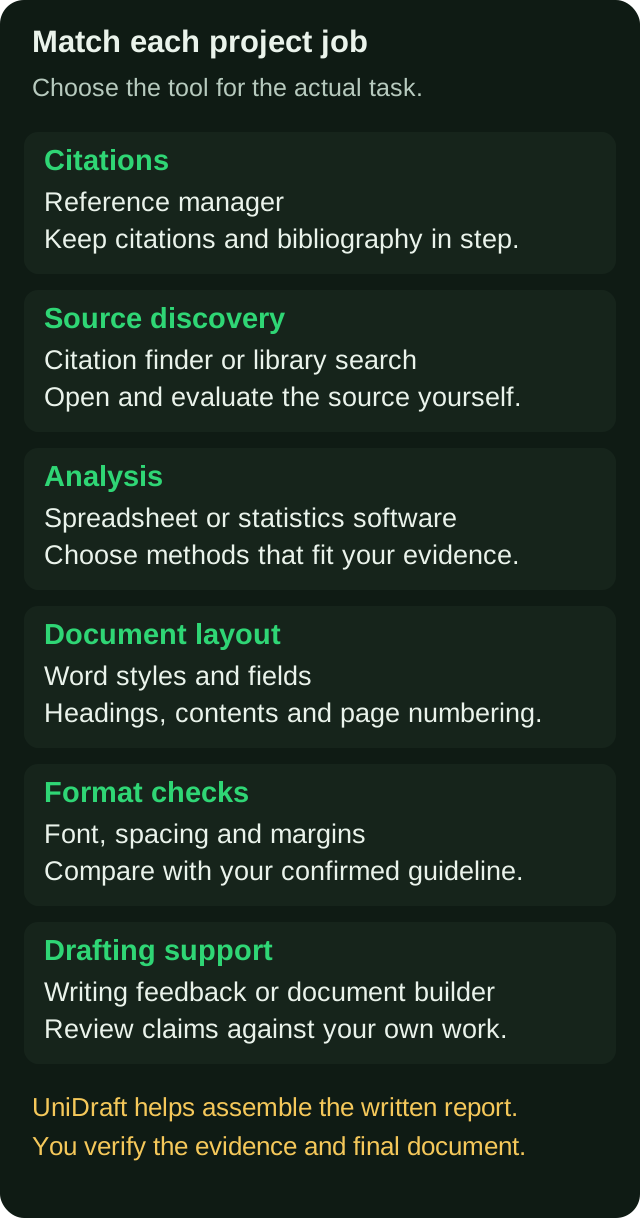
Good for: long literature reviews, switching between styles (APA to IEEE), avoiding a citation in the text that is missing from the list.
Not good for: checking that a source exists, is peer reviewed, or says what you claim. It also stores whatever metadata you import, so a wrong year or author name in the record appears in your reference list. Always proof the output against the rules for the style you were told to use.
Try it on a small task: add two sources, insert their citations, correct one record and update the bibliography. Decide whether that workflow helps your literature review. A manager can reduce citation-list mismatches, but an incorrect imported year still needs correction.
Finding the sources in the first place. Reference managers and their browser connectors can collect sources, but they do not replace a deliberate literature search or source evaluation. The free citation finder helps you locate real published works and format them in APA, IEEE or Harvard; your university library's databases and Google Scholar-type searches are the other standard routes. Whichever you use, open the source and read the part you are citing.
Survey and statistics software: match the tool to the test
Chapter 3 and Chapter 4 are where data tools matter, and where the choice depends entirely on your method.
| What your project does | What you need | Watch out for |
|---|---|---|
| Questionnaire collection | An online form tool or paper forms you enter by hand | A poorly designed questionnaire cannot be rescued by software |
| Percentages, means, charts | A spreadsheet | Tables and charts that are not labelled or numbered |
| Chi-square, t-test, ANOVA, correlation, regression | A statistics package (a free option such as R, or the package your department teaches) | Running a test that does not fit your data type |
| Engineering or lab measurements | The instrument's export plus a spreadsheet or plotting tool | Rounding and units that change between tables |
| Software or system builds | Your development tools, plus screenshots and test logs | Results described but never shown |
Two practical checks. First, a software suggestion does not establish that a test is appropriate. If you are unsure, work out your data type and research question first, then read which statistical test fits your project. Second, the questionnaire itself is the input to everything downstream, so design it carefully before you collect a single response.
Where UniDraft is not the right tool: UniDraft does not run statistics, analyse your dataset or generate data. If your project needs a regression run, you use a statistics package, then bring the real output into your write-up.
General AI chat assistants: useful, with limits
Chat assistants need particular care with evidence and references. Used well, they are like a patient friend who has read a lot. Used badly, they hand you an assignment that looks finished and is not yours.
Where they genuinely help:
- Explaining a concept you do not understand, so you can then read the real source.
- Suggesting how to structure a section you are stuck on.
- Rewording one clumsy sentence you wrote yourself.
- Generating questions a defence panel might ask, so you can practise.
Where they fail for a final year project:
- They cannot know evidence you have not supplied. Treat generated findings as unverified; never present invented results as observations from your study.
- They can produce citations that look right but do not exist. Author names, journal titles and years can be plausibly wrong. Never copy a reference from a chat reply without finding the real paper.
- They do not know your format. Unless you provide the relevant guideline through the features available in your chosen tool and check the output, the chapter order, spacing and citation style may differ from what your department requires.
- Check consistency across drafts. Compare variable names, sample sizes and methodological details against your confirmed records; conversation history is not a substitute for a stable study record.
There is also the policy question. Some departments restrict AI use, and some ask students to disclose it. Ask your supervisor before you rely on it, and see our note on why AI-written prose gets flagged. For a fuller comparison of how a general assistant differs from a purpose-built tool, read UniDraft versus generic AI writing tools.
Formatting checkers: catching what you cannot see
Formatting problems can make a draft harder to review. A formatting checker reads your finished .docx and compares what it finds with a set of rules.
What to check: font, size, spacing and margins are common checks. Page numbering, heading levels and chapter consistency need a separate manual review unless the chosen checker explicitly supports them.
What it cannot do: judge whether your argument is sound, whether your results are real, or whether your supervisor prefers something the general rules do not say. It also depends on the rules it checks against. If your department has its own handbook, that handbook wins, and the checker is only as good as the rule set behind it.
UniDraft's free formatting checker reads a .docx and compares font, spacing and margins with a university's rules; the file is not stored, and you do not need an account. Use it on your near-final draft, then fix the flagged items in Word. The university format guides are useful for finding out what your school normally asks, but always confirm against your own department's handbook and your supervisor's instructions, because the department and supervisor override the general rules. For the wider picture of what a full report needs, see how to format a final year project for a Nigerian university.
Document builders: when you want the assembly done
A document builder produces the structured document for you from the material you supply, instead of checking one you already wrote. This is the category UniDraft belongs to, and it suits a specific kind of student.
It suits you if: you have your topic, your supervisor's instructions and your real results, but you are running out of time to assemble a compliant document, or you keep getting the format wrong.
It does not suit you if:
- You need slides. UniDraft builds the written report, not PowerPoint or defence presentation content.
- You need statistics run. It does not analyse data or create results.
- You want a finished project with no input from you. It builds around your confirmed topic and your own results, but you must check the generated text against your evidence and verify every source.
- You want a guaranteed grade or an "undetectable" document. Nobody can promise that, and UniDraft does not try to defeat AI detectors.
- You need a SIWES placement, or Form 8 and logbook signatures filled. Those are separate processes outside the tool.
How to choose: a quick decision guide
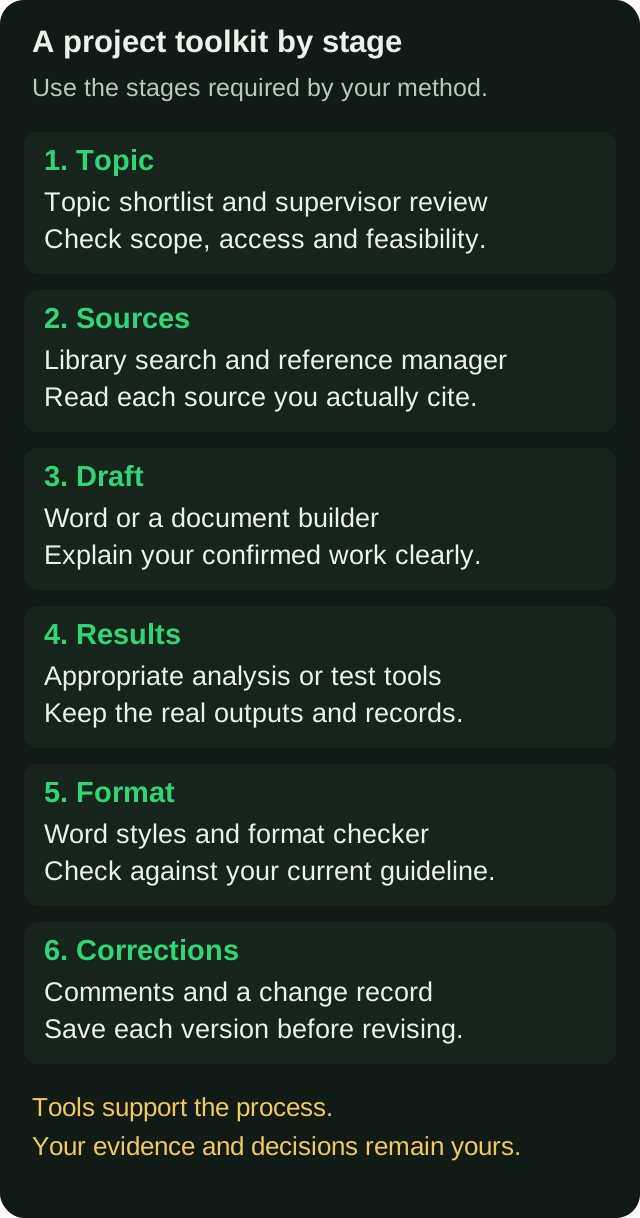
Work through these in order. Stop when you have covered your actual problem.
- Is my problem the topic? Use the free topic generator to get ideas, then narrow with your supervisor. Our guide to choosing a final year project topic covers how to judge one.
- Is my problem too many sources? Add a reference manager and use the citation finder to locate real works.
- Is my problem data? Pick software for the test your method needs, after you have settled the test.
- Is my problem prose? Draft it yourself first. Use a chat assistant only for feedback on structure or phrasing, and never for facts.
- Is my problem format? Run the checker on your draft, or use a document builder if you want the document assembled to the rules from the start.
- Is my problem corrections? Keep every version and read how to manage supervisor corrections without losing earlier work.
Common tool mistakes to check
- Formatting by hand. Headings that look the same but are not styled, so the contents page cannot be generated.
- A reference list that does not match the text. One source cited but missing, or listed but never cited.
- Chat-generated citations that cannot be found. An untraceable reference prevents the reader from checking the supporting evidence.
- A style mix. APA in Chapter 2 and Harvard in Chapter 5, usually from copying between drafts.
- Screenshots of tables instead of real tables. They cannot be edited and often blur when printed.
- Overwriting the previous version. After corrections, you cannot show what changed, or recover a paragraph you deleted by mistake.
- A tool's default settings left unchanged. Check default margins and fonts against your actual guideline.
A sensible toolkit, by budget
You do not need to spend money to write a good project. A workable free stack is a word processor, a free reference manager, a spreadsheet or free statistics tool, the free citation finder and the free formatting checker. Paid tools earn their place only where they save you real time on a specific problem. If your problem is assembling and formatting the whole document, a one-off paid builder may be worth it. If it is not, do not buy one.
If you are planning the whole project rather than choosing tools, how to write a final year project step by step gives the sequence, and this guide fits around it.
Where UniDraft fits in
See what to bring, what the workflow produces and how to start on the UniDraft final-year project document page.
UniDraft is a document builder for the written report: IT/SIWES report, seminar report or final-year project. It builds the editable Word (.docx) around your confirmed topic and your real results, applying your supervisor's instructions and student-confirmed guidelines before general departmental and university patterns. Supply and verify the facts and sources yourself; review the generated document before submission. You can upload your own results as a .docx with tables and labelled images.
When your supervisor returns corrections, you supply them, confirm the changes it extracted, and a new version is produced while earlier versions are kept. A final-year project costs ₦20,000 one-off (seminar ₦15,000, SIWES ₦10,000), including three free supervisor-correction rounds. If you only need a check or a source, the citation finder and formatting checker are free and need no signup. It is also worth reading what a "compliance engine" means in practice in this explainer.
Sources
- Insert a table of contents (Microsoft Support): how Word builds and updates a contents page from headings.
- Word processor integration (Zotero documentation): how a reference manager inserts citations and updates a bibliography.
- Citation styles (Zotero documentation): how citation styles are supplied and added.
- Title page setup (APA Style): the official APA guidance on paper format, for students told to use APA.