The tools that help most with a seminar report are the ones that organise your sources and apply your department's format, because those jobs are mechanical. Turning source summaries into an argument still requires your judgement; check your department's assessment criteria.
This guide compares the categories of tools honestly, says what each is good for, and says where each one stops. That includes UniDraft: it is the right tool for one part of the job, and the wrong tool for others.
Your reading deserves more than a pile of notes. Once you have checked your sources and decided what they mean together, UniDraft helps organise that material into an editable seminar report shaped by your supervisor's instructions. Start your seminar document with UniDraft, then review the argument, references and format before submission. Prepare presentation slides separately.
The short answer
- Start with a source table. A free spreadsheet or Word table beats any app if you fill it in properly.
- Use a citation finder to locate real sources, then read them yourself. Never cite something you have not opened.
- Use Word's built-in styles for headings, contents page and page numbers. Manual formatting can become inconsistent as the draft changes.
- Use AI, if you use it at all, for wording once you have decided what your sources say together, not for deciding it.
- Use slide software for the presentation. The report and the slides are separate jobs.
- Check the document against your department's rules before you submit, not after your supervisor returns it.
What actually helps
A simple source tracker
A useful starting tool is a table with four columns: the source (author, year, title), its key finding, how you will use it, and how it relates to your topic or to another source. Fill in the last column while you read, not afterwards. This is what separates a literature review that argues something from one that lists sources.
An illustrative example for a seminar on mobile money and small traders (the sources are placeholders, not real papers):
| Source | Key finding | How it relates to my topic |
|---|---|---|
| Author A (year) | Traders who accept transfers report fewer cash-handling losses | Supports my claim that adoption has a practical benefit |
| Author B (year) | Adoption is lower where network coverage is weak | Complicates A: benefit depends on infrastructure |
| Author C (year) | Most studies sample urban markets only | The gap: rural traders are missing |
Read down the last column and you can already see three sentences of a literature review. That is the point of the table. If you want a fuller treatment of the chapter itself, see how to write a literature review; the same logic applies at seminar scale.
A citation finder and, sometimes, a reference manager
Finding real, checkable sources is a bigger problem than formatting them. The free citation finder helps you locate real sources and produce APA, IEEE or Harvard entries, and you should still open each one before you cite it.
Do you need a reference manager such as Zotero or Mendeley? Try a small bibliography in both workflows. A source table may suit a short, stable report; a reference manager may help if citations change repeatedly or you reuse sources. There is no universal source-count threshold. If your department requires a particular style, the guide to writing the reference list covers APA, IEEE and Harvard side by side.
Whichever route you take, the purpose stated in the APA Style guidance on references is the test: a reference list exists so readers can identify and retrieve each work you cited. Check that recoverable works cited in the text have matching entries and that listed works are actually cited. APA treats some material, such as personal communications, differently; follow the rule for the source type and protect confidential information.
A word processor, used properly
A word processor such as Microsoft Word or Google Docs can handle much of the document work, if you use their features rather than fighting them. Apply real Heading styles to your headings and Word can generate the table of contents for you and update it when pages shift. Use automatic page numbers, and if your department wants Roman numerals for preliminary pages and Arabic for the body, Roman and Arabic page numbering in Word walks through the section breaks.
Typing a heading in bold and a larger font, or pressing Enter repeatedly to start a new page, looks fine until the supervisor asks you to add a paragraph and everything moves.
A writing assistant for connective sentences, not content
AI tools are genuinely useful for phrasing the sentence that ties two sources together once you have decided how they relate. They are much less useful for deciding that relationship, which requires understanding your topic. They can also produce citations that look real and are not, and text that reads like every other AI-assisted report. If you want the fuller comparison, UniDraft versus generic AI writing tools explains the differences in what each is built to do.
A safe way to use an assistant: paste in a paragraph you have written and ask whether a claim is unclear, or ask for two ways to phrase a transition. Do not ask it for sources, findings or statistics, and never let it supply a fact you have not checked. Your department may also have its own rules on AI use; ask your seminar coordinator before you rely on it.
A formatting tool that matches your department's seminar guideline
Citation style and structural expectations for a seminar report do not always match the final year project format, even within the same department. Some departments give a one-page seminar guide; others expect the project format with fewer chapters. Two free tools help here:
- The formatting checker reads a .docx and compares the font, spacing and margins against a university's rules, without storing your file.
- The university format guides provide institutional starting points to compare with your current confirmed seminar guideline.
Treat both as a starting point. Where your supervisor or department gives written instructions, those come first; a general university baseline only fills the gaps.
Slide software, for the presentation
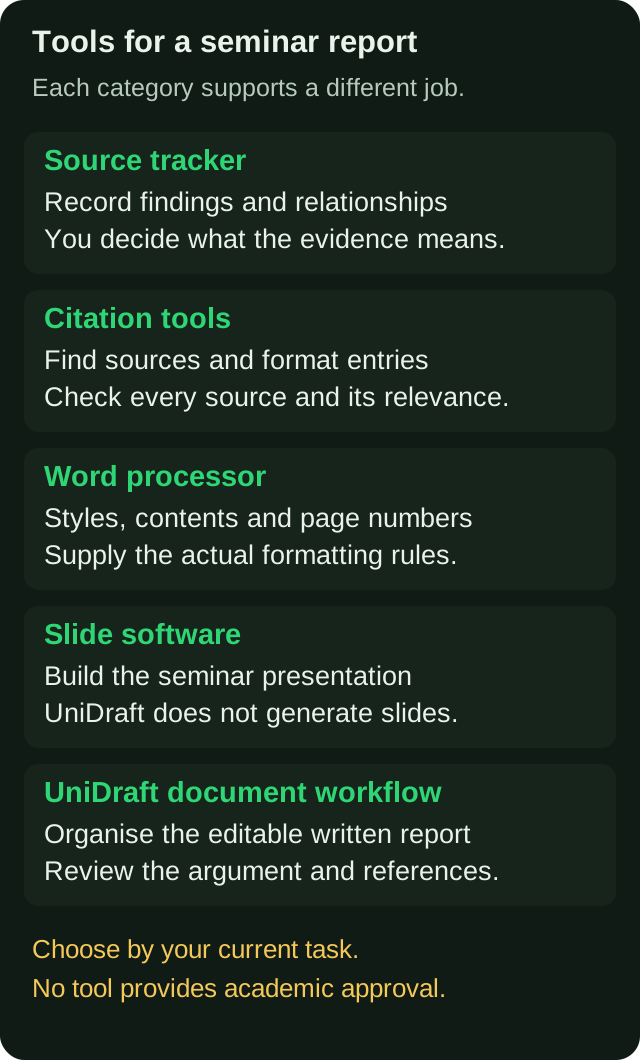
If your seminar includes a presentation, use slide software such as PowerPoint, Google Slides or Canva. This is a separate skill from writing the report: slides are short, visual and built for a room. UniDraft does not make slides. Build them after the report is stable, so you are summarising a finished argument rather than chasing a moving one.
Comparing the categories
| Tool category | Best for | Cost | Where it falls short |
|---|---|---|---|
| Source table (Word or spreadsheet) | Turning reading into an argument | Free | Only as good as the notes you type |
| Citation finder | Locating real sources, formatting entries | Free options exist | Cannot tell you whether a source fits your topic |
| Reference manager | Large source lists, reuse across documents | Often free, some paid tiers | Setup time; entries still need checking |
| Word or Google Docs | Styles, contents page, numbering | You likely have it | Does not know your department's rules |
| General AI assistant | Rewording your own sentences | Free and paid tiers | Can invent sources; cannot build your argument |
| Slide software | The seminar presentation | Free and paid options | Separate from the written report |
| Document builder (UniDraft) | The written report in your format | One-off fee | Does not think for you; no slides |
Choosing by your situation
Your circumstances matter more than any ranking.
Data is expensive or your connection is unreliable. Work offline in Word with a source table, download the PDFs you need while you have a signal, and use the free tools only for the final checks. Nothing in the core workflow needs a paid app.
You are writing on a phone or a shared laptop. Keep the source table in a cloud document so a lost laptop does not cost you weeks of reading notes, and save numbered copies of the report (v1, v2, v3) rather than overwriting one file.
You have a short deadline. Prioritise the argument, required format and reference checks. Use tools you already understand where learning a new one would delay the work.
Your department is strict about format. Check the rules first, then use the formatting checker before you print. Compare the final document with the actual rules, including anything the checker does not inspect.
You are unsure what your supervisor expects. No tool answers this. Ask for a recent good seminar report from your department and read its structure before you draft anything.
Check that your literature review connects the evidence
One weakness to check is a literature review that describes what each source found, one after another, without connecting them to each other or to your topic. "Author A found this. Author B found that. Author C found something else" is a list, not a review.
No tool fixes this automatically. It needs you to decide what your sources mean together, then say so explicitly. Compare:
The following comparison continues the fictional teaching example above; these are not verified study findings.
Descriptive (weak): "Author A (year) studied mobile money adoption among traders. Author B (year) studied network coverage. Author C (year) sampled urban markets."
Connected (stronger): "Mobile money reduces cash-handling losses for traders (Author A, year), but the benefit appears to depend on network coverage (Author B, year). Because most studies sample urban markets (Author C, year), little is known about rural traders, which is the focus of this seminar."
The second version uses the same three sources and tells the reader why they matter. The source table above is what makes it possible. If your topic is still loose, sort that out first: how to choose a seminar topic covers scoping, and the topic generator can suggest angles you can then check with your supervisor.
Common mistakes and how supervisors flag them
| What the supervisor writes | What went wrong | Fix |
|---|---|---|
| "Too descriptive" | Sources listed one by one | Group sources by theme and add a linking sentence |
| "Source not found" | A citation you cannot trace, often from AI | Remove it or replace it with a source you have opened |
| "Inconsistent referencing" | Mixed APA and Harvard, or missing entries | Choose one style and audit every citation |
| "Wrong format" | Font, spacing or margin off the department rule | Check against the guideline and run the format checker |
| "Not a seminar" | Structure does not match the assigned seminar brief | Read how a seminar differs from a final year project |
| "Where is your own view?" | Only summary, no conclusion of your own | Add a short section stating what the evidence together suggests |
A workable order of work
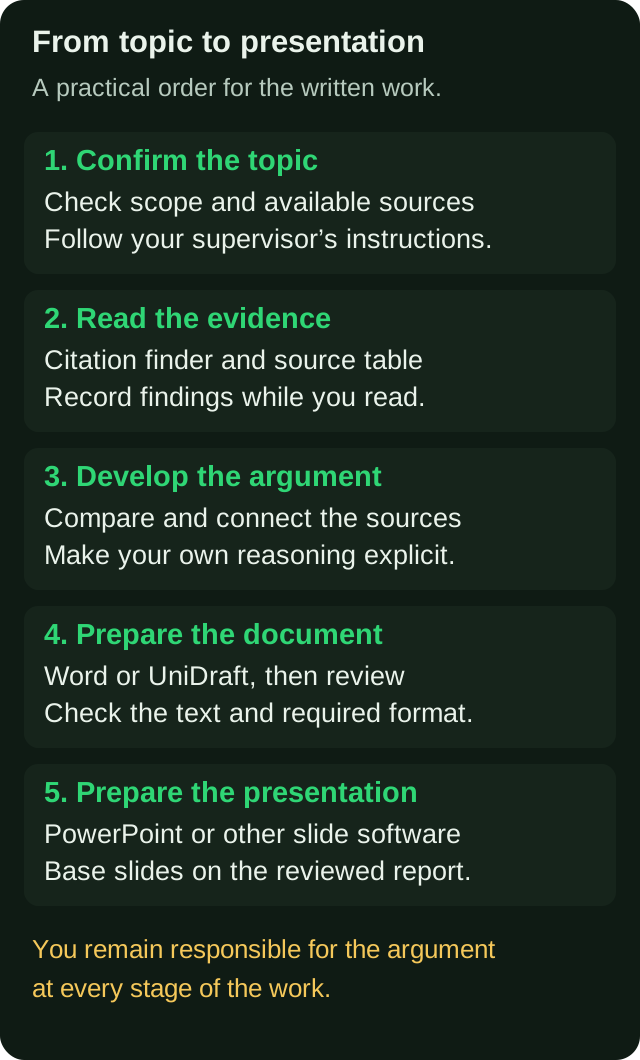
- Confirm the topic and scope. Follow your department's selection or approval process before committing to the report.
- Collect and read sources. Log each one in your table the same day you read it.
- Write the argument. Draft the outline from the last column of your table.
- Build the document. Apply the format, generate the contents page, and check citations against the reference list.
- Prepare the slides last. Once the report is stable, the presentation is a summary of it. A slide-by-slide structure for the seminar presentation helps with this.
For the structure of the report itself, use how to structure a seminar report in Nigeria, and compare your draft with what a strong seminar report looks like.
Handling corrections
Plan for supervisor feedback and keep a correction record if changes are requested. The tool that matters here is not software but discipline: keep every version, and keep a list of what was asked and what you changed. If you lose track, a later correction can quietly undo an earlier one. There is a practical system for this in managing seminar report corrections.
Pre-submission checklist
- Topic and scope follow the assignment and any required approval process
- Every source opened and read, none invented
- Literature review grouped by theme, not source by source
- One citation style used throughout
- Every in-text citation has a reference entry and vice versa
- Headings use real styles and the contents page is generated
- Font, spacing, margins and page numbers match your department's guideline
- Front pages in the order your department expects
- Supervisor's latest corrections all addressed
- File saved with a version number, plus a backup copy
Where UniDraft fits in
See what to bring, what the workflow produces and how to start on the UniDraft seminar report page.
UniDraft builds the written seminar report as an editable Word (.docx) document. It works from your confirmed topic and your real material, your supervisor's instructions and student-confirmed guidelines before general departmental and university patterns. You must supply and verify the real material, check the generated references and claims, and review the document before submission. It does not guarantee a grade.
When your supervisor sends corrections, you supply them, confirm the extracted changes, and a new version is produced while earlier versions are kept. The seminar report costs ₦15,000, one-off, and includes three free supervisor-correction rounds.
It is not the right tool for everything on this page. UniDraft does not make PowerPoint slides or presentation content, and it cannot do the thinking in your literature review. Use it for the document and its format, and use slide software for the presentation.
Sources
- APA Style: References, on the purpose of a reference list.
- Microsoft Support: Insert a table of contents, on generating a contents page from heading styles.