SCAF stands for Students Commencement of Attachment Form. It is the ITF form that tells the Industrial Training Fund which students have started industrial training with a given employer, where, and from when. If your coordinator has told you to "bring your SCAF", this is what they mean: a one-page form that you get at orientation, that your employer must endorse, and that ends up at an ITF Area Office.
This guide explains what the form contains, who does what, how it differs from your logbook and Form 8, and what to do when the instructions you receive do not match what you read online.
SCAF records the start of your placement; your later report explains the training itself. UniDraft helps organise your confirmed placement activities and instructions into an editable SIWES report. Start your SIWES report with UniDraft when those records are ready. SCAF completion, employer stamps and official submission stay with you and the responsible offices.
The short answer
- What it is: an official ITF form that records the start of an attachment. It is not your logbook and not an assessment.
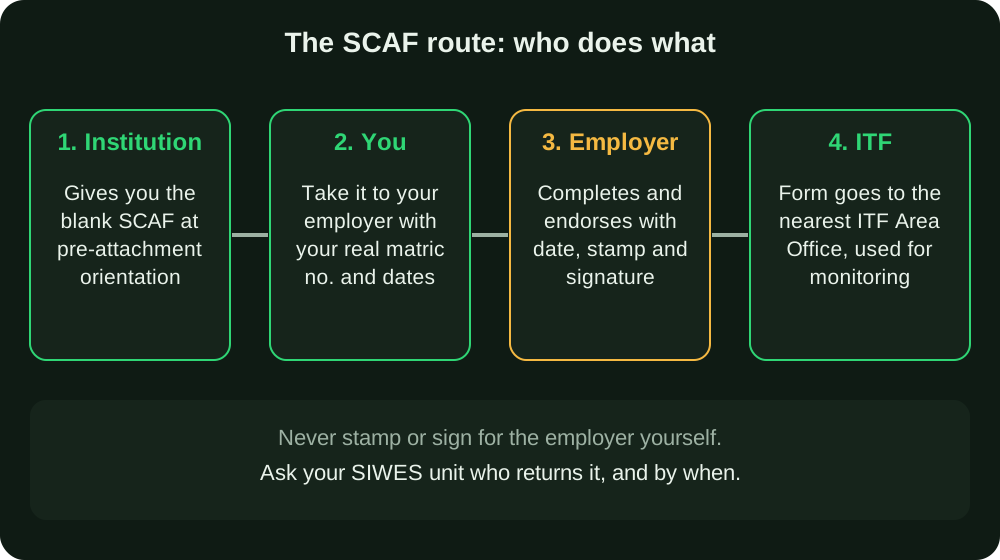
- Who gets it to you: ITF's SIWES guidelines say it is given to students during the pre-attachment orientation programme, so your institution's SIWES unit normally issues it.
- Who completes it: you supply your details, and the employer completes and endorses it with a date, stamp and signature. ITF's own guideline text describes this in two slightly different ways (see below).
- Where it goes: to the ITF Area Office nearest your place of training.
- What it is for: monitoring. The University of Ibadan's industrial training centre describes it as a form "designed to aid monitoring".
- What to confirm locally: the return route, the deadline, and how many copies your institution wants.
What SCAF actually contains
The ITF template is titled "Industrial Training Fund: Students Commencement of Attachment Form (SCAF)". A sample of it, as published by Crawford University's SIWES unit, has two parts.
The header asks for the ITF Area Office, the institution, the name of the organisation, its phone number and email, and its location address.
The table has one row per student and asks for:
- Name of student
- Matric number
- Course of study and year or level
- Period of attachment in months
- Date of commencement
- Date of completion
- Remarks
At the bottom there is a note that the form is to be completed and sent to the nearest ITF Area Office, followed by a space for the date and the stamp and signature of the employer.
Notice what is not on it: no daily activities, no grades, no supervisor comments on your performance. It is a register of who started where and when. That is why it is short, and why getting the dates and matric numbers right matters more than anything else on it.
Who fills it: what the ITF guidelines actually say
Students often get conflicting answers here, so it is worth reading the primary text. ITF's SIWES guideline document mentions the form twice.
In the section on students' responsibilities, it says students should "complete Students Commencement Attachment Form (SCAF) and get it endorsed by the Employer for onward submission to ITF".
In the section listing the SIWES forms, it says the SCAF is "to be given to all Students during pre-attachment orientation programme" and that "these forms are to be completed by the Employers and forwarded to the nearest ITF Area Office".
These are not really in conflict; they describe two halves of one job. Your part is to carry the form, make sure your own row is accurate, and see that the employer endorses it. The employer's part is the organisation details, the confirmation of dates and the stamp and signature. Because the wording differs, the sensible rule is:
- Fill in only facts you can prove: your name, matric number, course and level, and the dates in your placement letter.
- Let the employer complete the organisation details and endorse it.
- Ask your coordinator who physically returns it (you, the employer, or the SIWES unit).
When to submit it
The honest answer is: at the start, and as your institution instructs. The ITF guideline text we checked ties the form to commencement and does not give a fixed number of days. Some blogs and PDFs quote specific deadlines such as "within two weeks of resumption"; we could not confirm any such figure in an ITF primary document, so treat those as local practice at best.
Because the form belongs to the start of the placement, do not leave it until the end. A practical timeline:
| When | What to do |
|---|---|
| Pre-attachment orientation | Collect the SCAF and any institutional instructions. Ask about the return route and deadline. |
| Before or on your first day | Give the employer the form together with your placement letter so the dates match. |
| First week | Confirm the employer has completed and endorsed it, and hand it in as instructed. |
| After submission | Keep a photocopy or photo, and a receipt if your unit issues one. |
| Any later change | If your placement or dates change with approval, tell your coordinator; do not quietly edit a submitted form. |
If you are still hunting for a company, start with how to find a SIWES placement and how to write a SIWES application letter. The SCAF only becomes relevant once an employer has actually accepted you.
Is SCAF only for some students?
Not necessarily, but check. ITF funds SIWES for particular categories of courses, mainly engineering and technology, environmental studies and other approved courses, and its guideline lists the forms as part of the scheme. The University of Ibadan's industrial training page lists the SCAF among the documents collected at the start of training and carries a note that a particular item is "only for students on 6-month SIWES programme". The page does not make clear whether that note attaches to the SCAF alone, so we do not claim it either way.
What this tells you is that institutions differ in which documents they issue for which duration of attachment. Ask your unit: "Do I need a SCAF for my programme, and how long is my attachment?" If you are at Ibadan, see the University of Ibadan format guide for the school's formatting rules for the final report, and confirm SCAF handling with its centre directly.
SCAF, logbook, Form 8 and report: what each is for
Students mix these up constantly, mostly because all four carry the same company name and dates.
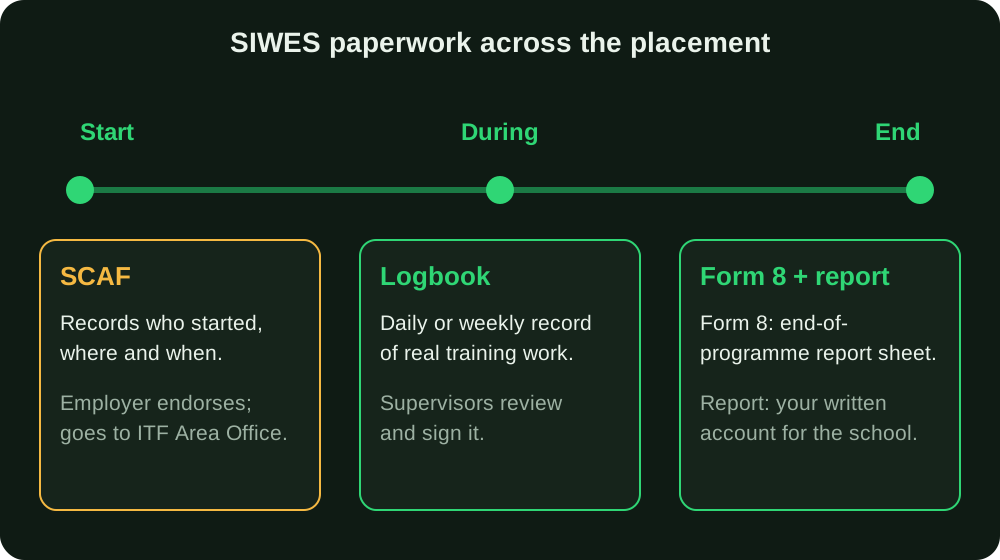
| Document | Main role | Who completes it | Stage |
|---|---|---|---|
| SCAF | Records commencement of the attachment | Employer endorses; you supply your details | Start |
| Logbook | Records your actual training activities | You write; industry-based and institution supervisors review | Throughout |
| ITF Form 8 | End-of-programme report sheet | Student, employer and institution | End |
| SIWES report | Your written account of the training for your department | You | End |
ITF describes Form 8 as the "End-of-Programme Report Sheet", completed by students, employers and institutions before being sent to ITF headquarters through the Area Offices, and it says completion is evidence of participation and supervision. Its three parts are broken down in our Form 8 explainer.
The logbook has its own routine, which is the subject of filling your SIWES logbook week by week. The report is what your department marks, and it draws on the logbook far more than on any form.
The important habit is consistency. The company name, address, start date and duration on your SCAF should match your placement letter, the first page of your logbook, Form 8 and the "Organisation" chapter of your report. A supervisor or panel who spots a mismatch will ask about it. Grading weights vary by institution, so treat any single breakdown as an example; how SIWES is graded shows how the pieces can be weighted.
Step by step: handling your SCAF
- Collect the blank form at orientation. If you missed orientation, ask the SIWES unit for it rather than downloading a random copy. The ITF resources page lists a SCAF sample alongside Form 8 and a logbook sample, but the copy your institution issues is the one to use.
- Read the note at the bottom. It says the form is to be completed and sent to the nearest ITF Area Office. Find out which office that is for your city and whether your unit collects forms centrally.
- Prepare your row. Have your matric number, course, year or level, attachment duration in months, commencement date and expected completion date ready. Take them from your placement letter, not from memory.
- Give it to your employer. Explain that it is an ITF requirement, that it needs the organisation's details and an endorsement, and that it goes to the ITF Area Office. Some HR desks have never seen one.
- Check before you leave the desk. Are the dates present? Is the stamp legible? Is the signature there? Ask the responsible office about any missing or unclear endorsement.
- Return it as instructed. Then keep a copy.
- Start your logbook. Keep the actual training record using your institution’s instructions; a logbook entry is not a substitute for the required SCAF endorsement.
Mistakes students make
- Filling in the employer's stamp and signature. Never. A forged endorsement is an integrity matter, not a formatting slip. If the employer is slow, follow up politely or ask your coordinator to intervene.
- Guessing dates. Estimating a commencement or completion date is worse than leaving the cell for the employer to confirm. Use the dates on your placement letter.
- Different company names across documents. "ABC Ltd", "ABC Nigeria Limited" and "ABC Engineering" are three different strings to an examiner. Use the name as it appears on the letterhead.
- Treating the acceptance letter as the SCAF. They do different jobs. An acceptance letter shows the employer agreed; the SCAF is an ITF form for monitoring.
- Waiting until the end. If it is late, ask your coordinator and the responsible office for the actual remedial process. Do not backdate a form or manufacture an endorsement.
- Relying on an old sample. Templates and routes change. If a portal, school desk or ITF office gives instructions that differ from a PDF you found, follow them.
- Assuming online guides are official. Many "how to fill SCAF" pages are written by third parties. Use ITF's own documents and your unit's instructions as the authority.
What to do when things go wrong
The employer refuses or delays. Explain that the form is an ITF requirement and that you only need endorsement of the commencement details. If it stalls, tell your SIWES coordinator early, while they can still intervene.
You changed placement. ITF's guidelines tell students to avoid changing places of attachment except in special circumstances approved by the institution's supervisor, the employer and, where necessary, ITF. Get the approval in writing and ask the unit how the paperwork should reflect the new employer and dates.
You lost the form. Ask your unit for a replacement and explain what happened. Do not reconstruct a stamped copy.
Your dates changed. Tell your coordinator; do not overwrite a submitted form or silently change dates in later documents.
Nobody at your institution knows about it. Ask your department's SIWES coordinator, then the nearest ITF Area Office, which is the recipient anyway.
Pre-submission checklist
- I collected the SCAF from my institution (or asked for it).
- My name, matric number, course and level are correct.
- Duration in months and commencement and completion dates match my placement letter.
- The employer completed the organisation details and dated it.
- The employer's stamp and signature are on it, and I did not add them.
- I know which ITF Area Office or unit desk receives it, and who returns it.
- I kept a copy and any receipt.
- The company name matches my logbook and placement letter exactly.
After you submit SCAF: keep a submission record
Use the current form and submission route your institution or responsible ITF office gives you. Keep a copy or submission acknowledgement with the date, recipient or office, and any reference number. This is evidence of what you submitted; it is not proof that payment, acceptance or a visit has been approved.
If the form is returned, ask which field or attachment needs correcting. Do not fill an official signature, assessment or stamp yourself. A senior student's old form can explain the layout but cannot confirm the current deadline or route for your school.
The paperwork is one part of the attachment. Continue keeping your logbook, use it to write the technical report, and prepare to explain your actual activities in the SIWES defence. Keep the same employer name and placement dates across the documents, correcting genuine errors through the appropriate office.
Where UniDraft fits in
Be clear about the boundary: UniDraft does not generate, fill or sign ITF forms, including SCAF and Form 8, and it does not find placements. Those come from your institution, your employer and ITF.
What it does help with is the document your department actually marks. Once you have real logbook entries and a confirmed placement, UniDraft builds your IT/SIWES report as an editable Word document from your own activities, applying your supervisor's instructions first, then your department's and university's format. It does not invent activities, and every version is kept when you send supervisor corrections. Check the current SIWES price and correction allowance before checkout. You can also run a finished .docx through the free formatting checker or browse the university format guides before you submit. If you are new to the scheme itself, start with what SIWES is.
Sources
- ITF SIWES guidelines (itf.gov.ng): students' responsibilities (section 2.6), SIWES forms (section 7), and the Form 8 description.
- ITF SIWES portal, resources page: lists SCAF, Form 8 and logbook samples separately.
- Crawford University SIWES: SCAF template (PDF): fields and layout of the form.
- University of Ibadan Industrial Training Coordinating Centre: commencement of industrial training: SCAF described as an ITF monitoring form, and the documents collected at commencement.