
Good computer engineering project topics describe a device, network or embedded system that you can build or simulate, buy parts for, and test against measurable targets before your deadline. Judge a candidate by its components, cost, board choice, test plan and safety, not by how modern the title sounds.
UniDraft's free topic generator can suggest directions from your department and courses you enjoyed; treat those as questions to test with the gates below, not as approved titles. This guide is for hardware, embedded, IoT and networking projects. A software-first idea belongs in the Computer Science topics guide, which covers a different kind of evidence.
Once you have a design that survives the checks, UniDraft helps turn your confirmed work, checked sources and supervisor instructions into an editable Word document. It does not design circuits, write firmware or take measurements. Start your project document with UniDraft when you have real work to describe.
How is a computer engineering project different from a computer science one?
A computer science project is usually judged on a program and how you evaluated it. A computer engineering project usually joins software to something physical or networked: sensors, a microcontroller, a radio link, a circuit, a protocol implementation. That adds failure modes software students never meet: a loose connection, a voltage sag when a motor starts, a component that is out of stock, a sensor reading that drifts with temperature.
So the questions change. Besides "does the code work?", your supervisor will ask what it costs, what happens when power drops, how you know the reading is right, and what you can show if the prototype fails on defence day. Departments differ on whether a simulation alone is acceptable, how much hardware is expected, and how the report is structured. Your department's project guide and your supervisor override everything in this article.
What are the main areas to look at?
The table lists fictional planning directions, not approved titles, tested systems or student case studies. Nobody has verified that any of them is available, original or accepted in your department.
| Area | A bounded question shape (provisional) | Evidence you must gather first |
|---|---|---|
| Sensing and monitoring | Can a low-power node report one measured quantity reliably over a defined period? | Sensor datasheet, calibration method, power budget, a place to test |
| Control and automation | Can a controller hold one variable near a target under a defined disturbance? | Actuator ratings, safe supply, the control rule, a way to record response |
| Wireless and networking | How does one chosen link behave over distance, obstacles or load? | Radio or protocol documentation, test locations, a measurement method |
| Digital design | Does a defined circuit or processor block meet a stated timing or function? | Simulator access, test vectors, a target device if you will implement it |
| Embedded interface | Can a small device give a user one reliable input and feedback loop? | Display and input parts, interface standard, a usability check if people are involved |
| Power and energy | How long does a node run on a given supply under a defined duty cycle? | Current measurements in each mode, battery information, test duration |
Pick the row where you can honestly answer the right-hand column. Ideas about "smart" this or "automated" that are only starting points; the question shape, not the label, makes the project.
The five feasibility gates
Run every shortlisted idea through these gates before you buy anything. A candidate that fails one is revised or dropped.
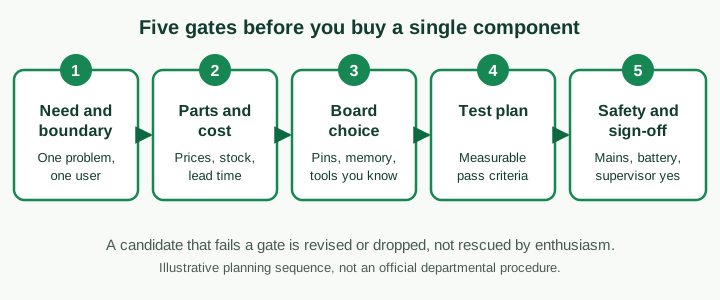
Gate 1: need and boundary. State one problem for one user in a sentence, then list what you will not do. "Monitor soil dryness for one small plot" is a boundary. "Smart farming platform" is a wish. A boundary protects you from a supervisor asking for features that were never in scope, and from your own scope creep.
Gate 2: parts and cost. Make a bill of materials with every part, the quantity, the price you actually found, where you found it, and how long delivery takes. Add the things students forget: a power supply, wires, connectors, a breadboard or board, an enclosure, a charger, spare parts for the one you will probably damage, shipping and clearance if you import. Prices and stock change, so check on the day, and keep a screenshot or receipt as evidence of the cost you report. If your department does not fund components, the budget is yours; say what happens if a part cannot be bought.
Gate 3: board and tool choice. See the next section.
Gate 4: test plan. If you cannot write how you will measure success now, you will not be able to later. See the section on specifications.
Gate 5: safety and sign-off. Confirm with your supervisor, in writing if you can, that the idea, the parts and the workspace are acceptable. See the safety section.
How do I choose a microcontroller or board?
Choose from requirements, then check the manufacturer's datasheet. Do not copy a board from a topic list or a video.
- Interfaces and pins. Count the inputs, outputs and communication links your design needs, then leave spare ones. Check voltage levels: connecting a 5 V part to a pin that tolerates less can damage it. The datasheet states the limits.
- Processing and memory. Most student sensing projects need very little; heavy signal processing, cameras or running a full operating system need more. Say why you need more, not just that you want it.
- Power budget. A device that must run on a battery has a different budget from one on a socket. Wireless radios are often the largest consumer. Plan to measure current, not guess it.
- Tools you can use. A board you can program with software you already know, with documentation and examples you can read, lowers risk. Check that you can get the toolchain installed and working on your own computer.
- Supply and spares. Can you buy it locally, and a second one? Clones and counterfeit parts exist; if a board behaves oddly, suspect the part as well as your code.
- Support from your supervisor. If no one in your department has used the platform, plan extra time, or choose one they can help with.
State the comparison in your report in a short table (candidate, why considered, why chosen or rejected, source). That table is a strong defence answer to "why this board?".
Simulation or prototype?
Neither is automatically better. Ask what each can and cannot show.
- Simulation lets you test a design cheaply, repeat it and change one parameter at a time. It is appropriate for circuits, digital logic and many network scenarios. Its limit is that it tests your model: real components have tolerances, noise and wiring faults that a simulator may not capture.
- A prototype shows that the thing works in the physical world, but it is slower, costs money and breaks.
- Both is common: simulate first to fix the design, then build and compare. If the two disagree, that is a finding, not an embarrassment. Explain the likely causes honestly.
Whatever you do, label every figure in your report as "simulated" or "measured on the prototype". Presenting a simulated result as a measured one is a serious misrepresentation of your own work, and examiners often ask to see the hardware or the simulation file.
How do I write measurable specifications and a test plan?
A specification is a requirement turned into a quantity, a unit, a method and a pass condition. The approach mirrors the writing in the software requirements guide: clear, testable, traceable to the original need.
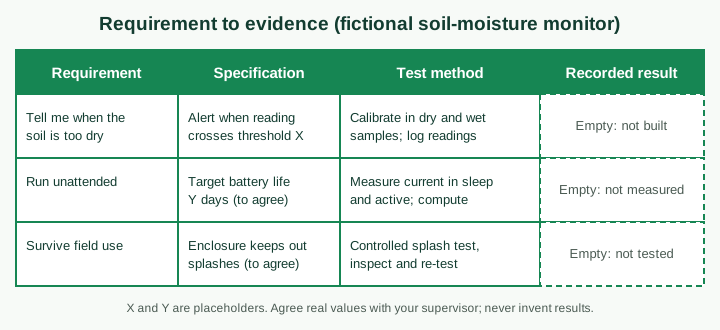
The figure shows a fictional worksheet. The last column is empty on purpose: until you build and measure, there is no result. Fill it with what you actually record, including readings that miss the target, because an honest failure with a reasoned explanation is far stronger than an invented success.
Good practice for the test plan:
- Use calibration where relevant. Say how you checked a sensor against a trusted reference, and what the reference was. If you cannot, say so, and state the limits of the reading.
- Repeat and record conditions. Note the date, supply voltage, temperature if relevant, distance, firmware version and the equipment used. A single reading proves little.
- Test failure and edge cases. What happens when power is lost, a sensor is disconnected, a network drops or an input is out of range?
- Keep raw data. Save logs, photos of the setup and simulator files, so your tables can be traced.
- Report error honestly. If your measuring instrument is a student-grade multimeter, say that, and do not claim more precision than the instrument allows.
For the structure of cases, expected and actual results, adapt the software test cases guide to physical measurements by adding the instrument and conditions as columns.
Worked planning example: a fictional soil-moisture monitor
Fictional exercise: nothing here has been built, priced or measured. A student proposes a device that reports when the soil in one small plot is too dry.
Need and boundary. One plot, one measured quantity, one alert method. Out of scope: automatic irrigation, a phone app, weather forecasting. The student writes these exclusions down and asks the supervisor to confirm them.
Parts and cost. The student lists a sensor, a board, a power source, a radio or display, an enclosure and spares, and records a placeholder cost column with "price to be checked" until real quotes are collected. Because the project may be used outdoors, the student also notes that stock, shipping time and weather exposure are open risks.
Board choice. The student compares two candidate boards on interfaces, power use and available tools, and records the reason for the pick, with the datasheet pages consulted.
Specifications. Threshold, battery life and splash resistance are written as "to agree" placeholders, matching the worksheet in the figure. A real project would replace each placeholder with an agreed value.
Evidence plan. Calibration against samples of known dryness, a current measurement in sleep and active modes, and an enclosure test, each recorded with conditions. A risk register lists sensor drift and corrosion as things to watch.
Design documentation. A block diagram and wiring diagram follow the principles in the system design diagrams guide; a diagram shows the intended design and is not proof that it works.
Every number above is a placeholder. The exercise shows the shape of the planning, not a result you can reuse.
What about safety and ethics?
Safety is a gate, not a footnote. Confirm with your supervisor which voltages, batteries and equipment you may work with and where. Avoid working directly on mains electricity unless your department's rules and a competent supervisor allow it; use low-voltage supplies and approved adapters where possible. Take particular care with rechargeable batteries, which can be hazardous if damaged, shorted or charged incorrectly, and with motors, heating elements and anything that moves.
If your device collects data about people (cameras, location, attendance, biometrics), you also need to think about consent, storage and who can see the data; the research ethics and consent guide is a starting point. If you deploy at a real site such as a farm, clinic or office, get permission from whoever controls it. Do not test on public infrastructure or other people's networks without authorisation.
Documentation to keep from day one
Keep a project notebook or folder with dated entries, a changing bill of materials, receipts, datasheets, circuit and wiring diagrams, firmware versions, test logs and photos. This is what lets you write the methodology and results honestly. Match what you built against your department's report structure; the methodology guide and results chapter guide help you describe the design process and present measurements without overstating them.
If you are also in a technical placement, your SIWES records can show related practical experience, but keep placement activities and project work distinct. See the engineering SIWES logbook examples and the electrical/electronic SIWES guide for how to record equipment work without exaggeration.
Questions to expect at your defence
Examiners for hardware projects tend to probe whether the prototype is really yours and whether you understand it. Prepare answers to questions such as these (they are examples, not a prediction of what you will be asked):
- Why did you choose this board or protocol, and what did you reject?
- How did you calculate or measure the power use? What happens when the battery is low?
- How was the sensor calibrated, and how accurate is it?
- What fails first if the supply is unstable? What did you do about it?
- Which results are simulated and which are measured?
- Show me the part of the circuit or code you wrote and explain it.
- What would you change with more time or budget? What does the project not do?
Have the prototype working, a backup plan if it does not (photos, a video of earlier tests, logs, simulation files), and spare parts. Practise explaining the block diagram in two minutes. The defence questions guide covers general preparation, and how to choose a project topic covers the supervisor and deadline checks that apply to every department.
Common mistakes
- Choosing the title first. A catchy title with no parts list or test plan is a risk.
- Underestimating cost and lead time. Components can be out of stock, delayed or counterfeit.
- Buying before approval. Wait for supervisor sign-off on the design before spending.
- No measurable targets. "It works well" cannot be defended.
- Mixing simulated and measured results. Always label them.
- Leaving documentation to the end. Photos, logs and receipts are hard to recreate.
- Skipping safety. Ask before using mains, large batteries or moving parts.
- Copying a project from a video or old report. Examiners ask you to explain every choice, and you cannot defend work you do not understand.
A shortlist worksheet
For each candidate, write:
- The one-sentence problem and what is out of scope.
- The bill of materials with real, dated prices and delivery times.
- The board or tool comparison and the datasheets you checked.
- The specification table with quantities, units, methods and pass conditions (agreed with your supervisor).
- Whether you will simulate, build or both, and how you will label results.
- The safety and permission checks still needed.
- The decision your supervisor or department still has to make.
If you cannot complete a line, that is the next job, not a reason to skip it. Answering these honestly does not guarantee acceptance or a grade, but it gives you a project you can build, test and defend.
When you have built and measured something real, UniDraft can help organise your confirmed work, checked references and supervisor instructions into an editable project document. Use the citation finder for candidate references and verify each one yourself.