A free plagiarism checker can show you which passages of your project look like text already online, so you can fix them before your supervisor sees them. It cannot tell you that your project is original, it cannot reproduce your school's Turnitin result, and no free tool decides what percentage is acceptable. Your department decides that.
So the useful way to use one is as a draft-stage smoke alarm. Run a section, read every highlighted line, rewrite what really overlaps, and ask your department which official check applies to you. If you want the meaning of Turnitin-style reports in detail, read what a plagiarism report in a final year project is. This guide covers the earlier question: which free checker to use, how to use it without exposing your work, and what its result does and does not mean.
UniDraft helps you build the project properly in the first place: it organises your confirmed work, checked sources and supervisor instructions into an editable Word document, which makes your own source trail easier to follow. Start your project document with UniDraft when your notes are ready.
The short answer
- Free checkers are screening tools. They flag text that matches sources they can see. They do not judge intent or citation quality.
- A low number is not clearance. A free tool may not search journals, printed books or your school's stored projects.
- A high number is not a verdict. Quotations, references and common phrases also match.
- There is no universal Nigerian threshold. Your department, faculty or university sets any limit. Ask in writing.
- Do not upload everything. Check section by section and read the tool's privacy terms first.
- The real fix is in the writing. Rewrite from understanding, cite as you write, and keep a source log.
What are people actually searching for?
When a student types "plagiarism checker free" before submission, the real question is usually one of these:
- "Can I find out my score before the department does?"
- "Which free tool is closest to Turnitin?"
- "What percentage will my supervisor accept?"
- "Is my own writing going to be flagged?"
The honest answers are: sometimes, none can promise that, it depends on your school, and yes, ordinary matches happen. The rest of this guide explains why.
What kinds of free checker exist?
"Free plagiarism checker" covers four different things. Mixing them up is the main reason students misread results.
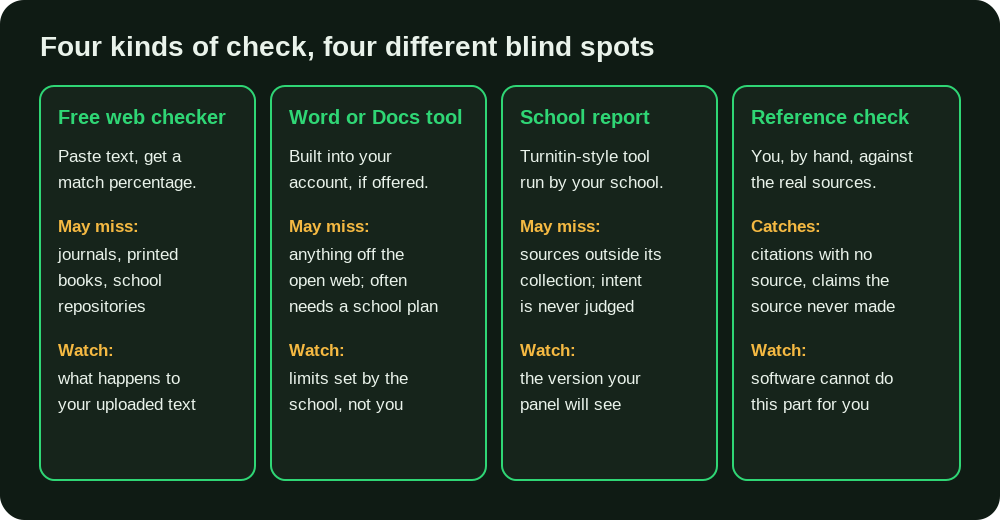
Decision table
| Type | What it can show | What it cannot show | Privacy and access cautions |
|---|---|---|---|
| Free web-based text checker (paste or upload) | Passages that match text it can find, usually on the open web, with a percentage | Whether a match is a proper quotation; matches in sources it does not search; your school's number | The free version may limit length, require an account, and may store or reuse what you submit. Read the terms |
| Built-in checker in a word processor or learning platform, if your account has it | A match report inside the tool you already use | Anything outside the sources it compares against; availability depends on your school's plan | Governed by your school's account terms. Not every student has access, and features change |
| Institution-provided Turnitin-style similarity report | Matches against the tool's collection, as configured by your school, which can include previous submissions | Intent, quality of citation, or sources outside the collection | Your school controls access, settings and storage. You may only see it if the department allows |
| Manual reference and citation check (you, with the sources) | Citations without a real source, quotations without marks, claims the source never made | Nothing automatic: it takes your time | No upload at all, which is its main advantage |
The fourth row is not glamorous, but it catches problems the other three cannot. A software match report never opens the book you cited. You can.
What the evidence says about free tools
Be careful with claims in blog roundups, including ones that say a particular free tool is "as good as Turnitin". Three points are documented by the vendors and institutions themselves:
- Google Classroom's originality reports are available only for Google Workspace for Education accounts when a teacher has turned them on for an assignment. Google's help page says a student can run up to 3 reports on their own work before submitting, compared against webpages and books on the internet, and previous submissions only if the school's administrator has enabled that. Documents must be 2MB or smaller. See Google's originality report help page. This is a good example of how a "free" built-in checker depends on your school's setup: if your school does not use it, you do not have it.
- A university library FAQ on Turnitin says there is no fixed number for an acceptable score and tells students to look at the highlighted parts, noting that a low percentage can still hide a problem if a chunk is flagged and that highlighted references are unlikely to be a concern. See the university library answer on acceptable Turnitin scores.
- Canadian college guidance on privacy explains that when a paper goes into Turnitin's repository it is saved in a large database and, according to that college's page, students cannot remove it and storage is indefinite. It lists steps to reduce risk. Whether this applies to you depends on how your school configured Turnitin, so ask. See Langara College's page on student papers and Turnitin.
None of these pages is about Nigeria specifically, so treat them as examples of how the tools work, not as your school's rules.
What is known about Nigerian rules
A few verified points, and one warning.
The National Open University of Nigeria's Policy on Plagiarism (PDF) states that projects, dissertations and theses must come with a plagiarism declaration, and that theses and dissertations must go through Turnitin, Drillbit or another approved similarity tool before moderation. It also says departments should provide guidelines on the use of such software to staff and students. Different parts of that same document mention different percentages in different contexts: one in the list of penalties, one in an example of an internal memo, one in the investigation procedure. A student who picks one of those numbers and treats it as the safe limit is misreading it. Read the document for what it says, then ask your own department what applies.
On the technology side, the Daily Trust report of 30 April 2021 describes the launch of EagleScan, a locally developed plagiarism detection software, with officials from the National Universities Commission and TETFund present. The article does not say whether students may run their own checks on it, and it quotes the NUC's representative saying software is only one part of the effort and that universities must adopt anti-plagiarism policies. So if your school mentions EagleScan, Turnitin or Drillbit, ask who runs it and whether you can see a draft report.
The warning: you will find websites claiming "most Nigerian universities allow 10 to 25 percent". Those ranges are usually unsourced. Do not use them. The thresholds that matter are in your handbook and your supervisor's instructions.
Is a free checker safe for your data?
This is the part most competing pages skip. Your final year project is unpublished work, and it may contain respondent data, company information from a SIWES placement, or findings you want to publish later. Before you paste it into any online tool:
- Read the terms and privacy policy. Look for words like store, retain, database, share and train. If the policy says your text may be stored or added to a collection, decide if you are comfortable.
- Check a section, not the whole file. A literature review chapter is the one most likely to need checking. Raw data tables, questionnaires and respondent details do not need to leave your computer.
- Remove personal details. Delete your name, matric number, supervisor's name and any respondent or company identifiers from the pasted text.
- Check whether deleting is possible. Some services let you delete a submission; others do not say.
- Know the downstream effect. If a free tool keeps your text in a database, a later check by another system could, in principle, match against that stored copy. You cannot always know. This is a reason to prefer checking less, not more.
- Never pay an unknown person to run a "Turnitin check". You hand your work to someone outside the school, and the report they send back cannot be verified.
If a tool does not tell you what it does with your text, assume the risk is real.
How to use a free checker responsibly: a workflow
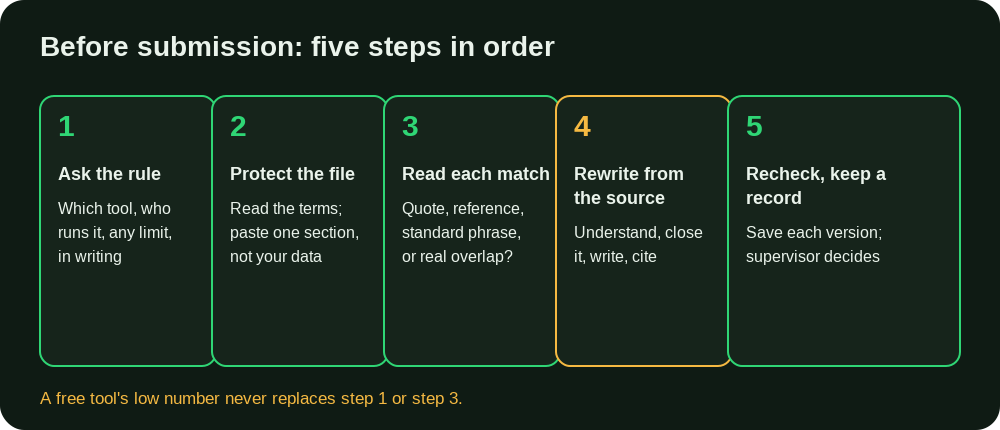
Step 1: ask the rule first
Send your supervisor or department a short written message: which tool is used, who runs it, whether there is a written limit, whether quotations and references are excluded, and whether you may see a draft report. The question list in the similarity report guide works well here. Save the reply with the date.
Step 2: protect the file
Decide what to check and what to keep off the internet. Use the privacy steps above.
Step 3: read every match, not the percentage
For each highlighted passage, decide which of these it is: a quotation with marks and a citation, a reference list entry, a standard phrase or instrument name, a definition you copied nearly word for word, or a real overlap with a source. Only the last two need rewriting. The match-triage method in the similarity report guide covers each case.
Step 4: rewrite from the source, not from the sentence
Read the source until you can explain it, close it, write what you understood, then compare for accuracy and add the citation in the same sentence. The full method is in the paraphrasing guide. If you cannot write the point without looking, you do not understand it well enough yet.
Step 5: recheck, keep versions and a record
Save the draft you checked and the revised one. A simple log with the date, the section, what was flagged and what you changed is enough. If your supervisor later asks, you can show the work.
A fictional worked example
This example is invented for teaching. The names, wording and counts are not from a real report.
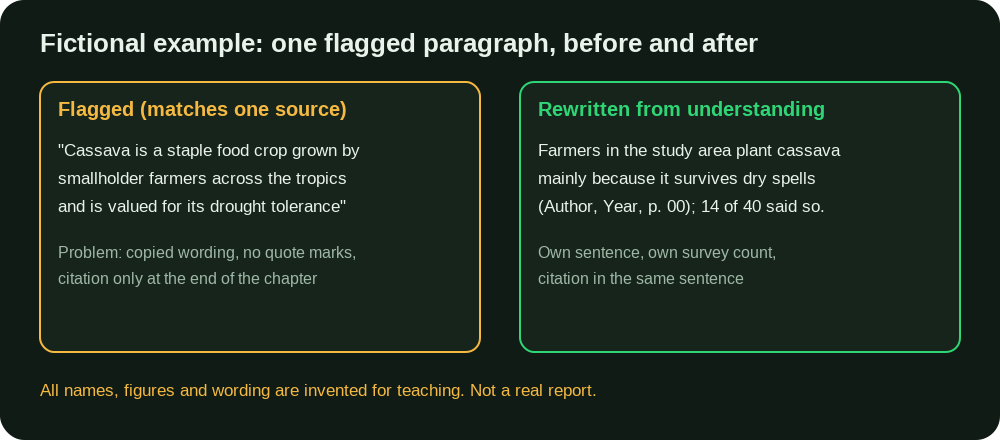
Imagine a student, Ada, studying cassava farming among smallholders in a local government area. She pastes her Chapter Two section into a free web checker. The tool returns a percentage and highlights five passages in different colours.
She reads them one at a time:
- A highlighted reference entry. It matches a published record because it is that record. She checks the entry for accuracy against her citation style and leaves it.
- The title of a standard questionnaire. A proper name. She leaves it and makes sure the instrument is acknowledged in Chapter Three.
- A short quotation inside quotation marks with an author, year and page. This is a match, but a correctly formatted one. She confirms the page number against the source.
- A sentence about cassava being a staple crop valued for drought tolerance. It matches one webpage nearly word for word and has no quotation marks. The citation appears only in a list at the end of the chapter.
- A paragraph in which every sentence follows a journal article's order with synonyms swapped. This is patchwriting, the kind of thing a supervisor spots by reading.
For item 4 she reopens the source, closes it and writes what she actually found relevant: why the farmers in her own study area plant cassava, using her own survey count, with the citation inside the sentence. For item 5 she lists the article's three actual points, compares them with a second source she has read, and writes a paragraph that says what the two sources agree on and what they leave open for her study.
After the rewrite she runs the same section again. The percentage is lower, but that is not why she stops. She stops because she has read every match, fixed the two real problems and recorded what she changed. She still sends her department the question about which official report applies and whether she can see it.
A free checker did not make Ada's project original. Her reading, her own data and her citations did. The tool pointed to where to look.
What a free tool's result does and does not mean
| If the free tool shows | It may mean | It does not mean |
|---|---|---|
| 0% or very low | Little of your text matched the sources it could search | That you did not plagiarise, or that your school's report will match |
| A moderate or high figure | Several passages match something; some may be quotes, references or common phrases | That you plagiarised, or that you will fail |
| Different figures on two tools | Different collections and settings | That one tool is lying; compare the highlighted matches |
| A clean result after you swapped words | The matching text is no longer identical | That the idea is credited; close paraphrase can still be a problem |
Turnitin similarity percentage: what to do with the number
If you search "turnitin similarity percentage", you will find confident numbers. Treat them with caution. The Turnitin-style report your school uses depends on the sources in its collection and on settings your department may control, such as excluding quotations, the bibliography or small matches. Two reports for the same project can differ for that reason alone. A university library page cited above says plainly that there is no fixed acceptable number, and the NOUN document shows how one university's policy mentions different figures in different contexts.
So the practical steps are:
- Ask what limit, if any, your department applies, and where it is written.
- Ask whether quotations and references are excluded.
- Read the matches yourself, because a supervisor will.
- Do not edit the text to shift a number. Edit it to be accurate and properly credited.
Common mistakes
- Chasing a percentage. Writers rewrite until a number drops, and sometimes damage accurate quotations or standard terms. Fix real overlaps, not a target.
- Ignoring quoted and referenced matches. They are usually fine, but check that quotations have marks, a page number and a matching reference.
- Paraphrasing by synonym swapping. The structure and ideas are still the source's. See the paraphrasing guide for the method that works.
- Trusting a free tool's 0%. It may simply not have searched where you copied from.
- Uploading the whole project and respondent data. Check sections and protect personal data.
- Using a paraphrasing or "humaniser" tool to hide matches. It tends to produce poor, sometimes inaccurate sentences and does not repair missing credit. The guide on AI use and academic integrity explains why your own process matters more.
- Fixing the text but not the source trail. A reference list entry for a source you never read is a separate integrity problem. Match your in-text citations to your reference list using the reference writing guide, and format entries with the free citation tool.
- Checking only the night before submission. Check a chapter at a time while there is still time to rewrite.
Build a clean source trail so the checker has little to find
Most flagged problems start earlier, in how notes were taken. Three habits help more than any tool:
- Take notes in your own words and mark direct quotes as quotes. The guide to taking notes from research papers shows a simple layout.
- Record each source as you use it, ideally in a reference manager. See the guide to Zotero and Mendeley.
- Cite in the sentence, following the style your department requires, for example the rules in the APA 7 in-text citation guide.
When your supervisor returns comments about unclear sourcing, managing supervisor corrections helps you track and close each one, and working with your supervisor covers how to ask questions like "can I see a draft similarity report?" without friction.
What this applies to: project, SIWES and seminar
The same workflow applies to a SIWES report and a seminar report, but check the specifics. A SIWES report often includes confidential workplace information; keep that out of any online checker. A seminar report leans heavily on literature, so paraphrase quality matters most. Your department may ask for different declarations for each. If your formatting also needs checking, the free formatting checker reads a .docx and flags mismatches with rules, which is a separate job from similarity.
Pre-submission checklist
- You have the department's written rule on similarity, or have asked for it.
- You know whether you may see a draft report from the official tool.
- You checked sections, not raw data, in any free online tool, after reading its terms.
- Every highlighted match is classed: quotation, reference, standard phrase, or real overlap.
- Real overlaps are rewritten from sources you have read, with citations.
- Quotations have marks, citations and page numbers.
- References match in-text citations in both directions.
- Chapters 3 to 5 describe your own design, data and analysis.
- You saved the checked version, the revised version and a short change log.
Final note
A free plagiarism checker is worth using if you use it for what it is: a fast way to find passages to review. It is not an authority on whether your work is original, and it is not your school's check. The decision rests with your department and supervisor, and your best protection is a project built from sources you read, data you collected and citations you can defend.
UniDraft is for the building part. It organises your confirmed work, checked sources and supervisor instructions into an editable Word document. Start your final year project document with UniDraft, then verify every citation yourself.
Sources
- Google Classroom Help: Run an originality report on your work: who can run reports, the 3-report limit, sources compared, file size and supported accounts.
- University library FAQ: What is an acceptable Turnitin score?: no fixed threshold; read the highlighted matches.
- Langara College: Turnitin and student privacy: repository storage and privacy concerns, as described by one college.
- National Open University of Nigeria: Policy on Plagiarism (PDF): declaration requirement, named similarity tools and different percentages in different contexts; one university's policy, not a national rule.
- Daily Trust: Nigeria unveils plagiarism detection software, 30 April 2021: launch of EagleScan, described as locally developed; no student self-check rules stated.