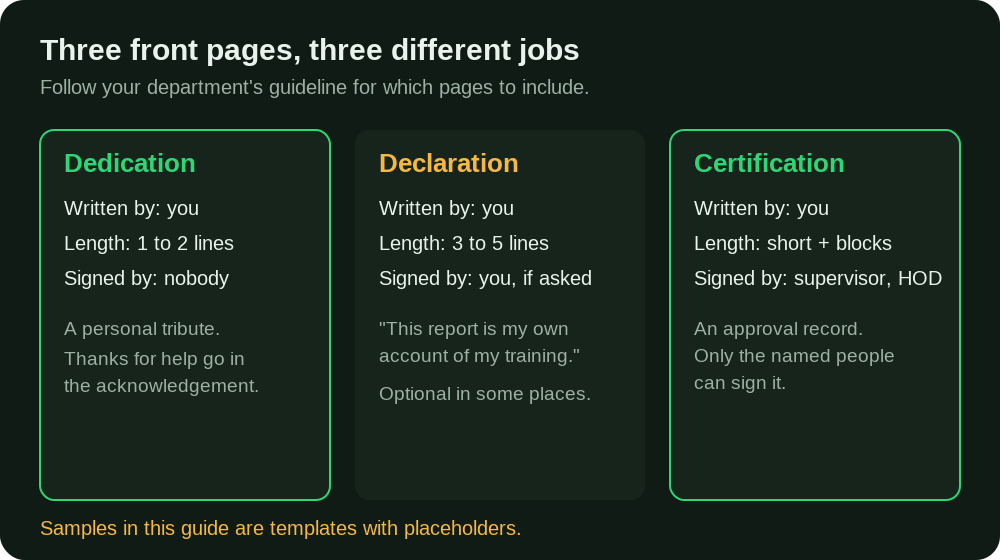
The dedication, certification and declaration are three short pages at the front of your SIWES report, and each has a different author and a different job. The dedication is yours and personal. The declaration is yours and formal: you state that the report is your own work. The certification is an approval record that other people sign. Get the order, wording and signature lines right, and these pages take half an hour. Get them wrong and the report comes back for a reason that has nothing to do with your training.
This guide explains what each page is for, gives illustrative sample wording with placeholders, and shows you how to avoid the mistakes that make a department send a report back.
The short answer
- Dedication: one or two lines, optional in many departments, to a person or people. No thanks to supervisors here; that belongs in the acknowledgement.
- Declaration: a short first-person statement by you that the report is your own account of your training. Required by some departments, optional in others, and absent in many.
- Certification: a short third-person statement that your training was done and the report was supervised, with signature and date lines. Written by you, signed by others.
- Order: commonly title page, then certification, dedication, acknowledgement, abstract and table of contents, with the declaration (if used) next to the certification. This varies by department, so follow your guideline.
- Rule of thumb: if your department's guideline lists a page, include it exactly as listed. If it does not, do not add it.
Every sample in this article is an illustrative template. The names, organisations and signatures are placeholders. Replace each one with your own details, and use the signature spaces only for the people who actually sign.
UniDraft builds your written SIWES report as an editable Word document from the placement details you confirm, your supervisor's instructions and your school's format, so the preliminary pages carry the same names, titles and dates as the rest of the report. You still choose the wording and your supervisors still sign. Start your SIWES report with UniDraft.
Where these pages sit in a SIWES report
A SIWES report has preliminary pages, then the main chapters, then references and appendices. The preliminary pages are everything before Chapter One. The order in student reports that I looked at, and in the guides that cover this, is not identical everywhere. A typical sequence looks like this:
- Title page
- Declaration (where required)
- Certification
- Dedication
- Acknowledgement
- Abstract (some departments do not ask for one in a SIWES report)
- Table of contents, then lists of figures and tables if you have any
One real example: a SIWES technical report submitted to the Department of Pharmacology at Afe Babalola University goes from title page to a one-line dedication, then a certification page with signature and date lines for a supervisor and the Head of Department. That report has no separate declaration page in the version I read. It is a single student document, so treat it as an example of one department's practice, not a national template. I opened it for this article; see the Sources section.
The reason the order matters is practical. Your table of contents lists these pages, your page numbers run through them, and your department may check them against a list. If your department publishes a SIWES guideline, that list is the authority. If it does not, ask your SIWES coordinator or supervisor, or look at one recent approved report from your department.
For the whole report, not only the front pages, see our guide to how to write a SIWES report.
The dedication page
A dedication is the most personal page in the report. It is one or two lines, centred, usually in the middle of the page or slightly above it.
What it should say
Dedicate the report to a person or people, and optionally to God, in plain language. Typical choices are your parents or guardians, a spouse, a mentor, or someone who died. You do not need to explain why.
An illustrative template:
This report is dedicated to [Almighty God / my parents, Mr. and Mrs. [Surname] / the memory of [Name]].
Or, for a slightly longer version:
To my parents, [Name] and [Name], who funded my training and never let me quit.
Keep it brief. Both examples above are one sentence. If you find yourself writing a paragraph, you are drifting into the acknowledgement.
What it should not say
- Thanks for help. Thanks to supervisors, the HOD, your industry supervisor and colleagues go in the acknowledgement, not here. If you are unsure where a sentence belongs, our guide on what to write in an acknowledgement is written for project reports, but the order and tone apply to a SIWES report as well.
- Jokes or slang. A panel or coordinator will read this page.
- Claims about the work. "To the staff of [Company] for teaching me everything" is a thank-you, not a dedication.
Check whether you need one at all
Not every department wants a dedication. Some guidelines list it, some skip it, and a few students add one even when it is not requested. An unrequested page is not usually punished, but it shifts your page numbers and can irritate a coordinator who works from a list. Include it if the guideline lists it. If the guideline is silent, ask.
The declaration page
The declaration is where you take responsibility for the report. It is short, written in the first person, and it is yours alone. You write it and you sign it, if signing is required.
What a declaration usually covers
A declaration normally makes up to four statements:
- You wrote the report. It is your own account of your own SIWES training.
- Where and when. The organisation and the period of the training.
- Sources are acknowledged. Anything you borrowed from books, articles, company documents or manuals is referenced.
- No duplicate submission. The report has not been submitted elsewhere for another award or grade.
Use only the statements that are true, and do not copy a clause that does not fit. If you did not use any company manuals, do not mention them. If you are not sure that a clause is required, leave it out and ask.
An illustrative template, to be adapted to your own facts:
DECLARATION
I, [Full Name] ([Matriculation Number]), a student of the Department of [Department], [University/Polytechnic], declare that this report is a true account of my Student Industrial Work Experience Scheme (SIWES) training at [Name of Organisation], [Location], from [Start Date] to [End Date]. It was written by me, and any information taken from other sources has been acknowledged by reference. This report has not been submitted to any other institution or for any other award.
[Student's signature] [Date]
Two points about that template. First, the declaration is not a place for a defence of your work. Say what happened and who wrote it, and stop. Second, the claim in the final sentence must be true. If you reused a paragraph from a previous report, from a senior, or from a company document without acknowledging it, you cannot honestly sign this page.
Declaration and plagiarism
A declaration is a promise about originality, so the rest of the report has to back it up. Copying a senior's report and changing the company name is exactly what a declaration says you did not do, and many departments treat it as misconduct. If you want to know how similarity is checked, and what a safe range looks like for a project, see our guide to similarity reports and plagiarism. The checking logic is the same for a SIWES report: write about what you did, in your own words.
Do not confuse the declaration with the SIWES forms
The declaration is a page in your report. It is not the same as the training forms handled by the SIWES office, such as Form 8 or the SCAF form. Those forms have their own signatories and their own submission steps, and a declaration in your report does not replace any of them.
The certification page
The certification page confirms that your training took place and that your report was done under supervision. You write the wording; others sign it.
What it should say
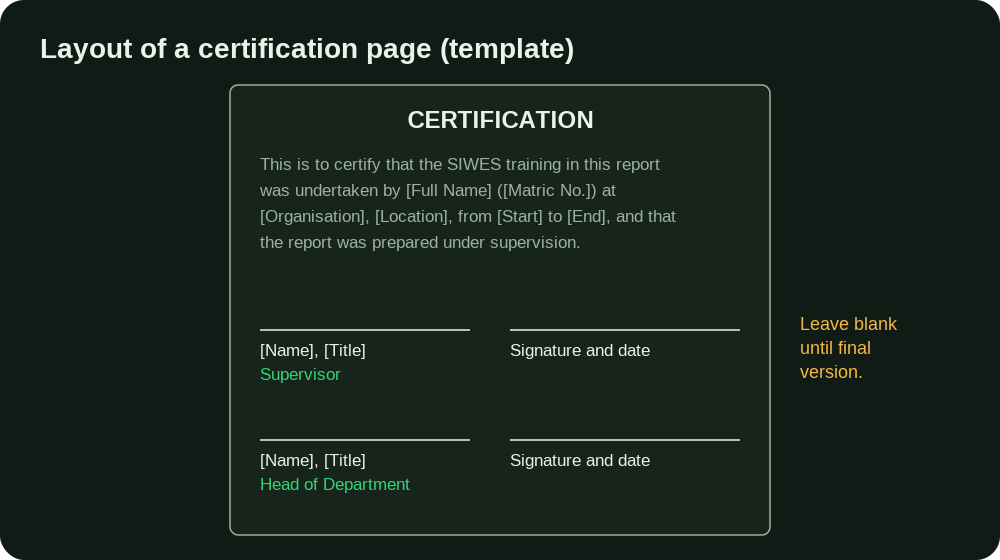
A certification page typically has:
- A heading: CERTIFICATION
- A sentence that your SIWES training was done by you, at a named organisation, for a stated period.
- A sentence that the report is submitted to your department, usually in partial fulfilment of your degree or diploma, and sometimes naming the supervision.
- Two or more signature blocks, each with a printed name and title, a line for a signature, and a line for a date.
The Afe Babalola University example I opened follows that shape: a short certifying statement about three months of industrial training at a named institute under a named supervisor, with the report presented to the department, then a supervisor block and a Head of Department block, each with a signature and date line.
An illustrative template:
CERTIFICATION
This is to certify that the Student Industrial Work Experience Scheme (SIWES) training described in this report was undertaken by [Full Name] ([Matriculation Number]) of the Department of [Department], [University/Polytechnic], at [Name of Organisation], [Location], for [duration] from [Start Date] to [End Date], and that this report was prepared under supervision and submitted to the Department of [Department] in partial fulfilment of the requirements for the award of [Degree/Diploma] in [Programme].
[Name], [Title] Signature and date Supervisor ____________________ ________ [Name], [Title] Signature and date Head of Department ____________________ ________
If your department also wants a SIWES coordinator, an industry-based supervisor or an external examiner, add a block for each. Do not add a block for anyone your guideline does not mention.
Who signs
The people who sign are the people your department names, and only they can sign. Common signatories are your departmental SIWES supervisor and your Head of Department. Some departments add the SIWES coordinator, and some ask for the industry-based supervisor to endorse the training. I could not find a single national rule that fixes this, which is consistent with how SIWES works: the scheme is coordinated by the Industrial Training Fund (ITF), but each institution and department sets its own report format and approval sequence. So ask, and use what you are told.
A few hard rules:
- Never sign for someone else. Not even if a supervisor says "just put my name". If you are handed a signed page, make sure the signature is real and was added by that person.
- Never type approval into the page. Writing "Approved by Dr. [Name]" or inserting an image of a signature is not the same as the person signing. The page is only evidence if the person signs it.
- Leave the lines blank until the signing happens. Print the certification page with empty signature lines, and have it signed after your corrections are done.
- Use titles exactly as they appear on your title page. Dr., Prof., Engr., Mrs, Mr: copy them from a source that gets them right.
A certification page signed too early can cause trouble. If your supervisor signs an earlier version and you then change the report, you may need the page signed again. Collect signatures on the final, corrected version.
For how the grading and approval sequence normally runs, see how SIWES is graded.
Dedication, certification and declaration compared
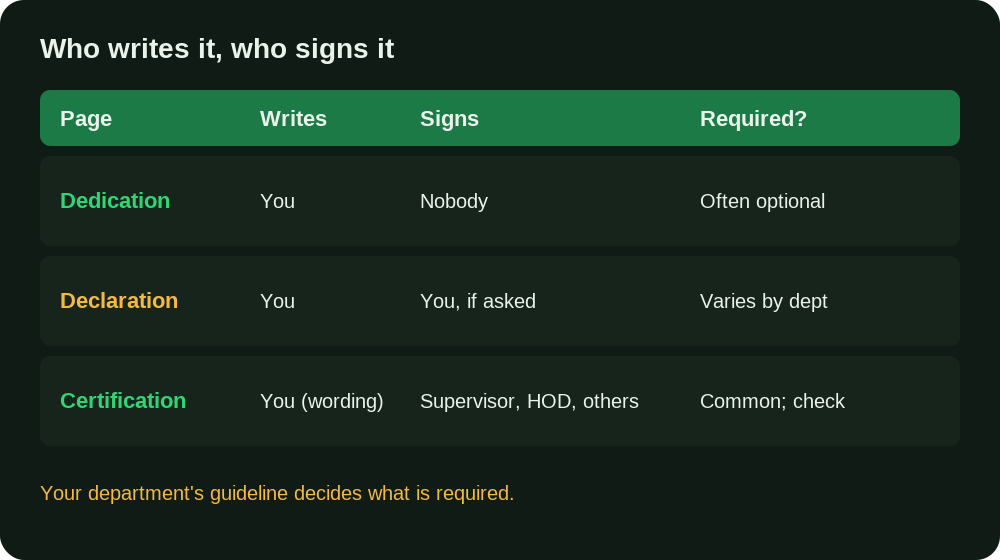
In words:
| Dedication | Declaration | Certification | |
|---|---|---|---|
| Purpose | A personal tribute | Your statement that the work is yours | A record that training was done under supervision |
| Written by | You | You | You (wording), others (signatures) |
| Voice | First person or none | First person | Third person |
| Typical length | 1 to 2 lines | 3 to 5 lines | 4 to 6 lines plus signature blocks |
| Signed by | Nobody | You, if the department asks | Supervisor, HOD and any other named signatory |
| Always required? | No | No | Common, but check |
Common mistakes on these pages
- Putting thanks in the dedication. It belongs in the acknowledgement.
- Leaving placeholders in. "Mr. [Name]" or "____" in a printed copy looks careless. Search the file for square brackets and underscores before you print.
- Wrong titles or spellings. Check that the supervisor's name and rank match across the title page, certification page and acknowledgement.
- Pre-filled signatures. If a signature is a typed name or a pasted image, the page has no value, and it can be read as forgery.
- A declaration you cannot support. If the report includes unreferenced material, fix the report before signing the declaration.
- Wrong dates. The training period on these pages must match your logbook and your title page. A mismatch is the first thing a careful reader notices. Our guide to filling the SIWES logbook is worth reading if your logbook dates are untidy.
- Adding pages your department did not ask for. Extra pages shift numbering and can confuse a checker.
- Inconsistent heading style. If CERTIFICATION is centred and bold, then DEDICATION should be the same, with the same case and size.
- Putting these pages in the main numbering. If your report uses Roman numerals for the preliminary pages, these pages carry Roman numbers, and Chapter One starts at 1.
Formatting them properly
These pages are short, so the formatting must be tidy. Use the same font and size as the rest of the report, a centred heading in capitals (or in whatever style your department uses), and consistent spacing. Signature blocks work best as a borderless two- or three-column table so the lines align.
Preliminary pages are usually numbered with lower-case Roman numerals (i, ii, iii). The title page is counted but normally shows no number. The main report then restarts at 1 in Arabic numerals. That requires a section break in Word, which is where many people get stuck; the walkthrough in Roman and Arabic page numbering in Word shows how to set it up. Universities and departments differ on details, so look at your institution in the university format guides, then run your finished file through the free formatting checker to catch font, spacing and margin problems.
A sequence that avoids rework
- Get the guideline. Ask your SIWES coordinator or department for the report format. Note which of the three pages are listed, in what order, and who signs.
- Write the wording now, leave the signatures empty. Draft the dedication, declaration (if required) and certification text in the same file as your report.
- Complete your corrections first. Show your report to your supervisor and finish revisions. Our guide on managing IT report supervisor corrections covers how to keep the versions straight.
- Check the details. Names, titles, matric number, organisation, dates and department must match across every page and your logbook.
- Print a clean copy and get it signed. Use the final version, with the supervisor and HOD signing in ink.
- Scan or bind as instructed. If you submit a digital copy, make sure the signed page is included in the form your department asks for.
Reports that arrive at departmental review with correct signature blocks, consistent dates and no stray placeholders tend to spend less time in revision. Our pre-submission checklist for departmental review is a useful companion to this list.
Pre-submission checklist
- My department's guideline lists these pages and their order, and I followed it.
- Dedication is one or two lines, with no thanks in it.
- Declaration (if required) contains only statements that are true.
- Certification names the organisation, period and department correctly.
- Signature blocks match the signatories my department requires.
- Signature lines are empty until the final corrected version is printed.
- Supervisor's name and title match the title page and acknowledgement.
- Training dates match the logbook and the title page.
- No brackets, underscores or placeholder text left.
- Headings, fonts and spacing match the other preliminary pages.
- Page numbers follow the Roman sequence for the preliminary pages.
Where UniDraft fits in
The three pages in this article are made of facts you supply: your name, matric number, organisation, dates and your supervisors' names and titles. UniDraft builds your SIWES report as an editable Word (.docx) document around the details you confirm and the formatting rules of your supervisor, department and university, so names and dates stay consistent across the title page, the preliminary pages and the chapters. The signatures stay with the people who sign: your supervisor and HOD sign the printed certification page themselves. A SIWES report costs ₦10,000, one-off, and includes three free supervisor-correction rounds.
Start your SIWES report with UniDraft
Sources
- Technical report on SIWES at the Nigerian Institute of Medical Research (student report, Afe Babalola University), opened for the order and layout of a dedication and a certification page with supervisor and HOD signature lines. A single student document, used here as an example of one department's practice and not as an institutional template.
- ITF SIWES portal, for the scheme's coordination by the Industrial Training Fund and its stakeholder structure of institutions, employers and students.