If you are trying to work out which software will help you write a SIWES or IT report, the honest answer is that it depends on the job: keeping records, drafting, checking format, and citing sources are four different tasks, and different tools suit each. The report must reflect your actual placement activities and the assessment requirements your institution gives you.
You have done the placement; the report should explain that work clearly. UniDraft helps organise the activities and details you confirm into an editable SIWES report using the guidelines you supply. Start your SIWES report with UniDraft and bring your own placement records and permitted evidence. Your official logbook, forms and supervisor signatures remain separate responsibilities.
The short answer
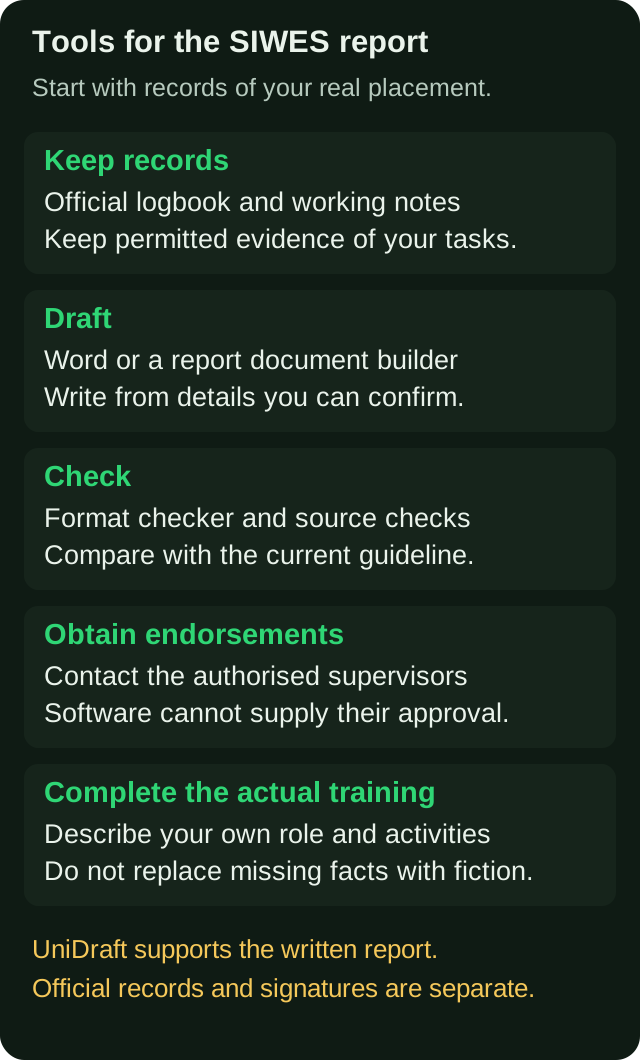
- Records: the physical logbook your school issues, plus a spreadsheet or notes app on your phone. Use the records and devices available to you; keep the official logbook current.
- Drafting: Microsoft Word or Google Docs if you are confident with structure; a purpose-built report builder if you want the format applied for you. General AI chat tools can polish wording but cannot know your placement.
- Format checking: a checker that compares your .docx with your institution's rules. The UniDraft formatting checker is free and does not store your file.
- Citations: follow your guideline and cite the technical sources you actually use; the free citation finder helps you find real sources instead of made-up ones.
- Your responsibilities: obtain the authorised endorsements for your logbook and Form 8, secure a placement and complete the actual training. A search tool can help identify openings; it cannot guarantee a placement.
Category 1: Record-keeping tools (start here)
A SIWES report lives or dies on specificity, and specificity comes from records kept during placement, not reconstructed after. Trying to remember four months of work in the week before submission is where vague, generic descriptions come from.
The official logbook. Use the logbook and endorsement schedule your institution provides. ITF's SIWES guidance assigns students responsibility for recording training activities and describes supervisor vetting and signing; confirm local submission and signing instructions with your coordinator. Treat it as the primary record. If you are unsure how much detail each entry needs, how to fill your SIWES logbook shows entries by department.
A spreadsheet or notes app. This is a working copy for you, not a replacement for the logbook. Use one row per day or task with these columns: date, unit or section, task, tools or equipment used, who you worked with, and outcome. Add a "photo?" column. The point is that when you write Chapter 2 or 3 of the report, you are reading your own notes rather than guessing.
Your phone camera. Photographs of equipment, site progress, screens or diagrams (where your company allows it) are the raw material for figures. Ask permission first: many companies restrict photography and confidential material, and some information should not go into a report at all. Blank out client names, account data and proprietary code.
What it costs and what it misses. Costs depend on the stationery, device and software you already have. Record tasks while they are fresh and follow the daily or weekly schedule your institution requires; keep a separate review slot for checking omissions.
Category 2: Drafting tools
Here you have three realistic options.
Word or Google Docs
If you already know your school's SIWES structure, Word is enough. It gives you full control, and most departments want a .docx or a printed copy anyway. Its weakness is that it does nothing to keep you compliant: page numbering, heading styles, a contents page that updates and consistent spacing are all your job. If your report needs roman numerals for front matter and Arabic numerals afterwards, this page-numbering walkthrough saves an evening of frustration.
General AI chat tools
These can be genuinely useful for a narrow task: tightening a sentence you wrote, turning your bullet notes into a smoother paragraph, or explaining a technical term you met at work. They cannot know your actual placement or current instructions unless you provide permitted material. File, project and editing features vary by tool. A request such as "write a SIWES report on my placement at a bank" leaves the actual tasks unspecified; check that a draft does not fill those gaps with activities you never performed.
Generic activity descriptions can conflict with your logbook or your supervisor's record. At a defence, you need to be able to explain the tasks you claim. If you use such a tool, give it your own notes, ask it only to rephrase, and check every line against your logbook. How UniDraft differs from generic AI writing tools goes into that comparison in more depth.
Whether AI assistance is allowed at all is set by your institution and your supervisor, not by the tool. Ask before you rely on it.
Purpose-built report builders
This category applies a specific institutional format for you and builds the document around facts you supply. The questions to ask of any tool in this group are the same:
- Does it work from my logbook details, or does it invent activities?
- Does it apply my institution's SIWES guideline, or a generic template?
- Can I edit the output freely in Word?
- What happens when my supervisor asks for corrections: do I lose my earlier version?
- Does it promise things nobody can promise, such as guaranteed grades or "undetectable" text? If so, walk away.
UniDraft is in this category, and its scope is set out in the section near the end of this post.
Category 3: Formatting and compliance checkers
Formatting is part of the submission requirements to check. SIWES reports often follow a guideline that differs from the final-year-project format, sometimes right down to the certification page, and departments differ on font, spacing, margins, numbering and chapter order. How to format a project report for a Nigerian university covers the common variations.
A checker reads your finished .docx and reports where it departs from a stated rule, such as body font, line spacing or margins. The free formatting checker does this against university rules, and the per-university format guides let you see what your school expects before you start typing. Use the guide first, then draft, then check.
A checker cannot know a rule your department wrote on a handout and never published. So still read your coordinator's guideline yourself, and compare it with what any tool tells you. When they disagree, the coordinator's document wins.
Category 4: Citation and reference tools
The number of references depends on the report and guideline. Cite sources you actually use, such as a company manual, a standard, a regulator's publication or a textbook explaining a technique you used. The risk is fabricated citations, which is a known failure of general AI tools. Only cite something you have actually located and read.
The citation finder searches real sources and formats them in APA, IEEE or Harvard. The reference styles themselves are defined by their publishers: APA's official guidance on reference lists is on the APA Style references pages, and how to write the references list walks through the three styles with layout examples. For company documents, confirm permission and apply the required citation style. Confidential or non-retrievable material may need different treatment; do not publish restricted details or assume an in-text mention makes disclosure acceptable.
Comparing the categories honestly
| Job | Best fit | Cost | Main risk |
|---|---|---|---|
| Keep records | Logbook, spreadsheet, notes app | Costs depend on what you already have | Missing the required recording schedule |
| Draft text | Word, or a builder that uses your facts | Free to paid | Generic text if facts are missing |
| Polish wording | General AI chat (with your own notes) | Free to paid | Invented detail, institution's AI rules |
| Check format | Checker plus your coordinator's guideline | Free | Unpublished departmental rules |
| Find sources | Citation finder, your library | Free | Citing what you have not read |
| Obtain required logbook and Form 8 endorsements | Authorised people at your placement and school | Follow the official process | Leaving signatures until submission |
| Find a placement | Your own search and network | Costs vary | Applying too late |
The last two rows require action by you and the relevant people; a tool cannot provide an endorsement or guarantee a placement. For the placement itself, see how to find a SIWES placement, which also helps with the application letter.
For the paperwork at the end, the SCAF form explained covers what you submit and when.
A workable toolchain, in order
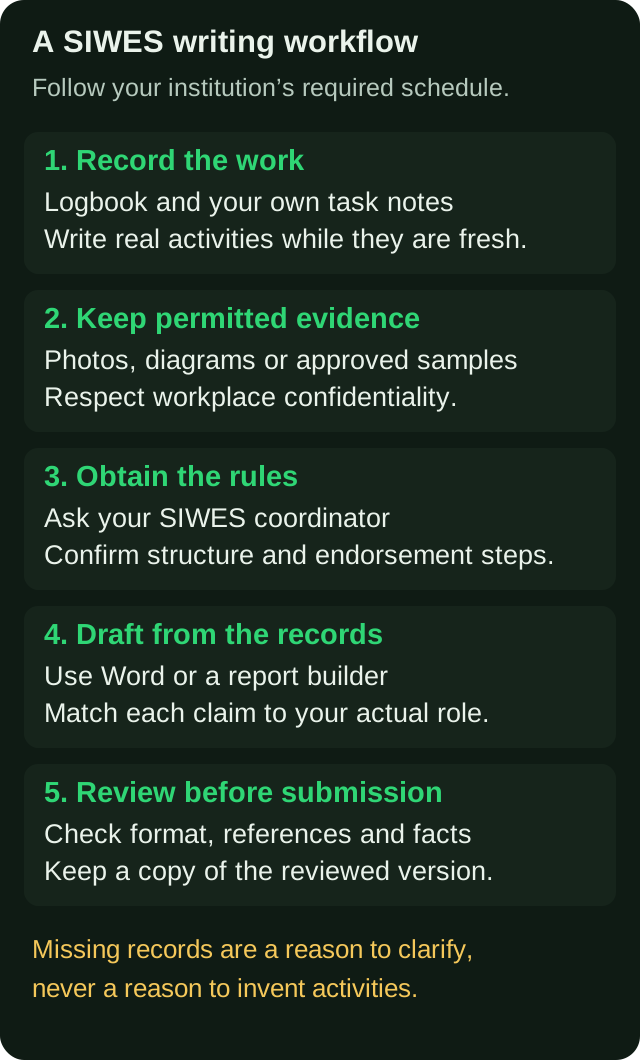
- Log daily during placement. Logbook plus your own spreadsheet. Use your institution's required record schedule.
- Collect proof as you go. Photos where allowed, sketches, screenshots of your own work, approved samples, safety notices you followed.
- Get your rules early. Ask the SIWES coordinator for the current written guideline, not last year's senior's copy. Confirm the chapter structure and certification page.
- Draft from your notes. Write in Word or use a builder. Structure follows the guideline; content follows your log. How to write a SIWES report gives the standard outline.
- Check. Run the format checker, verify every reference, and read the report aloud against your logbook.
If your school has a defence or oral component, prepare from the same notes; what to expect when defending your SIWES report shows what examiners ask.
What each tool cannot do
It helps to be blunt about limits, because a lot of stress comes from expecting a tool to solve the wrong problem.
- No tool signs for your supervisors. A logbook entry or a Form 8 signature that nobody actually gave you is fabrication, and it can put your whole result at risk.
- No tool creates experience. If your placement was thin in a particular month, the honest fix is to describe what you actually did and what you learnt from observing, not to pad with invented projects.
- No tool controls your grade. Marks depend on your supervisors' assessment and how your department weights the report. How SIWES is graded explains the components that typically apply, and your own department's scheme is the one that counts.
- No checker replaces a supervisor's comments. When corrections arrive, handle them methodically; managing IT report corrections without losing earlier work suggests a way to do that.
A worked example: turning a logbook week into report text
Here is an illustrative logbook note (not a real entry) and how it becomes report content. Suppose your spreadsheet says: "Wed: helped install and label patch panel in server room; supervisor Mr A showed how to test cable with a tester; 3 of 24 ports failed, re-terminated them."
A weak report sentence would be: "I gained knowledge of networking infrastructure and cabling." It could describe anyone's placement.
A strong one, built from the same note: "On Wednesday I assisted with installing and labelling a 24-port patch panel and testing the runs with a cable tester. Three ports failed the test, and under supervision I re-terminated those ports." It names the task, the equipment, the result and your role, and it matches what your logbook says. That match is the whole point of the record-keeping category: a tool can polish that second sentence, but it cannot invent the failed ports.
Questions to answer before choosing a tool
Answer these questions before you install or pay for anything:
- Do I already have weekly notes? If not, fix that first; every other tool depends on it.
- Have I got my coordinator's written guideline? If not, get it before choosing a template.
- Am I comfortable with headings, page numbers and a contents page in Word? If yes, Word may be all you need; if you keep breaking the layout, a tool that applies the format is worth considering.
- Will my supervisor send corrections in rounds? If so, choose something that keeps versions, or save a dated copy yourself each time.
- Does my department restrict AI use? Ask, and follow the answer.
Students on a tight budget can complete a good report with only the first three: a logbook, a spreadsheet and Word, plus the free checker and citation finder. Paid tools are a convenience, not a requirement.
Common mistakes when choosing tools
- Choosing by price or hype instead of by job. Ask what specific task the tool removes for you.
- Pasting confidential company material into an online tool. Check company policy first.
- Using last year's report as a template. Guidelines change, and copying a senior's structure imports their mistakes.
- Checking format only at the end. Set the styles up at the start so that headings and numbering follow from the beginning.
- Trusting a tool's output without reading it. You will be questioned on it.
Where UniDraft fits in
See what to bring, what the workflow produces and how to start on the UniDraft SIWES report page.
UniDraft builds the written part of your IT/SIWES report as an editable Word (.docx). It works from your confirmed topic and the placement details you enter, follows the instructions you supply, with supervisor instructions and student-confirmed guidelines taking priority over general institutional patterns. Verify every activity, company detail and reference before submission. You can upload results with tables and labelled images. When your supervisor sends corrections, you provide them, confirm the changes UniDraft extracts, and a new version is produced while earlier versions are kept. The SIWES report costs ₦10,000, one-off, and includes three free supervisor-correction rounds.
To be clear about what it does not do: UniDraft does not fill your logbook or Form 8, does not find you a placement, and does not guarantee grades or approval. For those, use the record-keeping habits above and the people at your placement and school. The free citation finder, topic generator and formatting checker need no signup.
Sources
- ITF SIWES guidance, sections 2.6 and 4.6, on students' training records and supervisor responsibilities. Confirm your institution's current process.
- APA Style: References (American Psychological Association), for how APA 7 reference lists are defined and where the full guidance sits.